Forums

Skip to content

Advanced search
  • Quick links
    • Unanswered topics
    • Active topics
    • Search
  • FAQ
  • Login
  • Register
  • Board index Assistance Networking & Security
  • Search

constantly uploading at over 10KB

Having problems getting connected to the internet or running a server? Wondering about securing your box? Ask here.
Post Reply
Advanced search
19 posts • Page 1 of 1
Author
Message
edudlive
Guru
Guru
User avatar
Posts: 557
Joined: Tue Jan 06, 2004 5:46 am

constantly uploading at over 10KB

  • Quote

Post by edudlive » Fri Jul 01, 2005 11:10 pm

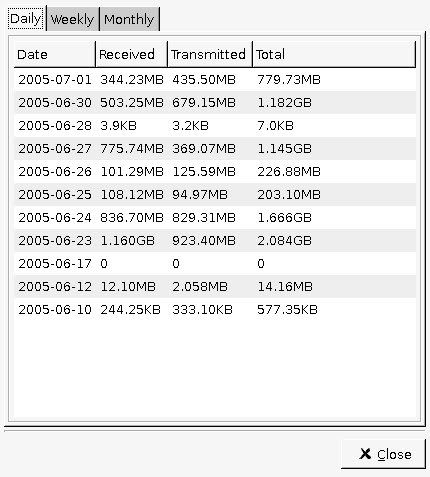
According to Superkaramba I'm curerntly downloading at 9KB/s and uploading at 12KB/s..but I'm not downloading anything..or syncing...or seeding torrents...

This seems to be going on every day, so far today (and I've only been up 4 hours) it says I've uploaded 400+ MB and downloaded 300.

I know that there is always traffic when you're connected to the net, but something seems to be amiss to me.

Here is my netstat:

Code: Select all

edudlive@KonKave ~ $ netstat
Active Internet connections (w/o servers)
Proto Recv-Q Send-Q Local Address           Foreign Address         State
tcp        0      0 192.168.0.104:51905     caim-m05b.blue.aol:5190 ESTABLISHED
tcp        0      0 192.168.0.104:45355     205.188.7.212:5190      ESTABLISHED
tcp        0      5 192.168.0.104:47902     baym-cs331.msgr.ho:1863 ESTABLISHED
tcp        0      0 192.168.0.104:34852     oam-m13b.blue.aol.:5190 ESTABLISHED
tcp        0      0 192.168.0.104:56976     64.233.187.99:http      ESTABLISHED
tcp        0      0 192.168.0.104:56975     64.233.187.99:http      ESTABLISHED
Active UNIX domain sockets (w/o servers)
Proto RefCnt Flags       Type       State         I-Node Path
unix  4      [ ]         DGRAM                    13717  /dev/log
unix  2      [ ]         DGRAM                    1199   @udevd
unix  3      [ ]         STREAM     CONNECTED     89075  /tmp/.ICE-unix/dcop2196
3-1120240445
unix  3      [ ]         STREAM     CONNECTED     89074
unix  3      [ ]         STREAM     CONNECTED     89069  /tmp/.ICE-unix/21985
unix  3      [ ]         STREAM     CONNECTED     89068
unix  3      [ ]         STREAM     CONNECTED     89067  /tmp/.X11-unix/X0
unix  3      [ ]         STREAM     CONNECTED     89066
unix  3      [ ]         STREAM     CONNECTED     88926  /tmp/ksocket-edudlive/k
launcher9aEkjc.slave-socket
unix  3      [ ]         STREAM     CONNECTED     88925
unix  3      [ ]         STREAM     CONNECTED     88811  /tmp/.ICE-unix/21985
unix  3      [ ]         STREAM     CONNECTED     88810
unix  3      [ ]         STREAM     CONNECTED     88809  /tmp/.X11-unix/X0
unix  3      [ ]         STREAM     CONNECTED     88808
unix  3      [ ]         STREAM     CONNECTED     85328  /tmp/.ICE-unix/dcop2196
3-1120240445
unix  3      [ ]         STREAM     CONNECTED     85327
unix  3      [ ]         STREAM     CONNECTED     85319  /tmp/.X11-unix/X0
unix  3      [ ]         STREAM     CONNECTED     85318
unix  3      [ ]         STREAM     CONNECTED     85296  /tmp/.ICE-unix/dcop2196
3-1120240445
unix  3      [ ]         STREAM     CONNECTED     85295
unix  3      [ ]         STREAM     CONNECTED     85290  /tmp/.ICE-unix/21985
unix  3      [ ]         STREAM     CONNECTED     85289
unix  3      [ ]         STREAM     CONNECTED     85288  /tmp/.X11-unix/X0
unix  3      [ ]         STREAM     CONNECTED     85287
unix  3      [ ]         STREAM     CONNECTED     85217  /tmp/jpsock.142.22063
unix  3      [ ]         STREAM     CONNECTED     85216
unix  3      [ ]         STREAM     CONNECTED     85211  /tmp/.X11-unix/X0
unix  3      [ ]         STREAM     CONNECTED     85210
unix  3      [ ]         STREAM     CONNECTED     85203
unix  3      [ ]         STREAM     CONNECTED     85202
unix  3      [ ]         STREAM     CONNECTED     85201
unix  3      [ ]         STREAM     CONNECTED     85200
unix  3      [ ]         STREAM     CONNECTED     85199
unix  3      [ ]         STREAM     CONNECTED     85198
unix  3      [ ]         STREAM     CONNECTED     85197
unix  3      [ ]         STREAM     CONNECTED     85196
unix  3      [ ]         STREAM     CONNECTED     85151  /tmp/orbit-edudlive/lin
c-562f-0-1b2006d9ad7a
unix  3      [ ]         STREAM     CONNECTED     85150
unix  3      [ ]         STREAM     CONNECTED     85149  /tmp/orbit-edudlive/lin
c-5636-0-634645869a024
unix  3      [ ]         STREAM     CONNECTED     85146
unix  2      [ ]         DGRAM                    85134
unix  3      [ ]         STREAM     CONNECTED     85117  /tmp/.X11-unix/X0
unix  3      [ ]         STREAM     CONNECTED     85116
unix  3      [ ]         STREAM     CONNECTED     84971  /tmp/.ICE-unix/21985
unix  3      [ ]         STREAM     CONNECTED     84970
unix  3      [ ]         STREAM     CONNECTED     84956  /tmp/.X11-unix/X0
unix  3      [ ]         STREAM     CONNECTED     84955
unix  3      [ ]         STREAM     CONNECTED     84925  /tmp/.ICE-unix/21985
unix  3      [ ]         STREAM     CONNECTED     84924
unix  3      [ ]         STREAM     CONNECTED     84916  /tmp/.X11-unix/X0
unix  3      [ ]         STREAM     CONNECTED     84915
unix  3      [ ]         STREAM     CONNECTED     84750  /tmp/.ICE-unix/21985
unix  3      [ ]         STREAM     CONNECTED     84749
unix  3      [ ]         STREAM     CONNECTED     84728  /tmp/.X11-unix/X0
unix  3      [ ]         STREAM     CONNECTED     84727
unix  3      [ ]         STREAM     CONNECTED     84726  /tmp/.ICE-unix/dcop2196
3-1120240445
unix  3      [ ]         STREAM     CONNECTED     84725
unix  3      [ ]         STREAM     CONNECTED     84715  /tmp/.ICE-unix/21985
unix  3      [ ]         STREAM     CONNECTED     84714
unix  3      [ ]         STREAM     CONNECTED     84711  /tmp/.X11-unix/X0
unix  3      [ ]         STREAM     CONNECTED     84710
unix  3      [ ]         STREAM     CONNECTED     84709  /tmp/.ICE-unix/dcop2196
3-1120240445
unix  3      [ ]         STREAM     CONNECTED     84708
unix  3      [ ]         STREAM     CONNECTED     84695  /tmp/.ICE-unix/21985
unix  3      [ ]         STREAM     CONNECTED     84694
unix  3      [ ]         STREAM     CONNECTED     84693  /tmp/.X11-unix/X0
unix  3      [ ]         STREAM     CONNECTED     84692
unix  3      [ ]         STREAM     CONNECTED     84685  /tmp/.ICE-unix/21985
unix  3      [ ]         STREAM     CONNECTED     84684
unix  3      [ ]         STREAM     CONNECTED     84683  /tmp/.X11-unix/X0
unix  3      [ ]         STREAM     CONNECTED     84682
unix  3      [ ]         STREAM     CONNECTED     84679  /tmp/.ICE-unix/dcop2196
3-1120240445
unix  3      [ ]         STREAM     CONNECTED     84678
unix  3      [ ]         STREAM     CONNECTED     84675  /tmp/.ICE-unix/dcop2196
3-1120240445
unix  3      [ ]         STREAM     CONNECTED     84674
unix  3      [ ]         STREAM     CONNECTED     84667  /tmp/.ICE-unix/21985
unix  3      [ ]         STREAM     CONNECTED     84666
unix  3      [ ]         STREAM     CONNECTED     84665  /tmp/.ICE-unix/dcop2196
3-1120240445
unix  3      [ ]         STREAM     CONNECTED     84664
unix  3      [ ]         STREAM     CONNECTED     84659  /tmp/.ICE-unix/21985
unix  3      [ ]         STREAM     CONNECTED     84658
unix  3      [ ]         STREAM     CONNECTED     84657  /tmp/.X11-unix/X0
unix  3      [ ]         STREAM     CONNECTED     84656
unix  3      [ ]         STREAM     CONNECTED     84651  /tmp/.ICE-unix/dcop2196
3-1120240445
unix  3      [ ]         STREAM     CONNECTED     84650
unix  3      [ ]         STREAM     CONNECTED     84645  /tmp/.X11-unix/X0
unix  3      [ ]         STREAM     CONNECTED     84644
unix  3      [ ]         STREAM     CONNECTED     84635  /tmp/ksocket-edudlive/k
deinit__0
unix  3      [ ]         STREAM     CONNECTED     84634
unix  3      [ ]         STREAM     CONNECTED     84611  /tmp/.X11-unix/X0
unix  3      [ ]         STREAM     CONNECTED     84610
unix  3      [ ]         STREAM     CONNECTED     84609  /tmp/.ICE-unix/dcop21963-1120240445
unix  3      [ ]         STREAM     CONNECTED     84608
unix  3      [ ]         STREAM     CONNECTED     84561  /tmp/.X11-unix/X0
unix  3      [ ]         STREAM     CONNECTED     84560
unix  4      [ ]         STREAM     CONNECTED     84551  /tmp/.X11-unix/X0
unix  3      [ ]         STREAM     CONNECTED     84550
unix  3      [ ]         STREAM     CONNECTED     84528  /tmp/.X11-unix/X0
unix  3      [ ]         STREAM     CONNECTED     84527
unix  3      [ ]         STREAM     CONNECTED     84525  /tmp/.ICE-unix/dcop21963-1120240445
unix  3      [ ]         STREAM     CONNECTED     84524
unix  3      [ ]         STREAM     CONNECTED     84507  /tmp/.ICE-unix/dcop21963-1120240445
unix  3      [ ]         STREAM     CONNECTED     84506
unix  3      [ ]         STREAM     CONNECTED     84502
unix  3      [ ]         STREAM     CONNECTED     84501
unix  4      [ ]         STREAM     CONNECTED     84442  /tmp/.X11-unix/X0
unix  3      [ ]         STREAM     CONNECTED     84384
unix  2      [ ]         DGRAM                    14231
What is this:

Code: Select all

unix  3      [ ]         STREAM     CONNECTED     85149  /tmp/orbit-edudlive/lin
c-5636-0-634645869a024
I ran chkrootkit and found nothing.

http://img.photobucket.com/albums/v81/e ... 82977b.jpg <~ picture from GKrellm of eth0's usage over the last few days
Top
irwinr
Apprentice
Apprentice
User avatar
Posts: 152
Joined: Tue May 11, 2004 9:02 pm
Location: Texas
Contact:
Contact irwinr
Website

  • Quote

Post by irwinr » Fri Jul 01, 2005 11:54 pm

netstat with no options is almost useless, try this AS ROOT:

netstat -e -p -a --tcp --udp -n

Post that here, and that will tell you every process that has an open tcp or udb connection.

To answer your question about the 'unix' connection, any connections that are with 'unix' are local-local, meaning they do not leave your system or add traffic to eth0

After you figure out which IP/port is causing the problem, you can run tcpdump or ethereal to see what kind of traffic is going accross that connection.

-Jeremy
Top
edudlive
Guru
Guru
User avatar
Posts: 557
Joined: Tue Jan 06, 2004 5:46 am

  • Quote

Post by edudlive » Sat Jul 02, 2005 12:05 am

Code: Select all

KonKave edudlive # netstat -e -p -a --tcp --udp -n
Active Internet connections (servers and established)
Proto Recv-Q Send-Q Local Address           Foreign Address         State       User       Inode      PID/Program name
tcp        1      0 192.168.0.104:54259     140.211.166.170:80      CLOSE_WAIT  1000       92830      26235/firefox-bin
tcp        0      0 192.168.0.104:45355     205.188.7.212:5190      ESTABLISHED 1000       84940      22012/gaim
tcp        0      0 192.168.0.104:47902     207.46.6.123:1863       ESTABLISHED 1000       85261      22012/gaim
tcp        0      0 192.168.0.104:34852     64.12.165.92:5190       ESTABLISHED 1000       84943      22012/gaim

Top
irwinr
Apprentice
Apprentice
User avatar
Posts: 152
Joined: Tue May 11, 2004 9:02 pm
Location: Texas
Contact:
Contact irwinr
Website

  • Quote

Post by irwinr » Sat Jul 02, 2005 12:17 am

That looks really good, actually. You have no listening services, and the only programs maintaining a connection at that point is GAIM. The firefox connection is closed, but hasn't cleared from the table yet.

If you suspect you're generating traffic again, hit that netstat command again and look for suspicious processes maintaining connections.

Also, is this system acting as a router of any kind?

-Jeremy
Top
edudlive
Guru
Guru
User avatar
Posts: 557
Joined: Tue Jan 06, 2004 5:46 am

  • Quote

Post by edudlive » Sat Jul 02, 2005 12:26 am

Noticed a lot of Gnutella-SVC packets...does Sharezza use the Gnutella protocol? brother uses that...

Turned off my brother's PC and it stopped...hm.

My PC doesn't act as a router no.

His computer would have to be pretty heavily infected to generate that many calls from my PC over the LAN no?
Top
irwinr
Apprentice
Apprentice
User avatar
Posts: 152
Joined: Tue May 11, 2004 9:02 pm
Location: Texas
Contact:
Contact irwinr
Website

  • Quote

Post by irwinr » Sat Jul 02, 2005 12:34 am

If your PC isn't acting as a router, why are you seeing packets from your brothers machine? Those won't add to your eth0 bandwidth counter unless they are destined for your machine, or unless your machine replies in some way to the receipt of those packets, both of which would show up on netstat and tcpdump/ethereal

-Jeremy
Top
edudlive
Guru
Guru
User avatar
Posts: 557
Joined: Tue Jan 06, 2004 5:46 am

  • Quote

Post by edudlive » Sat Jul 02, 2005 12:35 am

irwinr wrote:If your PC isn't acting as a router, why are you seeing packets from your brothers machine? Those won't add to your eth0 bandwidth counter unless they are destined for your machine, or unless your machine replies in some way to the receipt of those packets, both of which would show up on netstat and tcpdump/ethereal

-Jeremy
Thats true.

Strange then, it randomly stopped. I'll watch and update if I find anything/see it happen again.
Top
edudlive
Guru
Guru
User avatar
Posts: 557
Joined: Tue Jan 06, 2004 5:46 am

  • Quote

Post by edudlive » Sat Jul 02, 2005 1:01 am

I went back in there, turned on his PC, and started Sharezza. Behold, uploading again!
Top
irwinr
Apprentice
Apprentice
User avatar
Posts: 152
Joined: Tue May 11, 2004 9:02 pm
Location: Texas
Contact:
Contact irwinr
Website

  • Quote

Post by irwinr » Sat Jul 02, 2005 2:58 am

Output from netstat?

-Jeremy
Top
edudlive
Guru
Guru
User avatar
Posts: 557
Joined: Tue Jan 06, 2004 5:46 am

  • Quote

Post by edudlive » Sat Jul 02, 2005 4:18 am

irwinr wrote:Output from netstat?

-Jeremy
Same thing as before...it just doesn't make sense.
Top
irwinr
Apprentice
Apprentice
User avatar
Posts: 152
Joined: Tue May 11, 2004 9:02 pm
Location: Texas
Contact:
Contact irwinr
Website

  • Quote

Post by irwinr » Sat Jul 02, 2005 5:31 am

Hrm, tricky. Lets try another command 'lsof' (List open files, you may need to 'emerge lsof'):

Code: Select all

lsof | grep TCP
lsof | grep UDP
Basically does the same thing as netstat, but in case your netstat command has been comprimised somehow, it's unlikely that lsof would have also been comprimised (especially if you have to emerge it to get the command.)

Make sure you do it while your mysterious 'uploading' is occuring.

-Jeremy
Top
edudlive
Guru
Guru
User avatar
Posts: 557
Joined: Tue Jan 06, 2004 5:46 am

  • Quote

Post by edudlive » Sat Jul 02, 2005 6:23 am

Code: Select all

KonKave edudlive # lsof | grep TCP
gaim      16625 edudlive    6u     IPv4     173034                 TCP 192.168.0.104:45822->205.188.7.212:5190 (ESTABLISHED)
gaim      16625 edudlive    7u     IPv4     188389                 TCP 192.168.0.104:52729->baym-cs188.msgr.hotmail.com:1863 (ESTABLISHED)
gaim      16625 edudlive    8u     IPv4     194836                 TCP 192.168.0.104:57523->baym-sb53.msgr.hotmail.com:1863 (ESTABLISHED)
gaim      16625 edudlive    9u     IPv4     173167                 TCP 192.168.0.104:60261->oam-m13b.blue.aol.com:5190 (ESTABLISHED)
Nothing for UDP, and netstat again

Code: Select all

KonKave edudlive # netstat -e -p -a --tcp --udp -n
Active Internet connections (servers and established)
Proto Recv-Q Send-Q Local Address           Foreign Address         State       User       Inode      PID/Program name
tcp        0      0 192.168.0.104:60261     64.12.165.92:5190       ESTABLISHED 1000       173167     16625/gaim
tcp        0      0 192.168.0.104:52729     207.46.4.56:1863        ESTABLISHED 1000       188389     16625/gaim
tcp        0      0 192.168.0.104:45822     205.188.7.212:5190      ESTABLISHED 1000       173034     16625/gaim
And I turned his PC on and started Sharezza (and the traffic on my PC started again)
Top
irwinr
Apprentice
Apprentice
User avatar
Posts: 152
Joined: Tue May 11, 2004 9:02 pm
Location: Texas
Contact:
Contact irwinr
Website

  • Quote

Post by irwinr » Sat Jul 02, 2005 7:08 am

Care to share the details of your network layout? routers, switches/hubs, LAN IP's for your machine's?

It is especially important to determine if you're on a switched or hubbed network.

-Jeremy
Top
svf
n00b
n00b
Posts: 50
Joined: Tue Feb 01, 2005 12:22 am

  • Quote

Post by svf » Sat Jul 02, 2005 4:56 pm

i dont know superkaramba... but maybe its watching all ifaces... like lo
so loopbacktraffic would appear in the stats..?

just a thought..
uchafu!
Top
ter_roshak
Apprentice
Apprentice
Posts: 171
Joined: Sat Jan 31, 2004 5:43 am
Location: Everett, WA

  • Quote

Post by ter_roshak » Sun Jul 03, 2005 5:06 am

The best way to figure out what is happening would be to begin running a sniffer. Start tcpdump capturing packets and then you can read the packet capture with ethereal if you require a GUI to perform the analysis, or use TCPDump to analyze the capture. You'll be able to see exactly what is occurring at that point.

Code: Select all

tcpdump -s 1515 -C 20 -w content.lpc
That command will start tcpdump capturing full length packets and save them in 20 MB files named content.lpc, content.lpc.1, etc... You can then analyze the captures for malicious activity.
Josh Miller -- RHCE, VCP
Ditree Consulting
http://ditree.com/
Registered Linux User #318200
Top
infecticide
Apprentice
Apprentice
User avatar
Posts: 262
Joined: Wed Mar 10, 2004 3:37 am
Location: Regina, SK Canada
Contact:
Contact infecticide
Website

  • Quote

Post by infecticide » Fri Aug 05, 2005 7:05 pm

I've discovered that a ton of network usage on my ISP is from the Address Resolution Protocol, it uses MB's a day in data that my computer sees but has nothing to do with.

I recommend using NTOP to findout what connections are made and how much data is used on a per IP address basis and it also breaks it down into services.

Screen Shot <-- You can see the usage from the ARP protocol is in excess of 100MB

Screen Shot2 <-- It doesn't show up under IP capture packets


This is an awsome program to find out exactly where your data is going and coming from, I highly recommend it.
Top
ter_roshak
Apprentice
Apprentice
Posts: 171
Joined: Sat Jan 31, 2004 5:43 am
Location: Everett, WA

  • Quote

Post by ter_roshak » Sun Aug 07, 2005 12:12 am

infecticide wrote:I've discovered that a ton of network usage on my ISP is from the Address Resolution Protocol, it uses MB's a day in data that my computer sees but has nothing to do with.

I recommend using NTOP to findout what connections are made and how much data is used on a per IP address basis and it also breaks it down into services.

Screen Shot <-- You can see the usage from the ARP protocol is in excess of 100MB

Screen Shot2 <-- It doesn't show up under IP capture packets


This is an awsome program to find out exactly where your data is going and coming from, I highly recommend it.
If you use tcpdump, it will capture ARP traffic. If you determine that you do not want to capture the arp traffic, you can use a bfp filter to not capture it:

Code: Select all

tcpdump -s 1515 -C 20 -w content.lpc not arp
Josh Miller -- RHCE, VCP
Ditree Consulting
http://ditree.com/
Registered Linux User #318200
Top
infecticide
Apprentice
Apprentice
User avatar
Posts: 262
Joined: Wed Mar 10, 2004 3:37 am
Location: Regina, SK Canada
Contact:
Contact infecticide
Website

  • Quote

Post by infecticide » Sun Aug 07, 2005 8:53 am

If I didn't misunderstand, the whole point of this post was finding out what could possibly be causing a constant upload of data for no apparent reason and ARP is one that I have found in my case to be causing this issue. :D

I just threw in how I found out about it so others can take a look in the same place to see if they also have this situation.
Top
ter_roshak
Apprentice
Apprentice
Posts: 171
Joined: Sat Jan 31, 2004 5:43 am
Location: Everett, WA

  • Quote

Post by ter_roshak » Sun Aug 07, 2005 3:20 pm

infecticide wrote:If I didn't misunderstand, the whole point of this post was finding out what could possibly be causing a constant upload of data for no apparent reason and ARP is one that I have found in my case to be causing this issue. :D

I just threw in how I found out about it so others can take a look in the same place to see if they also have this situation.
Ah, then I misunderstood your post. I thought you were trying to say that tcpdump would not capture ARP traffic...:) My apologies.
Josh Miller -- RHCE, VCP
Ditree Consulting
http://ditree.com/
Registered Linux User #318200
Top
Post Reply

19 posts • Page 1 of 1

Return to “Networking & Security”

Jump to
  • Assistance
  • ↳   News & Announcements
  • ↳   Frequently Asked Questions
  • ↳   Installing Gentoo
  • ↳   Multimedia
  • ↳   Desktop Environments
  • ↳   Networking & Security
  • ↳   Kernel & Hardware
  • ↳   Portage & Programming
  • ↳   Gamers & Players
  • ↳   Other Things Gentoo
  • ↳   Unsupported Software
  • Discussion & Documentation
  • ↳   Documentation, Tips & Tricks
  • ↳   Gentoo Chat
  • ↳   Gentoo Forums Feedback
  • ↳   Duplicate Threads
  • International Gentoo Users
  • ↳   中文 (Chinese)
  • ↳   Dutch
  • ↳   Finnish
  • ↳   French
  • ↳   Deutsches Forum (German)
  • ↳   Diskussionsforum
  • ↳   Deutsche Dokumentation
  • ↳   Greek
  • ↳   Forum italiano (Italian)
  • ↳   Forum di discussione italiano
  • ↳   Risorse italiane (documentazione e tools)
  • ↳   Polskie forum (Polish)
  • ↳   Instalacja i sprzęt
  • ↳   Polish OTW
  • ↳   Portuguese
  • ↳   Documentação, Ferramentas e Dicas
  • ↳   Russian
  • ↳   Scandinavian
  • ↳   Spanish
  • ↳   Other Languages
  • Architectures & Platforms
  • ↳   Gentoo on ARM
  • ↳   Gentoo on PPC
  • ↳   Gentoo on Sparc
  • ↳   Gentoo on Alternative Architectures
  • ↳   Gentoo on AMD64
  • ↳   Gentoo for Mac OS X (Portage for Mac OS X)
  • Board index
  • All times are UTC
  • Delete cookies

© 2001–2026 Gentoo Foundation, Inc.

Powered by phpBB® Forum Software © phpBB Limited

Privacy Policy


magic