Forums

Skip to content

Advanced search
  • Quick links
    • Unanswered topics
    • Active topics
    • Search
  • FAQ
  • Login
  • Register
  • Board index Assistance Kernel & Hardware
  • Search

xen-4.19.3 not booting

Kernel not recognizing your hardware? Problems with power management or PCMCIA? What hardware is compatible with Gentoo? See here. (Only for kernels supported by Gentoo.)
Post Reply
Advanced search
19 posts • Page 1 of 1
Author
Message
PatomaS
Tux's lil' helper
Tux's lil' helper
Posts: 137
Joined: Thu Feb 09, 2006 11:10 am

xen-4.19.3 not booting

  • Quote

Post by PatomaS » Thu Jan 22, 2026 8:08 pm

Hi

I just finished a fresh installation of gentoo on a laptop and everything seems to be working fine when I boot with a standard gentoo-sources kernel.

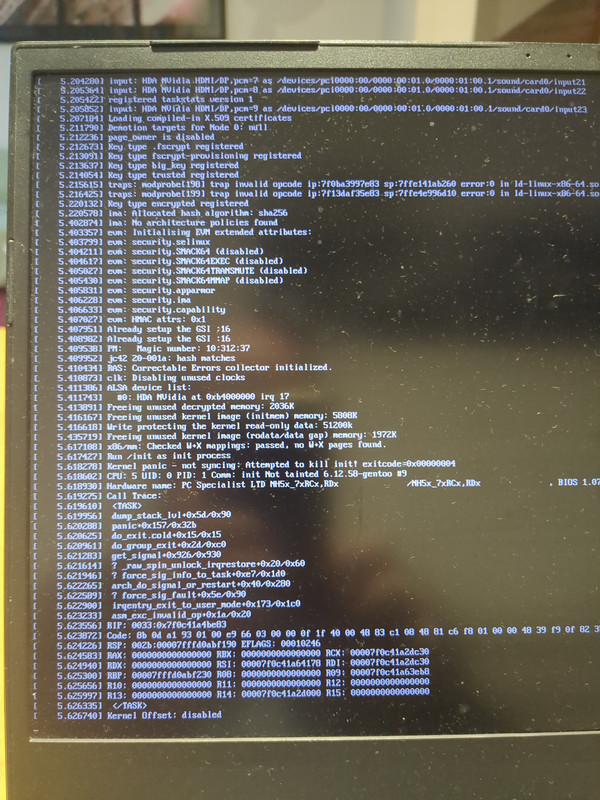
My intention is to use Xen on this machine, so I followed the Gentoo Xen Wiki and I believe that I did it properly but when I rebooted the computer, the system didn't boot, it got stuck on a kernel panic.

Considering that the system boots and works fine with the non Xen kernel, I didn't expect any problem so right now I'm a bit lost about what to look for.

If this message will be better placed on another subforum, please move it to the relevant place and excuse my ignorance.

This is some of the information that may be relevant but if I'm missing something, please let me know and I'll update this message with the requested information:

uname -a

Code: Select all

Linux patitotil 6.12.58-gentoo #9 SMP PREEMPT_DYNAMIC Wed Jan 21 16:54:33 CET 2026 x86_64 Intel(R) Core(TM) i7-9750H CPU @ 2.60GHz GenuineIntel GNU/Linux
xen and xen-tools

Code: Select all

[I] app-emulation/xen
     Available versions:  4.19.3^st ~4.20.2^st {+boot-symlinks debug flask secureboot uefi}
     Installed versions:  4.19.3^st(16:24:41 20/01/26)(boot-symlinks uefi -debug -flask -secureboot)

[I] app-emulation/xen-tools
     Available versions:  4.19.3(0/4.19)^t ~4.20.2(0/4.20)^t {api debug doc +hvm +ipxe lzma ocaml ovmf pygrub python +qemu +qemu-traditional +rombios screen sdl selinux static-libs system-ipxe system-qemu system-seabios systemd zstd PYTHON_SINGLE_TARGET="python3_11 python3_12 python3_13"}
     Installed versions:  4.19.3(0/4.19)^t(16:13:09 20/01/26)(hvm ipxe qemu qemu-traditional rombios -api -debug -doc -lzma -ocaml -ovmf -pygrub -python -screen -sdl -selinux -static-libs -system-ipxe -system-qemu -system-seabios -systemd -zstd PYTHON_SINGLE_TARGET="python3_13 -python3_11 -python3_12")
ls /boot -hl

Code: Select all

-rw-r--r-- 1 root root  14M ene 21 16:56 System.map
-rw-r--r-- 1 root root  15M abr  7  2025 System.map-6.12.21-gentoo
-rw-r--r-- 1 root root  15M abr  7  2025 System.map-6.12.21-gentoo.old
-rw-r--r-- 1 root root  14M ene 21 16:56 System.map-6.12.58-gentoo
-rw-r--r-- 1 root root  15M ene 21 11:01 System.map-6.12.58-gentoo.old
-rw-r--r-- 1 root root  15M ene 21 11:01 System.map.old
-rw-r--r-- 1 root root  15M abr  3  2025 System.old
-rw-r--r-- 1 root root 173K ene 20 12:42 amd-uc.img
-rw-r--r-- 1 root root 197K abr  7  2025 config-6.12.21-gentoo
-rw-r--r-- 1 root root 197K abr  7  2025 config-6.12.21-gentoo.old
-rw-r--r-- 1 root root 201K ene 21 16:56 config-6.12.58-gentoo
-rw-r--r-- 1 root root 201K ene 21 11:01 config-6.12.58-gentoo.old
drwxr-xr-x 6 root root 4,0K ene 21 19:34 grub
-rw-r--r-- 1 root root  37M abr  7  2025 initramfs-6.12.21-gentoo.img
-rw-r--r-- 1 root root  37M abr  7  2025 initramfs-6.12.21-gentoo.img.old
-rw-r--r-- 1 root root  14M ene 21 16:56 initramfs-6.12.58-gentoo.img
-rw-r--r-- 1 root root  14M ene 21 11:01 initramfs-6.12.58-gentoo.img.old
-rw-r--r-- 1 root root  25M ene 20 12:37 intel-uc.img
-rw-r--r-- 1 root root  25M ene 21 16:56 vmlinuz
-rw-r--r-- 1 root root  25M abr  7  2025 vmlinuz-6.12.21-gentoo
-rw-r--r-- 1 root root  25M abr  7  2025 vmlinuz-6.12.21-gentoo.old
-rw-r--r-- 1 root root  25M ene 21 16:56 vmlinuz-6.12.58-gentoo
-rw-r--r-- 1 root root  25M ene 21 11:01 vmlinuz-6.12.58-gentoo.old
-rw-r--r-- 1 root root  25M ene 21 11:01 vmlinuz.old
-rw-r--r-- 1 root root 2,8K ene 20 16:24 xen-4.19.3.config
-rw-r--r-- 1 root root 1,2M ene 20 16:24 xen-4.19.3.gz
-rw-r--r-- 1 root root 1,2M ene 20 16:24 xen-4.19.gz
-rw-r--r-- 1 root root 1,2M ene 20 16:24 xen-4.gz
-rw-r--r-- 1 root root 1,2M ene 20 16:24 xen.gz
rc-status --all

Code: Select all

Runlevel: shutdown
 killprocs							[  stopped  ]
 savecache							[  stopped  ]
 mount-ro							[  stopped  ]
Runlevel: sysinit
 devfs								[  started  ]
 kmod-static-nodes					[  started  ]
 systemd-tmpfiles-setup-dev			[  started  ]
 sysfs								[  started  ]
 udev								[  started  ]
 dmesg								[  started  ]
 udev-trigger						[  started  ]
 cgroups							[  started  ]
Runlevel: nonetwork
 local								[  started  ]
Runlevel: default
 metalog							[  started  ]
 wpa_supplicant						[  started  ]
 dhcpcd								[  started  ]
 dbus								[  started  ]
 net.enp9s0f1						[  started  ]
 net.eth0							[  stopped  ]
 net.wlp8s0							[  stopped  ]
 netmount							[  stopped  ]
 thermald							[  started  ]
 acpid								[  started  ]
 consolefont						[  stopped  ]
 cronie								[  started  ]
 tlp								[  started  ]
 local								[  started  ]
Runlevel: xen
 xencommons							[  stopped  ]
 xenstored							[  stopped  ]
 xenconsoled						[  stopped  ]
 xen-watchdog						[  stopped  ]
 xendomains							[  stopped  ]
Runlevel: boot
 hwclock							[  started  ]
 modules							[  started  ]
 fsck								[  started  ]
 termencoding						[  started  ]
 hostname							[  started  ]
 procfs								[  started  ]
 root								[  started  ]
 mtab								[  started  ]
 swap								[  started  ]
 localmount							[  started  ]
 seedrng							[  started  ]
 sysctl								[  started  ]
 bootmisc							[  started  ]
 save-termencoding					[  started  ]
 loopback							[  started  ]
 binfmt								[  started  ]
 alsasound							[  started  ]
 keymaps							[  started  ]
 save-keymaps						[  started  ]
 systemd-tmpfiles-setup				[  started  ]
Dynamic Runlevel: hotplugged
Dynamic Runlevel: needed/wanted
Dynamic Runlevel: manual
cat /etc/default/grub (uncommented lines only)

Code: Select all

GRUB_DISTRIBUTOR="Gentoo"

GRUB_THEME="/boot/grub/themes/gentoo_glass/theme.txt"
GRUB_DISABLE_LINUX_PARTUUID=false
GRUB_CMDLINE_XEN="gnttab_max_frames=256 sched=credit"
GRUB_CMDLINE_XEN_DEFAULT="dom0_mem=1024M,max:1024M"
GRUB_CMDLINE_LINUX_XEN_REPLACE_DEFAULT="softlevel=xen"
/boot/grub/grub.cfg ( kernel that boots fine )

Code: Select all

menuentry 'Gentoo GNU/Linux' --class gentoo --class gnu-linux --class gnu --class os $menuentry_id_option 'gnulinux-simple-88d5675a-e2a6-48f2-a784-7f5e291228f9' {
	load_video
	if [ "x$grub_platform" = xefi ]; then
		set gfxpayload=keep
	fi
	insmod gzio
	insmod part_gpt
	insmod ext2
	set root='hd0,gpt3'
	if [ x$feature_platform_search_hint = xy ]; then
	  search --no-floppy --fs-uuid --set=root --hint-bios=hd0,gpt3 --hint-efi=hd0,gpt3 --hint-baremetal=ahci0,gpt3  88d5675a-e2a6-48f2-a784-7f5e291228f9
	else
	  search --no-floppy --fs-uuid --set=root 88d5675a-e2a6-48f2-a784-7f5e291228f9
	fi
	echo	'Loading Linux 6.12.58-gentoo ...'
	linux	/boot/vmlinuz-6.12.58-gentoo root=UUID=88d5675a-e2a6-48f2-a784-7f5e291228f9 ro  
	echo	'Loading initial ramdisk ...'
	initrd	/boot/intel-uc.img /boot/amd-uc.img /boot/initramfs-6.12.58-gentoo.img
}
/boot/grub/grub.cfg ( xen kernel that panics )

Code: Select all

menuentry 'Gentoo GNU/Linux, with Xen hypervisor' --class gentoo --class gnu-linux --class gnu --class os --class xen $menuentry_id_option 'xen-gnulinux-simple-88d5675a-e2a6-48f2-a784-7f5e291228f9' {
	insmod part_gpt
	insmod ext2
	set root='hd0,gpt3'
	if [ x$feature_platform_search_hint = xy ]; then
	  search --no-floppy --fs-uuid --set=root --hint-bios=hd0,gpt3 --hint-efi=hd0,gpt3 --hint-baremetal=ahci0,gpt3  88d5675a-e2a6-48f2-a784-7f5e291228f9
	else
	  search --no-floppy --fs-uuid --set=root 88d5675a-e2a6-48f2-a784-7f5e291228f9
	fi
	echo	'Loading Xen xen ...'
        if [ "$grub_platform" = "pc" -o "$grub_platform" = "" ]; then
            xen_rm_opts=
        else
            xen_rm_opts="no-real-mode edd=off"
        fi
	multiboot2	/boot/xen.gz placeholder gnttab_max_frames=256 sched=credit dom0_mem=1024M,max:1024M ${xen_rm_opts}
	echo	'Loading Linux 6.12.58-gentoo ...'
	module2	/boot/vmlinuz-6.12.58-gentoo placeholder root=UUID=88d5675a-e2a6-48f2-a784-7f5e291228f9 ro  softlevel=xen
	echo	'Loading initial ramdisk ...'
	module2	--nounzip   /boot/initramfs-6.12.58-gentoo.img
	echo	'Loading initial ramdisk ...'
	module2	--nounzip   /boot/intel-uc.img
	echo	'Loading initial ramdisk ...'
	module2	--nounzip   /boot/amd-uc.img
}
dmesg ( from the kernel that boots fine )
It is a bit too long so I left it on a pastebin

Picture with the panic
Kernel panic - not syncing: Attempt to kill init! exitcode=0x00000004

Building / compiling the kernel ( same computer, run on the system with the kernel that boots fine )

Code: Select all

clear && make && emerge @module-rebuild && make modules_install && make install

grub-mkconfig -o /boot/grub/grub.cfg
Running dracut ( same computer, run on the system with the kernel that boots fine )

Code: Select all

dracut --force

dracut[I]: Executing: /usr/bin/dracut --force
dracut[I]: 70bluetooth: Could not find any command of '/usr/lib/bluetooth/bluetoothd /usr/libexec/bluetooth/bluetoothd'!
find: '/etc/dracut.conf.d': No such file or directory
dracut[I]: 74nfs: Could not find any command of 'rpcbind portmap'!
dracut[I]: 70bluetooth: Could not find any command of '/usr/lib/bluetooth/bluetoothd /usr/libexec/bluetooth/bluetoothd'!
find: '/etc/dracut.conf.d': No such file or directory
dracut[I]: 74nfs: Could not find any command of 'rpcbind portmap'!
dracut[I]: *** Including module: bash ***
dracut[I]: *** Including module: i18n ***
dracut[E]: i18n_vars not set!  Please set up i18n_vars in  configuration file.
dracut[I]: No KEYMAP configured.
dracut[I]: *** Including module: crypt ***
dracut[I]: *** Including module: dm ***
dracut[I]: *** Including module: fs-lib ***
dracut[I]: *** Including module: kernel-modules ***
dracut[I]: *** Including module: kernel-modules-extra ***
dracut[I]: *** Including module: qemu ***
dracut[I]: *** Including module: qemu-net ***
dracut[I]: *** Including module: hwdb ***
dracut[I]: *** Including module: lunmask ***
dracut[I]: *** Including module: rootfs-block ***
dracut[I]: *** Including module: terminfo ***
dracut[I]: *** Including module: udev-rules ***
dracut[I]: *** Including module: virtiofs ***
dracut[I]: *** Including module: initqueue ***
dracut[I]: *** Including module: usrmount ***
dracut[I]: *** Including module: base ***
grep: /var/tmp/dracut.di9PZMr/initramfs/etc/shadow: No such file or directory
dracut[I]: *** Including module: shell-interpreter ***
dracut[I]: *** Including module: shutdown ***
dracut[I]: *** Including modules done ***
dracut[I]: *** Installing kernel module dependencies ***
dracut[I]: *** Installing kernel module dependencies done ***
dracut[I]: *** Resolving executable dependencies ***
dracut[I]: *** Resolving executable dependencies done ***
dracut[I]: *** Generating early-microcode cpio image ***
dracut[I]: *** Constructing GenuineIntel.bin ***
dracut[I]: *** Store current command line parameters ***
dracut[I]: Stored kernel commandline:
dracut[I]:  root=UUID=88d5675a-e2a6-48f2-a784-7f5e291228f9 rootfstype=ext4 rootflags=rw,noatime
dracut[I]: *** Stripping files ***
dracut[I]: *** Stripping files done ***
dracut[I]: *** Creating image file '/boot/initramfs-6.12.58-gentoo.img.tmp' ***
dracut[I]: *** Hardlinking files ***
dracut[I]: *** Hardlinking files done ***
dracut[I]: Using auto-determined compression method 'zstd'
dracut[I]: *** Creating initramfs image file '/boot/initramfs-6.12.58-gentoo.img.tmp' done ***
dracut[I]: *** Moving image file '/boot/initramfs-6.12.58-gentoo.img.tmp' to '/boot/initramfs-6.12.58-gentoo.img' ***
dracut[I]: *** Moving image file '/boot/initramfs-6.12.58-gentoo.img.tmp' to '/boot/initramfs-6.12.58-gentoo.img' done ***

For more details, dracut --force --verbose ( same computer, run on the system with the kernel that boots fine )

thanks for the help and the time
Last edited by PatomaS on Fri Jan 23, 2026 7:04 pm, edited 3 times in total.
Top
NeddySeagoon
Administrator
Administrator
User avatar
Posts: 56085
Joined: Sat Jul 05, 2003 9:37 am
Location: 56N 3W

  • Quote

Post by NeddySeagoon » Thu Jan 22, 2026 8:18 pm

PatomaS,

The text explaning the cause of the panic will help narrow down the possible problem area.
It will be Kernel Panic! <Reason>
A photo works too.
Regards,

NeddySeagoon

Computer users fall into two groups:-
those that do backups
those that have never had a hard drive fail.
Top
PatomaS
Tux's lil' helper
Tux's lil' helper
Posts: 137
Joined: Thu Feb 09, 2006 11:10 am

  • Quote

Post by PatomaS » Thu Jan 22, 2026 8:32 pm

NeddySeagoon wrote:PatomaS,

The text explaning the cause of the panic will help narrow down the possible problem area.
It will be Kernel Panic! <Reason>
A photo works too.
Thanks for your reply @NeddySeagoon, I couldn't reboot before but I just posted the picture. It's hosted on postimages and I used a link tag, I hope it works well.
Top
pingtoo
Advocate
Advocate
User avatar
Posts: 2180
Joined: Fri Sep 10, 2021 8:37 pm
Location: Richmond Hill, Canada

  • Quote

Post by pingtoo » Thu Jan 22, 2026 8:45 pm

PatomaS,

Can you clarify what the dmesg in pastebin vs the pitcture, they are two type of errors. So are they refer to same kernel or different kernel or different setting?
Top
PatomaS
Tux's lil' helper
Tux's lil' helper
Posts: 137
Joined: Thu Feb 09, 2006 11:10 am

  • Quote

Post by PatomaS » Thu Jan 22, 2026 8:54 pm

pingtoo wrote:PatomaS,

Can you clarify what the dmesg in pastebin vs the pitcture, they are two type of errors. So are they refer to same kernel or different kernel or different setting?
Sure @pingtoo, the dmesg is from the same computer but on the kernel that boots fine.

Is it the dmesg generated on the system with the sys-kernel/gentoo-sources-6.12.58.

When I try to boot with xen, i don't get to the system and can't generate a dmesg.
Top
pingtoo
Advocate
Advocate
User avatar
Posts: 2180
Joined: Fri Sep 10, 2021 8:37 pm
Location: Richmond Hill, Canada

  • Quote

Post by pingtoo » Thu Jan 22, 2026 9:39 pm

PatomaS,

Thanks for clarification.

From the picture, It looks to me the /init in the initramfs is having problem. May be someone else can also confirm or disagree.

This become a little bit hard to debug because there is no chance to break in to see what is going on.

My wild guess is that the initramfs (initrd) may be missing libraries or somehow the /init is binary not compatible with CPU architecture.

If my guess is correct, you will need a functional system. (for example your bootable gentoo-source kernel) and decompose the initramfs and examine it there first to understand if anything need to change.
Top
PatomaS
Tux's lil' helper
Tux's lil' helper
Posts: 137
Joined: Thu Feb 09, 2006 11:10 am

  • Quote

Post by PatomaS » Thu Jan 22, 2026 9:50 pm

pingtoo wrote:PatomaS,

Thanks for clarification.

From the picture, It looks to me the /init in the initramfs is having problem. May be someone else can also confirm or disagree.

This become a little bit hard to debug because there is no chance to break in to see what is going on.

My wild guess is that the initramfs (initrd) may be missing libraries or somehow the /init is binary not compatible with CPU architecture.

If my guess is correct, you will need a functional system. (for example your bootable gentoo-source kernel) and decompose the initramfs and examine it there first to understand if anything need to change.
That doesn't sound very good, plus right now I have no idea how to do that.

May be I'm too tired to see a path but how would I go about this? Any suggestion or guide?

I'll come back tomorrow morning after a good sleep and hope for the best
Top
pingtoo
Advocate
Advocate
User avatar
Posts: 2180
Joined: Fri Sep 10, 2021 8:37 pm
Location: Richmond Hill, Canada

  • Quote

Post by pingtoo » Thu Jan 22, 2026 10:14 pm

PatomaS wrote:
pingtoo wrote:PatomaS,

Thanks for clarification.

From the picture, It looks to me the /init in the initramfs is having problem. May be someone else can also confirm or disagree.

This become a little bit hard to debug because there is no chance to break in to see what is going on.

My wild guess is that the initramfs (initrd) may be missing libraries or somehow the /init is binary not compatible with CPU architecture.

If my guess is correct, you will need a functional system. (for example your bootable gentoo-source kernel) and decompose the initramfs and examine it there first to understand if anything need to change.
That doesn't sound very good, plus right now I have no idea how to do that.

May be I'm too tired to see a path but how would I go about this? Any suggestion or guide?

I'll come back tomorrow morning after a good sleep and hope for the best
No worries, get some rest. This is debug excercize, it is better to work with clear mind.

Plus we don't know for sure if my guess is right. So may be someone else would point out something much simpler than my guess.
Top
pietinger
Administrator
Administrator
Posts: 6621
Joined: Tue Oct 17, 2006 5:11 pm
Location: Bavaria

  • Quote

Post by pietinger » Thu Jan 22, 2026 11:43 pm

I am not familiar with XEN and therefore just want to point something out for other helpers (taken from the screen photo):

At timestamp 5.215615 there are two lines with an trap:

Code: Select all

traps: modprobe[198] trap invalid opcode ip:... sp: ... error:0 in ld-linux-x86-64.so
traps: modprobe[199] trap invalid opcode ip:... sp: ... error:0 in ld-linux-x86-64.so
Later - at timesatamp 5.61... - there is the start of:

Code: Select all

Run /init as init process
but there is not the line "with arguments:" after that, but immediately the kernel panic ... which started with "asm_exc_invalid_op"

I have to pass here, as I don't understand how something can do a modprobe before “init” has even been started (and with an invalid OP code at that)? Is that the xen.gz?
https://wiki.gentoo.org/wiki/User:Pietinger --> https://wiki.gentoo.org/wiki/User:Pieti ... _at_Gentoo
Top
PatomaS
Tux's lil' helper
Tux's lil' helper
Posts: 137
Joined: Thu Feb 09, 2006 11:10 am

  • Quote

Post by PatomaS » Fri Jan 23, 2026 7:30 am

pietinger wrote:I am not familiar with XEN and therefore just want to point something out for other helpers (taken from the screen photo):

At timestamp 5.215615 there are two lines with an trap:

Code: Select all

traps: modprobe[198] trap invalid opcode ip:... sp: ... error:0 in ld-linux-x86-64.so
traps: modprobe[199] trap invalid opcode ip:... sp: ... error:0 in ld-linux-x86-64.so
Later - at timesatamp 5.61... - there is the start of:

Code: Select all

Run /init as init process
but there is not the line "with arguments:" after that, but immediately the kernel panic ... which started with "asm_exc_invalid_op"

I have to pass here, as I don't understand how something can do a modprobe before “init” has even been started (and with an invalid OP code at that)? Is that the xen.gz?
I appreciate the comment, for now it has made me check some other things and for now I'm finding some threads on other sites that may be talking about something related. If I find something else related to the problem, I'll update the original message.

If anybody has any other suggestion, I'll test it.

I'll also try to check what @pingtoo was mentioning about missing libraries on init.
Top
NeddySeagoon
Administrator
Administrator
User avatar
Posts: 56085
Joined: Sat Jul 05, 2003 9:37 am
Location: 56N 3W

  • Quote

Post by NeddySeagoon » Fri Jan 23, 2026 9:17 am

PatomaS,

I'm not too worried about the ordering of kernel messages on the screen. Once the kernel is running multi-threaded, things get out of order.
Much like the entries in build logs.

Invalid op code says that you are trying to execute an instruction that your CPU does not understand. It's in ld-linux-x86-64.so which is the dynamic linker provided by glibc. Almost nothing works without glibc.

It will be the copy in your initrd/initramfs.
How do you build your Xen kernel and initrd?
Regards,

NeddySeagoon

Computer users fall into two groups:-
those that do backups
those that have never had a hard drive fail.
Top
PatomaS
Tux's lil' helper
Tux's lil' helper
Posts: 137
Joined: Thu Feb 09, 2006 11:10 am

  • Quote

Post by PatomaS » Fri Jan 23, 2026 6:49 pm

NeddySeagoon wrote:PatomaS,

I'm not too worried about the ordering of kernel messages on the screen. Once the kernel is running multi-threaded, things get out of order.
Much like the entries in build logs.

Invalid op code says that you are trying to execute an instruction that your CPU does not understand. It's in ld-linux-x86-64.so which is the dynamic linker provided by glibc. Almost nothing works without glibc.

It will be the copy in your initrd/initramfs.
How do you build your Xen kernel and initrd?
Sorry for the delay on my reply.

About the question regarding how I build the Xen kernel, I just follow the steps mentioned on the wiki. I first built a kernel for the laptop, and once everything was working, then I added the options for the Xen kernel and recompiled.

About the initrd, I don't do much, I build the kernel, use grub-mkconfig to set grub.cfg and during my tests I have manually forced dracut to rebuild the initram.

I'll add those commands on the initial message.

Should I do something else?
Top
pingtoo
Advocate
Advocate
User avatar
Posts: 2180
Joined: Fri Sep 10, 2021 8:37 pm
Location: Richmond Hill, Canada

  • Quote

Post by pingtoo » Fri Jan 23, 2026 7:37 pm

PatomaS,

From the look of your dracut --force --verbose output. the result initrd will not work for your goal (boot xen) but should work for your system that execute the dracut command.

I am no expert on dracut and xen, so I will not able to give you exact instructions on what to do, however I am good at system boot sequence and linux boot in general so I should be able to debug and provide general guild line on where to look. However I need to remind you my answer will contain information from AI. so if you prefer no AI association, I understand and will stay out of you way.

Currently Gentoo Wiki not working for me so I am not able to understand exact steps you took to let to your current state.

from my general research I know boot xen require certain kernel modules to support xen kernel boot and some kernel command line to prepare for Dom0, these may or may not be in your prepared initrd. But I know for sure it is NOT in your most recent dracut --force --verbose build.

So if your other initrd that used in that grub configuration that boot xen is built exactly like you did with that dracut --force --verbose build then it for sure will not work.

But without actually look into the initrd that associated with the xen boot we will not be able to tell why you got those kernel panic.
Top
Max Steel
Advocate
Advocate
User avatar
Posts: 2324
Joined: Mon Feb 12, 2007 6:35 pm
Location: My own world! I and Gentoo!

  • Quote

Post by Max Steel » Fri Jan 23, 2026 10:01 pm

I think it should be possible to change the CFLAGS in your make.conf to safe values, like "--pipe -O2" for now and rebuilt @system and rerun dracut. Because XEN removes certain CPU-Flags/Opcodes from the virtual CPU on Dom0 for some reason which could be needed with --march=native.

But to be fair, this is only a shot in the dark im no expert in the cpu opcodes stuff. I just know that XEN does disable certain stuff by default. (not everything... only a few sidehussles, though. Maybe mtrr related stuff?)

Worth a try i think. In the running XEN Dom0 you could then reactivate --march=native and rebuild it, again.

To mitigate the problem of recompiling everything twice you could download a XEN-Alpine livecd and maybe try to rebuild the system in there. but maybe you're out of luck... this invalid opcode could be everywhere, in bash, python and the whole toolchain.
mfg
Steel
___________________

Heim-PC: AMD Ryzen 9 5950X, 64GB RAM, RX 9070 XT
Laptop: AMD Ryzen 5 7640U, 32GB RAM, Radeon onCPU Graphics
Arbeit-PC: AMD Ryzen 3 Pro 7335U, 16GB RAM, AMD Radeon Graphics (leider WSL2)
Top
PatomaS
Tux's lil' helper
Tux's lil' helper
Posts: 137
Joined: Thu Feb 09, 2006 11:10 am

  • Quote

Post by PatomaS » Sat Jan 24, 2026 10:53 am

pingtoo wrote:PatomaS,

From the look of your dracut --force --verbose output. the result initrd will not work for your goal (boot xen) but should work for your system that execute the dracut command.

I am no expert on dracut and xen, so I will not able to give you exact instructions on what to do, however I am good at system boot sequence and linux boot in general so I should be able to debug and provide general guild line on where to look. However I need to remind you my answer will contain information from AI. so if you prefer no AI association, I understand and will stay out of you way.

Currently Gentoo Wiki not working for me so I am not able to understand exact steps you took to let to your current state.

from my general research I know boot xen require certain kernel modules to support xen kernel boot and some kernel command line to prepare for Dom0, these may or may not be in your prepared initrd. But I know for sure it is NOT in your most recent dracut --force --verbose build.

So if your other initrd that used in that grub configuration that boot xen is built exactly like you did with that dracut --force --verbose build then it for sure will not work.

But without actually look into the initrd that associated with the xen boot we will not be able to tell why you got those kernel panic.
Well, I have nothing against AI if used properly, for instance, if I try to find the solution to my problem in any AI, most probably will burn the house down due to not being able to recognize slop, but if a person with better and deeper knowledge than me uses it and can discern a good and bad responses, then it is a great tool
Max Steel wrote: think it should be possible to change the CFLAGS in your make.conf to safe values, like "--pipe -O2" for now and rebuilt @system and rerun dracut. Because XEN removes certain CPU-Flags/Opcodes from the virtual CPU on Dom0 for some reason which could be needed with --march=native.

But to be fair, this is only a shot in the dark im no expert in the cpu opcodes stuff. I just know that XEN does disable certain stuff by default. (not everything... only a few sidehussles, though. Maybe mtrr related stuff?)

Worth a try i think. In the running XEN Dom0 you could then reactivate --march=native and rebuild it, again.

To mitigate the problem of recompiling everything twice you could download a XEN-Alpine livecd and maybe try to rebuild the system in there. but maybe you're out of luck... this invalid opcode could be everywhere, in bash, python and the whole toolchain.
From both of this answers, I'm diverging some energy to try to get a better understanding of the initramfs file generation, the way dracut works and how to get it to generate an initramfs for the xen kernel from my active working system..

I'll try to boot with a xen live cd to see how that works as well.

This is getting me to investigate a lot, which is a good thing, hopefully I'll assimilate enough knowledge to pass the threshold of just being dangerous.
Top
NeddySeagoon
Administrator
Administrator
User avatar
Posts: 56085
Joined: Sat Jul 05, 2003 9:37 am
Location: 56N 3W

  • Quote

Post by NeddySeagoon » Sat Jan 24, 2026 1:01 pm

PatomaS,

If the xen liveCD boots you may be able to use some bits from it under your own install as a get-you-going measure.

You will not be able to use the kernel command line as that expects root to be in a squashfs with an overlay fs to fake read write.
However, xen, the kernel, the initrd and /lib/modules (for the kernel modules) should all work under your existing install.

That leaves the grub.cfg to create.

-- edit --

Code: Select all

   multiboot2   /boot/xen.gz placeholder gnttab_max_frames=256 sched=credit dom0_mem=1024M,max:1024M ${xen_rm_opts}
   echo   'Loading Linux 6.12.58-gentoo ...'
   module2   /boot/vmlinuz-6.12.58-gentoo placeholder root=UUID=88d5675a-e2a6-48f2-a784-7f5e291228f9 ro  softlevel=xen
   echo   'Loading initial ramdisk ...'
   module2   --nounzip   /boot/initramfs-6.12.58-gentoo.img
What does placeholder do in two places?

-- edit --

It appears from the Alpine xen boot iso, that plachholder or random text is correcte
Last edited by NeddySeagoon on Sun Jan 25, 2026 1:08 pm, edited 1 time in total.
Regards,

NeddySeagoon

Computer users fall into two groups:-
those that do backups
those that have never had a hard drive fail.
Top
pingtoo
Advocate
Advocate
User avatar
Posts: 2180
Joined: Fri Sep 10, 2021 8:37 pm
Location: Richmond Hill, Canada

  • Quote

Post by pingtoo » Sat Jan 24, 2026 4:15 pm

PatomaS,

Conceptually the idea of using xen cd to boot then use dracut to build new initrd is correct. however this is not necessary going to work because the xen cd kernel may be configured very different from your own build kernel.

Now I am able to see Gentoo Xen Wiki, so if your kernel configured like the wiki and have every drivers build in to kernel then it should be OK. however if your own kernel have them as modules, then you need to make sure dracut will pick up them when you boot from xen cd that have everything build in.

If you still experience boot issue but it is no longer cause by bad op code, this mean it is likely you got into initrd with different problem. we can debug that when it happen.

if you still experience bad op code error during boot before initrd, then you can boot with the normal (or xen cd) kernel and use "lsinitrd" to see your dracut generated initrd. the syntax is

Code: Select all

lsinitrd /path/to/initramfs...
Top
PatomaS
Tux's lil' helper
Tux's lil' helper
Posts: 137
Joined: Thu Feb 09, 2006 11:10 am

  • Quote

Post by PatomaS » Mon Jan 26, 2026 9:32 am

I'll get back to this problem later today.

thanks for all the help
Top
PatomaS
Tux's lil' helper
Tux's lil' helper
Posts: 137
Joined: Thu Feb 09, 2006 11:10 am

  • Quote

Post by PatomaS » Tue Feb 03, 2026 3:35 pm

I apologyze for not coming back to this for a few days but I made a big mistake and damaged the system ...

While doding the tests, I was going to burn the Alpine Xen image to a USB, and in my mind this laptop was booting witn an NVME, so the /dev/sda was the USB ... I suppose you know how the rest goes ... :oops:

So I had to reinstall everything and of course I got a bit demoralized with my mistake ...

Now I just managed to have a booting Gentoo, on /dev/sda, firefox for browsing the forums, a few minor things and as fasr as I can tell, all the drivers for the system, so the next step is to add the Xen stuff to the kernel, rerun things like dracut to help with the initramfs and hope that everything works ...

Of course, on one hand, I want everything to work, but if that is the case, I would have no idea what was the problem before ... although, now that I said that, things won't work, but in a different way ...

well, again, thanks for all the help and sorry for dissaperarin so abruptly from the thread.

See you later today or tomorrow morning.
Top
Post Reply

19 posts • Page 1 of 1

Return to “Kernel & Hardware”

Jump to
  • Assistance
  • ↳   News & Announcements
  • ↳   Frequently Asked Questions
  • ↳   Installing Gentoo
  • ↳   Multimedia
  • ↳   Desktop Environments
  • ↳   Networking & Security
  • ↳   Kernel & Hardware
  • ↳   Portage & Programming
  • ↳   Gamers & Players
  • ↳   Other Things Gentoo
  • ↳   Unsupported Software
  • Discussion & Documentation
  • ↳   Documentation, Tips & Tricks
  • ↳   Gentoo Chat
  • ↳   Gentoo Forums Feedback
  • ↳   Duplicate Threads
  • International Gentoo Users
  • ↳   中文 (Chinese)
  • ↳   Dutch
  • ↳   Finnish
  • ↳   French
  • ↳   Deutsches Forum (German)
  • ↳   Diskussionsforum
  • ↳   Deutsche Dokumentation
  • ↳   Greek
  • ↳   Forum italiano (Italian)
  • ↳   Forum di discussione italiano
  • ↳   Risorse italiane (documentazione e tools)
  • ↳   Polskie forum (Polish)
  • ↳   Instalacja i sprzęt
  • ↳   Polish OTW
  • ↳   Portuguese
  • ↳   Documentação, Ferramentas e Dicas
  • ↳   Russian
  • ↳   Scandinavian
  • ↳   Spanish
  • ↳   Other Languages
  • Architectures & Platforms
  • ↳   Gentoo on ARM
  • ↳   Gentoo on PPC
  • ↳   Gentoo on Sparc
  • ↳   Gentoo on Alternative Architectures
  • ↳   Gentoo on AMD64
  • ↳   Gentoo for Mac OS X (Portage for Mac OS X)
  • Board index
  • All times are UTC
  • Delete cookies

© 2001–2026 Gentoo Foundation, Inc.

Powered by phpBB® Forum Software © phpBB Limited

Privacy Policy


magic