

After the latest update to Dolphin version 25.04.2, thumbnail image previews stopped working in Plasma X11; with Plasma Wayland, they work perfectly.
Is this happening to anyone else?
Thumbnail previews in Dolphin 25.04.2 not working (solved)
Message
Thumbnail previews in Dolphin 25.04.2 not working (solved)
Last edited by cameta on Fri Jul 25, 2025 11:41 am, edited 1 time in total.
Si algo falla LEE el jodido manual, Si sigue fallando LEE BIEN el jodido manual.

My dolphin is this, what's yours?
Code: Select all
equery uses kde-apps/dolphin
[ Legend : U - final flag setting for installation]
[        : I - package is installed with flag     ]
[ Colors : set, unset                             ]
 * Found these USE flags for kde-apps/dolphin-25.04.2:
 U I
 - - debug            : Enable extra debug codepaths, like asserts and extra output. If you want to get meaningful backtraces see
                        https://wiki.gentoo.org/wiki/Project:Quality_Assurance/Backtraces
 + + handbook         : Enable handbooks generation for packages by KDE
 + + semantic-desktop : Cross-KDE support for semantic search and information retrieval
 - - telemetry        : Send anonymized usage information to upstream so they can better understand our users
 - - test             : Enable dependencies and/or preparations necessary to run tests (usually controlled by FEATURES=test but can be toggled independently)
Si algo falla LEE el jodido manual, Si sigue fallando LEE BIEN el jodido manual.
Code: Select all
equery uses kde-apps/dolphin
[ Legend : U - final flag setting for installation]
[        : I - package is installed with flag     ]
[ Colors : set, unset                             ]
 * Found these USE flags for kde-apps/dolphin-25.04.3:
 U I
 - - debug            : Enable extra debug codepaths, like asserts and extra output. If you want to
                        get meaningful backtraces see
                        https://wiki.gentoo.org/wiki/Project:Quality_Assurance/Backtraces
 - - handbook         : Enable handbooks generation for packages by KDE
 - - semantic-desktop : Cross-KDE support for semantic search and information retrieval
 - - telemetry        : Send anonymized usage information to upstream so they can better understand
                        our users
 - - test             : Enable dependencies and/or preparations necessary to run tests (usually
                        controlled by FEATURES=test but can be toggled independently)
- rab0171610
- l33t

- Posts: 721
- Joined: Sat Dec 24, 2022 1:41 am
I am not in any way trying to insult your intelligence. However, I am not sitting at your computer and cannot see what you see. I am wondering what happens when you toggle previews in Dolphin (turning them off and then on again) in X by using the F12 keyboard shortcut when a folder is open. Also, have you checked the settings in Dolphin > Settings > Configure Dolphin > Interface > Previews for any irregularities or anomolies? Does changing any of those settings and restarting Dolphin have any effect? There is also a radio box to toggle previews in the information panel (if and when it is set to visible) in the Interface > Panels tab.
- rab0171610
- l33t
- Posts: 721
- Joined: Sat Dec 24, 2022 1:41 am
I would try with a new user to see if the issue can be replicated. The thumbnail preview files are saved in ~/.cache/thumbnails:
If you browse those sub-folders, you should normally see them populated with image files.
I don't think it would likely have any effect, but you can always delete the cache from a tty outside of a plasma session and then log into KDE and the cache will rebuild itself.
If you cannot replicate this issue with a new user, then the issue can likely be isolated to your user's home folder. That can be a permissions issue, corrupt files, invalid entries in KDE configuration files, misbehaving themes or settings, etc. You can then work to isolate the issue by moving configuration files. For, example you could move 50 percent of your .config directory. Log out and log in again. If the issue persists, move it back and move the other half back out. Keep doing that until you isolate and narrow down the file that is causing the issue. This can be tedious and time consuming and it may be better to start with a fresh KDE configuration.
If you can replicate the issue with a new user then the issue is likely one that is affecting the system globally when using KDE in an X11 session. At that point you should file a bug explaining that you tried to isolate the issue but were able to replicate it with a new user.
Someone recently filed a bug about similar issue "(X11-only) Thumbnails aren't working in general",
https://bugs.kde.org/show_bug.cgi?id=503799
You can choose to make reference to that bug report and also use it as a reference to help quickly fill out the fields in your own bug report.
Code: Select all
 ls .cache/thumbnails/
large normal x-large xx-largeI don't think it would likely have any effect, but you can always delete the cache from a tty outside of a plasma session and then log into KDE and the cache will rebuild itself.
If you cannot replicate this issue with a new user, then the issue can likely be isolated to your user's home folder. That can be a permissions issue, corrupt files, invalid entries in KDE configuration files, misbehaving themes or settings, etc. You can then work to isolate the issue by moving configuration files. For, example you could move 50 percent of your .config directory. Log out and log in again. If the issue persists, move it back and move the other half back out. Keep doing that until you isolate and narrow down the file that is causing the issue. This can be tedious and time consuming and it may be better to start with a fresh KDE configuration.
If you can replicate the issue with a new user then the issue is likely one that is affecting the system globally when using KDE in an X11 session. At that point you should file a bug explaining that you tried to isolate the issue but were able to replicate it with a new user.
Someone recently filed a bug about similar issue "(X11-only) Thumbnails aren't working in general",
https://bugs.kde.org/show_bug.cgi?id=503799
You can choose to make reference to that bug report and also use it as a reference to help quickly fill out the fields in your own bug report.

I can confirm that is an issue for me too, i reemerge everithing, kio-extras thumbnailer and others, cant get my perviews back. I had some thumbnails in ~/.cache/thumbnails (old thumbs but dolphin wont write new ones in that directory, i emerge thunar and works out of the box, writing new thumbs in the dir no, problem. Pretty sure is dolphin error. If you delete ~/.cache/thumbnails and launch dolphin over the terminal you will see dolphin complaining that it cant write or reach that directory, but with any other file manager this folder will be populated with the thumbs as intended. Maybe writing permission error? Somebody can fill a bug report.
In wayland every thing works fine.
Just to add, mi ingles no es el mejor, pero veo que hablas espanol. Creo que el error es del pquete, no podria decir desde cuando dolphin comenzo a dejar de escupir thumbs, porque uso siempre ranger y los preview de ranger pasan por otro lado.
In wayland every thing works fine.
Just to add, mi ingles no es el mejor, pero veo que hablas espanol. Creo que el error es del pquete, no podria decir desde cuando dolphin comenzo a dejar de escupir thumbs, porque uso siempre ranger y los preview de ranger pasan por otro lado.
- rab0171610
- l33t
- Posts: 721
- Joined: Sat Dec 24, 2022 1:41 am
That somebody can also be you. I would file a bug report but it is not affecting me therefore I have nothing to report. This issue was not something that was replicated when trying with a new user in forum posts of another distro. Again, before filing a bug report, it would be advised to try with a new user to make sure it is not something that only affects the configuration files of one user and not the system as a whole. As I already explained, there could be permissions problems in that users home directory, corrupt files, non-standard file system and malformed config entries, etc. If that is the case, which is still not has not been verified, then this is not necessarily a bug with KDE itself.

As a temporary solution I added sort of workaround to /etc/portage/package.accept_keywords/dolphin to emerge 25.04.3 dolphin over my setup.
Not very smart solution, but it works for me.
Maybe it could be helpful.
Not very smart solution, but it works for me.
Code: Select all
=kde-apps/dolphin-25.04.3 ~amd64
=kde-apps/thumbnailers-25.04.3 ~amd64
=kde-apps/baloo-widgets-25.04.3 ~amd64
=kde-apps/kio-extras-25.04.3 ~amd64
=kde-apps/ffmpegthumbs-25.04.3 ~amd64
=media-gfx/kio-raw-thumbnailer-25.04.3 ~amd64
=media-gfx/kio-ps-thumbnailer-25.04.3 ~amd64
=media-gfx/kio-blender-thumbnailer-25.04.3 ~amd64
=kde-apps/libkdcraw-25.04.3 ~amd64
=kde-apps/libkexiv2-25.04.3 ~amd64

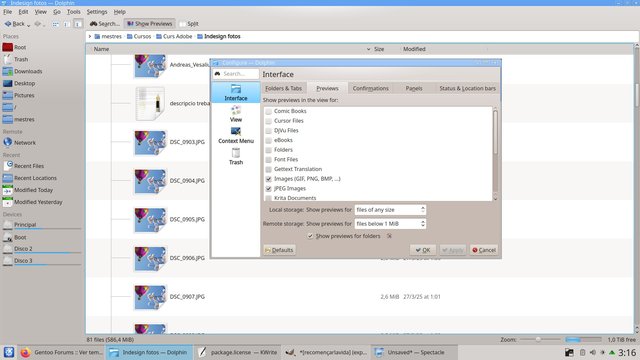
If only people responded to bugs when you gave them solutions ...
https://bugs.gentoo.org/956124
https://bugs.kde.org/504126
https://invent.kde.org/network/kio-extr ... 590257a96f
https://bugs.gentoo.org/956124
https://bugs.kde.org/504126
https://invent.kde.org/network/kio-extr ... 590257a96f