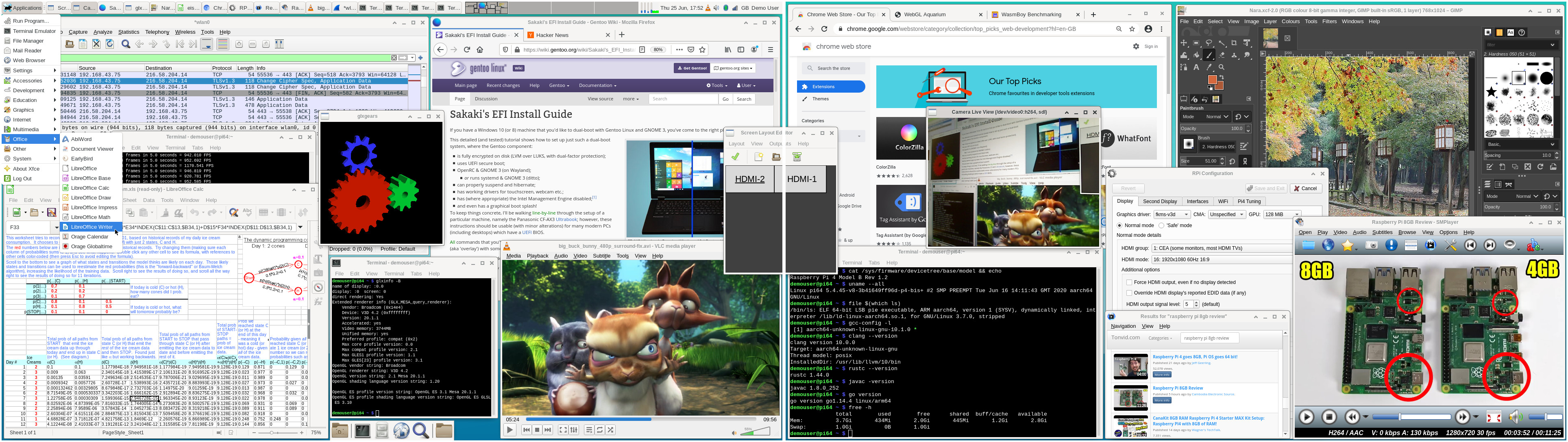
I've just posted a v1.6.0 release of my bootable 64-bit Gentoo image for the RPi4 B / RPi3 B & B+ on GitHub (here, includes full download instructions).
As always, you can burn the image (~1,961MiB compressed) to a microSD card (>=16GB), then boot your RPi3 or RPi4 from it directly (the root partition will be automatically resized to fill the card on first boot). Full instructions for download and use are provided on the project's GitHub page. As before, a 'lite' (CLI-only) image is also provided.
A screenshot of the image running on a dual-display RPi4 B may be viewed here.
A changelog from the prior release image (with upgrade instructions) may be viewed here, but in summary:
- Switched kernel branch, from rpi-4.19.y to rpi-5.4.y, with the shipped kernels upgraded to bcm{rpi3,2711}-kernel-bis-bin-5.4.45.20200616, and boot firmware to sys-boot/rpi3-64bit-firmware-1.20200601_p64, respectively (the rpi3 name in the latter being an historical artifact; code for both the RPi3 and RPi4 is provided). This migration is slightly in advance of RPi engineers switching to rpi-5.4.y as their default branch, but stability now appears to be good, and a 5.4 kernel is already used in the beta version of PIOS64.
- Following upstream, migrated from consolekit to elogind. As a result of this change, a large number of userland packages have had to be rebuilt wrt their v1.5.4 release versions.
- As the new kernels make each of HDMI-1, HDMI-2 and headphone outputs its own ALSA device, added a small, USE-flag gated workaround to media-sound/pulseaudio to counter an initialization issue (hopefully will be properly resolved soon - if you are a pulseaudio guru, please feel free to dig in!), whereby pulse can only use two of the three independent streams at any time (thanks to Gavinmc42 for reporting). The workaround allows audio on HDMI-1 (the HDMI0 port, confusingly!) and the headphone port so, if you are only using a single monitor, be sure to plug it into the HDMI0 socket (the one nearer the USB-C power connector); and if using two monitors, bear in mind that only the HDMI0-connected one will be able to play sound. (If your application requires sound out of both monitors, then disable the pi4-workaround USE flag on media-sound/pulseaudio and re-emerge it; your headphone port will then be disabled, and HDMI-1 and HDMI-2 enabled.) Note that the use of e.g. additional headset-to-USB adaptors etc is not affected by this workaround, and they should be fully useable.
- Added the net-analyzer/etherape and net-analyzer/wireshark packages (a network traffic visualizer and analysis tool), as these have been repeatedly requested.
- Added a fixup to ensure that the snd_bcm2835 module was still autoloaded on the RPi3.
- Fixed an issue with the keyboard switcher panel item, which did not always set up the initial layout correctly on first boot.
- Switched (for demouser) the default youtube streaming mechanism of media-video/smplayer to youtube-dl (since the 'internal' mechanism was no longer reliable), and added net-misc/youtube-dl to the core package set. Also setup media-video/smplayer to use 'auto-copy' for hardware decoding (per feedback in this issue; thanks Jimmy-Z) and to use 4 threads for software decoding, where possible.
- Removed app-portage/porthole from the apps / shipped @world sets, as it has been dropped upstream (Gentoo bug #708096).
- Migrated the XFCE desktop and associated tools to a mix of 4.14/4.15 (from 4.12).
- Updated media-video/ffmpeg with a number of LibreELEC patches (thanks acroobat). This should improve video playback performance in certain cases. NB: the LibreELEC hevc patches have not been applied in this release.
- Added an initial set of packages for the FOSS videoconferencing server, Jitsi. Please see this post for further instructions on setup and use (although you can of course skip the "RPi4 64-bit Gentoo Install" section there, as the necessary packages are already present on the image). You'll realistically require a 2GiB RPi4B (or better) to run this application successfully. Note, though, that since Jitsi does not process the video streams, but acts simply as a meeting coordination point, selective forwarding unit and TURN server, the CPU requirements are not onerous - an RPi4 should be able to handle a reasonable number of simultaneous participants.
- Updated the media-libs/raspberrypi-userland package to 1.20200520. As of this date, 64-bit MMAL userland support had (just ^-^) not yet been dropped, so in v1.6.0 of the image you can still use raspivid etc.
- Various minor ebuild tidy-ups.
- All packages brought up-to-date against the Gentoo tree, as of 11 June 2020. So e.g., www-client/chromium bumped to 84.0.4147.30, www-client/firefox to 77.0.1, app-office/libreoffice to 6.4.4.2 etc.
Note: this version should also support boot-from-USB on the Pi4, but to enable this you will need (at the time of writing) a beta version of the Pi4's EEPROM software. To install this, set (at your own risk!) FIRMWARE_RELEASE_STATUS="beta" in /etc/default/rpi-eeprom-update, and reboot.Once back up, reboot again to reflash the new EEPROM payload. You should then be able to write a copy of the image to a USB target, and boot from this (provided the uSD card is not inserted). However, I have not fully tested this process.
Have fun ^-^
And, as always, any problems or comments, please post either in this thread, or in the project's thread on the Raspberry Pi forums (here).
PS the bootable images are also available for download via PINN, for those who prefer that route, called gentoo64 and gentoo64lite there.


 I moved my install over last Wed, a highly technical exercise requiring 4 minutes to disconnect, pull the case and fan apart, switch boards swap the sd card over reconnect and reboot. Flat out the easiest hardware upgrade imaginable. Anyone interested in a rock-solid low-power dual-monitor desktop setup need look no further than the 8gb pi built up from this image and a good, fast ssd. It's a really useable system and I've found few limitations using it daily.