sys-boot/rpi3-64bit-firmware-1.20200210 seems to work flawlessly, again.Sakaki wrote:Ack. I've seen this myself also, in recent testing.nvertigo wrote:I've a serious issue when using sys-boot/rpi3-64bit-firmware-1.20200114:
The boot process stops after checking the fses (since it's at that point, when the screen blanks for a split second, I guess it happens when the gpu fw should be loaded).
This doesn't happen if I use sys-boot/rpi3-64bit-firmware-1.20190925.
It doesn't matter if I use my own kernel build or your prebuild kernel.
Won't affect most users happily, as the most recent unmasked kernels (bcm{rpi3,2711}-kernel{,-bis}-bin-4.19.89.20191217) constrain this package to be an earlier version (through the with-matching-boot-fw USE flag).
I've just masked sys-boot/rpi3-64bit-firmware-1.20200114, pending further investigation.
Bootable 64-bit RPi3/Pi4 Gentoo image (OpenRC/Xfce/VC4) Pt 2
Message
Re: sys-boot/rpi3-64bit-firmware


Re: sys-boot/rpi3-64bit-firmware
Yes, agreed, tested here on both RPi3B+ and RPi4B.nvertigo wrote:sys-boot/rpi3-64bit-firmware-1.20200210 seems to work flawlessly, again.
I'm going to leave sys-boot/rpi3-64bit-firmware-1.20200114 masked, but have just unmasked sys-kernel/bcm{2711,rpi3}-kernel{-bis,}-bin-4.19.102.20200211 (which pulls in sys-boot/rpi3-64bit-firmware-1.20200210 via the default with-matching-boot-fw USE flag).
Regards,
sakaki
sakaki
- Biker
- Apprentice

- Posts: 170
- Joined: Wed Jun 11, 2003 10:06 am
- Location: A very dark, cold and moisty place...

genup perl-cleaner always re-installs the same packages
Sakaki,
When I manually run genup, I've noticed that the call to perl-cleaner always re-installs the same 54 (!!) 'binary' packages.
This could probably be seen as a sub-optimal use of scarce system resources, run-time and SD-card usage.
I'm not an expert on the subject, but I'd guess the usage of '--selective=no' might be part of the cause.
Is there anyway the 'genup' could be more 'selective' so as to definitely re-install packages that are required to be, but not just brutally re-install 'everything' by perl-cleaner at each run ?
I'm aware of the '--no-perl-cleaner' flag of genup, but if I understand it correctly this is not what I want.
I believe the call to perl-cleaner is a good thing, but just that it should somehow be made more refined in the choice of what packages to re-install.
Best regards
Biker
When I manually run genup, I've noticed that the call to perl-cleaner always re-installs the same 54 (!!) 'binary' packages.
This could probably be seen as a sub-optimal use of scarce system resources, run-time and SD-card usage.
I'm not an expert on the subject, but I'd guess the usage of '--selective=no' might be part of the cause.
Is there anyway the 'genup' could be more 'selective' so as to definitely re-install packages that are required to be, but not just brutally re-install 'everything' by perl-cleaner at each run ?
I'm aware of the '--no-perl-cleaner' flag of genup, but if I understand it correctly this is not what I want.
I believe the call to perl-cleaner is a good thing, but just that it should somehow be made more refined in the choice of what packages to re-install.
Best regards
Biker
The Internet never forgets.
Where 'never' points in the direction of a moment in the very, very far future.
Where 'never' points in the direction of a moment in the very, very far future.

Dumb question, why do we need so many different versions of python installed? Aren't the various versions of 3.x backward compatible with each other?
I can see having 2.7 and a 3.x installed but, as of a clean 1.5.3 install, I see a total of four versions of python.
dev-lang/python-2.7.17::gentoo
dev-lang/python-3.5.9::gentoo
dev-lang/python-3.6.9-r1::genpi64
dev-lang/python-3.7.4-r2::genpi64
Can this be simplified at all?
I first started having problems with python and the gpsd service. I first had to add python to my local USE in order to emerge gpsd. Sadly, both 3,19 and 9999 ebuilds of gpsd are broke on arm64 due to what looks like QT errors. I had to manually compile gpsd v3.20 from source which compiled fine. I still have some python library location issues that I haven't figured out yet but the basic daemon is working 100%. gpsd is a key service for me as 99% of the time I am at my off-grid cabin deep in the woods and rely on gps time sync for some amateur radio apps.
I can see having 2.7 and a 3.x installed but, as of a clean 1.5.3 install, I see a total of four versions of python.
dev-lang/python-2.7.17::gentoo
dev-lang/python-3.5.9::gentoo
dev-lang/python-3.6.9-r1::genpi64
dev-lang/python-3.7.4-r2::genpi64
Can this be simplified at all?
I first started having problems with python and the gpsd service. I first had to add python to my local USE in order to emerge gpsd. Sadly, both 3,19 and 9999 ebuilds of gpsd are broke on arm64 due to what looks like QT errors. I had to manually compile gpsd v3.20 from source which compiled fine. I still have some python library location issues that I haven't figured out yet but the basic daemon is working 100%. gpsd is a key service for me as 99% of the time I am at my off-grid cabin deep in the woods and rely on gps time sync for some amateur radio apps.
- NeddySeagoon
- Administrator

- Posts: 56078
- Joined: Sat Jul 05, 2003 9:37 am
- Location: 56N 3W

n1ese,
Is the current state of stable python. Those stable versions are new yesterday.
Python 3.5 has been removed from ::gentoo but it still may be required by the ::genpi64 overlay, so don't just rip it out.
python-3.7 isn't strictly required yet but expect the migrations that have removed python 3.0..3.5 to continue.
Code: Select all
# eix dev-lang/python
[I] dev-lang/python
     Available versions:
     (2.7)  2.7.17-r1{tbz2}
     (3.6)  3.6.10(3.6/3.6m)^t{tbz2}
     (3.7)  3.7.6(3.7/3.7m)^t{tbz2}
     (3.8)  ~3.8.2^t
(3.9) ~3.9.0_alpha4^tPython 3.5 has been removed from ::gentoo but it still may be required by the ::genpi64 overlay, so don't just rip it out.
python-3.7 isn't strictly required yet but expect the migrations that have removed python 3.0..3.5 to continue.
Regards,
NeddySeagoon
Computer users fall into two groups:-
those that do backups
those that have never had a hard drive fail.
NeddySeagoon
Computer users fall into two groups:-
those that do backups
those that have never had a hard drive fail.
I need to replace by 2GB Pi4B's to 4GB but until I do:
What are sane MAKEOPTS for a 2GB Pi4B? I have set a bit less aggressive options from default but still seeing a lot of memory usage and load averages when doing a genup. I was successful yesterday in doing a genup on a fresh 1.5.3 system but just made some USE changes and now running into much higher load averages and temporary system lockups resulting in some failures.
What are sane MAKEOPTS for a 2GB Pi4B? I have set a bit less aggressive options from default but still seeing a lot of memory usage and load averages when doing a genup. I was successful yesterday in doing a genup on a fresh 1.5.3 system but just made some USE changes and now running into much higher load averages and temporary system lockups resulting in some failures.
Code: Select all
MAKEOPTS="-j4 -l3"
EMERGE_DEFAULT_OPTS="--jobs=4 --load-average=3"
Code: Select all
>>> Emerging binary (6 of 153) dev-lang/go-1.14::gentoo
>>> Installing (6 of 153) dev-lang/go-1.14::gentoo
>>> Emerging binary (7 of 153) sys-boot/rpi3-64bit-firmware-1.20200212::genpi64
>>> Jobs: 5 of 153 complete, 1 running              Load avg: 18.8, 12.3, 9.1Exception in callback AsynchronousTask.wait()
handle: <Handle AsynchronousTask.wait()>
Traceback (most recent call last):
  File "/usr/lib64/python3.6/asyncio/events.py", line 145, in _run
    self._callback(*self._args)
  File "/usr/lib64/python3.6/site-packages/_emerge/AsynchronousTask.py", line 84, in wait
    self._wait_hook()
  File "/usr/lib64/python3.6/site-packages/_emerge/AsynchronousTask.py", line 195, in _wait_hook
    self._exit_listener_stack.pop()(self)
  File "/usr/lib64/python3.6/site-packages/_emerge/BinpkgPrefetcher.py", line 31, in _fetcher_exit
    self._start_task(verifier, self._verifier_exit)
  File "/usr/lib64/python3.6/site-packages/_emerge/CompositeTask.py", line 112, in _start_task
    task.start()
  File "/usr/lib64/python3.6/site-packages/_emerge/AsynchronousTask.py", line 30, in start
    self._start()
  File "/usr/lib64/python3.6/site-packages/_emerge/BinpkgVerifier.py", line 59, in _start
    self._digester_exit)
  File "/usr/lib64/python3.6/site-packages/_emerge/CompositeTask.py", line 112, in _start_task
    task.start()
  File "/usr/lib64/python3.6/site-packages/_emerge/AsynchronousTask.py", line 30, in start
    self._start()
  File "/usr/lib64/python3.6/site-packages/portage/util/_async/FileDigester.py", line 30, in _start
    ForkProcess._start(self)
  File "/usr/lib64/python3.6/site-packages/_emerge/SpawnProcess.py", line 112, in _start
    retval = self._spawn(self.args, **kwargs)
  File "/usr/lib64/python3.6/site-packages/portage/util/_async/ForkProcess.py", line 24, in _spawn
    pid = os.fork()
  File "/usr/lib64/python3.6/site-packages/portage/__init__.py", line 246, in __call__
    rval = self._func(*wrapped_args, **wrapped_kwargs)
OSError: [Errno 12] Cannot allocate memory
--Return--
> /usr/lib64/python3.6/site-packages/portage/util/_eventloop/asyncio_event_loop.py(81)_internal_caller_exception_handler()->None
-> pdb.set_trace()
(Pdb) - NeddySeagoon
- Administrator
- Posts: 56078
- Joined: Sat Jul 05, 2003 9:37 am
- Location: 56N 3W
n1ese,
On a 2G system I would use and and expect big jobs to fail sometimes.
Deal with the failures on a per package basis with package.env.
Your --load-average=3 is clearly not working,
On a 2G system I would use
Code: Select all
MAKEOPTS="-j3"Code: Select all
EMERGE_DEFAULT_OPTS="--jobs=1Deal with the failures on a per package basis with package.env.
Your --load-average=3 is clearly not working,
Code: Select all
>>> Jobs: 5 of 153 complete, 1 running Load avg: 18.8, 12.3, 9.1Regards,
NeddySeagoon
Computer users fall into two groups:-
those that do backups
those that have never had a hard drive fail.
NeddySeagoon
Computer users fall into two groups:-
those that do backups
those that have never had a hard drive fail.


Removed it how? If portage is trying to reinstall it there must be an entry in @world somewhere...n1ese wrote:How do I prevent manually removed packages from being reinstalled?
I removed libreoffice yesterday and genup today is reinstalling it.
Did you grep through your world set, or try
Code: Select all
emerge -Cpv libreofficeIs it still there thoughn1ese wrote:I did a simple emerge -cian.au wrote:Removed it how? If portage is trying to reinstall it there must be an entry in @world somewhere..
 I'd say it is, did you grep it?
To remove from world would require emerge -C or better still,
Code: Select all
emerge --deselect app-office/libreofficeSure, I'm pulling together the next (v1.5.4) image release right now, so I'll look to bump kodi to 18.6 and push the matching tbz2 during this process. ETA early next week or so.mustang01 wrote:Can you add new kodi 18.6 to the binaries repository? Version 18.6 fixes audio problems when opening a .ts container. There is no kodi 18.6 even in the libreelec distribution on rpi 4.
Edit: built OK, and media-tv/kodi-18.6.tbz2 has just been pushed to the binhost.
Regards,
sakaki
sakaki
I have a problem with hardware acceleration in kodi.
The "rasberry-pi" flag does not work. When I want to compile kodi the flag is in brackets "(-rasberry-pi)".
I have "genpi64lite.img.xz" v. 1.5.3 and I have installed server-xorg and kodi-18.6 from binaries.
I have drop and skip frames on kodi when I use kodi deinterlacing on 1080p TV recordings.
https://photos.app.goo.gl/zmfnNjyau3TiBgHK9
The "rasberry-pi" flag does not work. When I want to compile kodi the flag is in brackets "(-rasberry-pi)".
I have "genpi64lite.img.xz" v. 1.5.3 and I have installed server-xorg and kodi-18.6 from binaries.
I have drop and skip frames on kodi when I use kodi deinterlacing on 1080p TV recordings.
https://photos.app.goo.gl/zmfnNjyau3TiBgHK9
mustang01,
been a little while since I looked at that flag, but last time I did, the kodi MMAL stuff wasn't compatible with the 64-bit MMAL userspace libraries, which may be why it is masked. This situation could have changed though (the current gentoo-on-rpi-64bit image does support appropriately written MMAL apps, so e.g. raspivid works).
In any event, I am given to understand v19 of kodi will support the v4l2-m2m interfaces to the RPi's video codecs, which are also supported on my image, so once this come out accelerated playback should "just work".
In the meantime, perhaps try playing your content with SMPlayer - this can usually handle 1080p even in software on the RPi4 (and can exploit both MMAL and v4l2-m2m endpoints)?
been a little while since I looked at that flag, but last time I did, the kodi MMAL stuff wasn't compatible with the 64-bit MMAL userspace libraries, which may be why it is masked. This situation could have changed though (the current gentoo-on-rpi-64bit image does support appropriately written MMAL apps, so e.g. raspivid works).
In any event, I am given to understand v19 of kodi will support the v4l2-m2m interfaces to the RPi's video codecs, which are also supported on my image, so once this come out accelerated playback should "just work".
In the meantime, perhaps try playing your content with SMPlayer - this can usually handle 1080p even in software on the RPi4 (and can exploit both MMAL and v4l2-m2m endpoints)?
Regards,
sakaki
sakaki
Hello,
I've just posted a v1.5.4 update release of my bootable 64-bit Gentoo image for the RPi4 B / RPi3 B & B+ on GitHub (here, includes full download instructions).
As always, you can burn the image (~1,763MiB compressed) to a microSD card (>=16GB), then boot your RPi3 or RPi4 from it directly (the root partition will be automatically resized to fill the card on first boot). Full instructions for download and use are provided on the project's GitHub page. As before, a 'lite' (CLI-only) image is also provided.
A screenshot of the image running on a dual-display RPi4 B may be viewed here.
A changelog from the prior release image (with upgrade instructions) may be viewed here, but in summary:
Have fun ^-^
And, as always, any problems or comments, please post either in this thread, or in the project's thread on the Raspberry Pi forums (here).
PS the bootable images are also available for download via PINN, for those who prefer that route, called gentoo64 and gentoo64lite there.
I've just posted a v1.5.4 update release of my bootable 64-bit Gentoo image for the RPi4 B / RPi3 B & B+ on GitHub (here, includes full download instructions).
As always, you can burn the image (~1,763MiB compressed) to a microSD card (>=16GB), then boot your RPi3 or RPi4 from it directly (the root partition will be automatically resized to fill the card on first boot). Full instructions for download and use are provided on the project's GitHub page. As before, a 'lite' (CLI-only) image is also provided.
A screenshot of the image running on a dual-display RPi4 B may be viewed here.
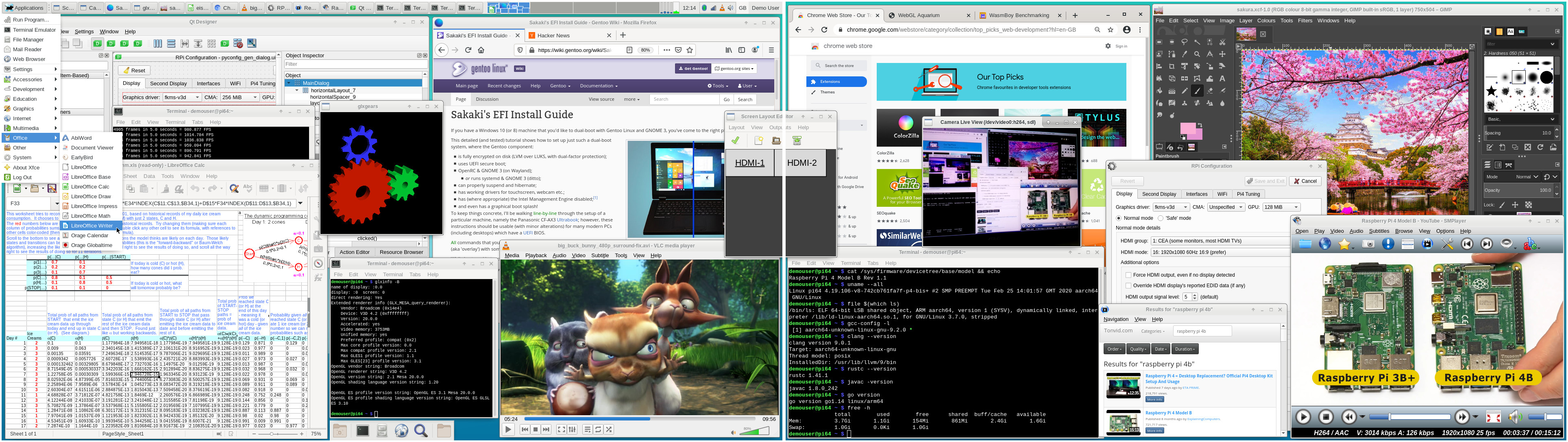
A changelog from the prior release image (with upgrade instructions) may be viewed here, but in summary:
- Added the media-video/smtube package. This provides a simple web-based front end allowing YouTube videos to be searched and selected, which are then handed off to media-video/smplayer for playback. This, in turn, is configured to use media-video/mpv under the hood, and can play (on an RPi4 with a fast Internet connection) 1080p videos at 30fps without glitching (it can use both v4l2m2m and MMAL endpoints for appropriate video types). (It would be nice if the vanilla firefox or chromium browsers could make use of the v4l2m2m codec endpoints, but they currently cannot, in any straightforward manner, so this tool at least provides an option for those wishing to watch hi-res video in the near term.)
- Dropped the suggested use of distcc-pump from /etc/portage/make.conf, following Gentoo bug 702146.
- Added a first cut build of bzt's usbimager program (lightweight alternative to Etcher).
- Turned on anti-aliasing and full hinting for screen fonts by default.
- Made switching keyboard layouts more straightforward, by adding the xfce-extra/xfce4-xkb-plugin into the top panel bar, and pre-populating two initial layouts (gb and us) in the config accessed via Applications->Settings->Keyboard, Layout tab. Also added xfce-extra/xfce4-kbsetup; this package installs a service, activated upon graphical login, which initialises the user's preferred keyboard layouts (if these have been set up), as Xfce does not do that correctly at the moment.
- Upgraded the shipped kernels, to bcm{rpi3,2711}-kernel-bis-bin-4.19.106.20200225, and boot firmware, to sys-boot/rpi3-64bit-firmware-1.20200212.
- Various minor ebuild tidy-ups.
- All packages brought up-to-date against the Gentoo tree, as of 4 Mar 2020. So e.g., www-client/chromium bumped to 82.0.4068.4, www-client/firefox to 73.0.1, app-office/libreoffice to 6.3.5.2 etc.
Have fun ^-^
And, as always, any problems or comments, please post either in this thread, or in the project's thread on the Raspberry Pi forums (here).
PS the bootable images are also available for download via PINN, for those who prefer that route, called gentoo64 and gentoo64lite there.
Regards,
sakaki
sakaki
Gentlemen, I performed a fresh install of 1.5.4 a few weeks ago and just getting around to running updates today.
I ran an 'emerge --sync' and it told me a new version of portage was available so I ran an 'emerge --oneshot sys-apps/portage' but there is a conflict I'm not sure how to resolve.
I ran an 'emerge --sync' and it told me a new version of portage was available so I ran an 'emerge --oneshot sys-apps/portage' but there is a conflict I'm not sure how to resolve.
Code: Select all
ganymede ~ # emerge --oneshot sys-apps/portage

Local copy of remote index is up-to-date and will be used.
Calculating dependencies... done!
[binary     U  ] sys-apps/portage-2.3.94 [2.3.89-r1]

!!! Multiple package instances within a single package slot have been pulled
!!! into the dependency graph, resulting in a slot conflict:

sys-apps/portage:0

  (sys-apps/portage-2.3.94:0/0::gentoo, binary scheduled for merge) USE="(ipc) native-extensions rsync-verify xattr -apidoc -build -doc -gentoo-dev (-selinux)" PYTHON_TARGETS="python3_6 python3_7 (-pypy3) (-python3_8)" pulled in by
    sys-apps/portage (Argument)

  (sys-apps/portage-2.3.89-r1:0/0::gentoo, installed) USE="(ipc) native-extensions rsync-verify xattr -apidoc -build -doc -gentoo-dev (-selinux)" PYTHON_TARGETS="python2_7 python3_6 python3_7 (-pypy3) (-python3_8)" pulled in by
    >=sys-apps/portage-2.1[python_targets_python2_7(-)?,-python_single_target_python2_7(-)] required by (app-portage/porthole-0.6.1-r6:0/0::sakaki-tools, installed) USE="nls" PYTHON_TARGETS="python2_7"


It may be possible to solve this problem by using package.mask to
prevent one of those packages from being selected. However, it is also
possible that conflicting dependencies exist such that they are
impossible to satisfy simultaneously.  If such a conflict exists in
the dependencies of two different packages, then those packages can
not be installed simultaneously. You may want to try a larger value of
the --backtrack option, such as --backtrack=30, in order to see if
that will solve this conflict automatically.

For more information, see MASKED PACKAGES section in the emerge man
page or refer to the Gentoo Handbook.


!!! The following installed packages are masked:
- virtual/shadow-0::gentoo (masked by: package.mask)
/var/db/repos/gentoo/profiles/package.mask:
# Mikle Kolyada <zlogene@gentoo.org> (2020-03-07)
# virtual/shadow has the only alive provider.
# sys-apps/hardened-shadow is unmaintained for the past
# five years (at least). Upstream is dead.
# Removal in 30 days.n1ese,
the issue is that porthole (in the @world set on the image) depends upon having a version of portage with the python 2.7 target, but as that python variant is now EOL, modern versions of portage have dropped it.
You need to unmerge, or at least deselect, app-portage/porthole if you want to proceed.
I have added a fixup that will do this on the next weekly run of this service (if you have it enabled), otherwise:should work.
the issue is that porthole (in the @world set on the image) depends upon having a version of portage with the python 2.7 target, but as that python variant is now EOL, modern versions of portage have dropped it.
You need to unmerge, or at least deselect, app-portage/porthole if you want to proceed.
I have added a fixup that will do this on the next weekly run of this service (if you have it enabled), otherwise:
Code: Select all
ganymede ~ # emerge --depclean app-portage/porthole
ganymede ~ # emerge --oneshot sys-apps/portage Regards,
sakaki
sakaki
Got it, thanks!Sakaki wrote:You need to unmerge, or at least deselect, app-portage/porthole if you want to proceed.
I have added a fixup that will do this on the next weekly run of this service (if you have it enabled), otherwise:should work.Code: Select all
ganymede ~ # emerge --depclean app-portage/porthole
ganymede ~ # emerge --oneshot sys-apps/portage
Sakaki or NeddySeagoon, would one of you be able/willing to compile a binary package for fpc & lazarus? It can't be natively built on arm64 and I don't have the ability to cross compile? I have something I really need to compile that needs it. I'd greatly appreciate it.
-- Mod Edit --
This has become its own topic See [topic=1111322]fpc & lazarus[/topic]
--
NeddySeagoon
-- Mod Edit --
This has become its own topic See [topic=1111322]fpc & lazarus[/topic]
--
NeddySeagoon
- Haraldpeter
- n00b

- Posts: 65
- Joined: Wed Jun 08, 2016 4:54 pm
Gentoo runs on Phasp pi4 - Thanks
Hi,
@sakaki
Yesterday i downloaded your Rhasp Version for my new PI 4 and flashed it and wow - it runs faster as the Offical Debian Rhasp Version. Many Thanks for that.
But i have had difficulties to set other locales then UK english via Gentoo Handbook. XFCE shows only english not german and the keyboard layout is english after a restart ,too
what is the right way to to that please?
I use my Rhasp PI on a 21Zoll HDMI Touch Display and the touch function works fine. But my Fonts in XFCE and Aurora are quiet ugly . How can i fixed that ?
Is it possible to install screenfetch ?
Best regards
Haraldpeter
@sakaki
Yesterday i downloaded your Rhasp Version for my new PI 4 and flashed it and wow - it runs faster as the Offical Debian Rhasp Version. Many Thanks for that.
But i have had difficulties to set other locales then UK english via Gentoo Handbook. XFCE shows only english not german and the keyboard layout is english after a restart ,too
what is the right way to to that please?
I use my Rhasp PI on a 21Zoll HDMI Touch Display and the touch function works fine. But my Fonts in XFCE and Aurora are quiet ugly . How can i fixed that ?
Is it possible to install screenfetch ?
Best regards
Haraldpeter
To set the keyboard layout in v1.5.4, you need to follow the instructions in the project's readme here, specifically:Haraldpeter wrote:But i have had difficulties to set other locales then UK english via Gentoo Handbook. XFCE shows only english not german and the keyboard layout is english after a restart ,too
what is the right way to to that please?
For the locale and timezone, you can either follow the Gentoo handbook or my instructions here (I haven't yet extended the pyconfig_gen program to allow these to be set via the GUI).click Applications->Settings->Keyboard, select the Layout tab, ensure Use system defaults is unchecked, and then, in the Keyboard layout section, click on Add to insert the layouts you need to use. For example, the image has English (UK) and English (US) selected, but you should obviously choose whatever works for you. Do not add more than four layouts (or the switcher plugin will not work correctly). You can use the arrow keys to re-order the list (if you have more than one layout); the one at the top will be the default activated at login time. Once done, click on Close to dismiss the dialog. You should now find that you can switch layouts (if you have specified more than one) either by clicking on the top panel-bar keyboard plugin (the one next to the Demo User text on the far right) or by pressing the hotkey (by default, this is [Windows Key][Space]
Not sure from this exactly what issue you are having (screenshot?), but it may be to do with font hinting or sub-pixel ordering. Try changing the settings at Applications->Settings->Appearance, Fonts tab. You can also change the default font in this dialog.Haraldpeter wrote:I use my Rhasp PI on a 21Zoll HDMI Touch Display and the touch function works fine. But my Fonts in XFCE and Aurora are quiet ugly . How can i fixed that ?
It is, but as this package is not keyworded for arm64 in the main Gentoo tree (try "eix screenfetch" to see), you need to tell Portage it is OK to try building it anyway. Instructions for doing this (and what keywording etc means) may be found in the project's readme here (and my further notes here), but in summary, open a command prompt and issue:Haraldpeter wrote:Is it possible to install screenfetch ?
Code: Select all
demouser@pi64 ~ $ echo "app-misc/screenfetch * ~*" | sudo tee /etc/portage/package.accept_keywords/screenfetch
demouser@pi64 ~ $ sudo emerge -v app-misc/screenfetchRegards,
sakaki
sakaki
- Jormungand
- n00b
- Posts: 4
- Joined: Wed Apr 15, 2020 12:54 pm
hi, Sakaki! After upgrading python to the latest stable version of portage constantly says that
needs perl-core/File-Path-2.160.0, which is required as a dependency virtual/perl-File-Path-2.160.0. but latest version perl-core/File-Path 2.130.0. Can this dependency conflict be fixed?!!! The following binary packages have been ignored due to changed dependencies:
perl-core/File-Path-2.130.0::gentoo