Bootable 64-bit RPi3/Pi4 Gentoo image (OpenRC/Xfce/VC4) Pt 2
Message


Hello,
If you'd like to install and run precompiled Flatpak apps on your Gentoo RPi4 (or RPi3), please see my new wiki entry here.
Once set up as described therein, you can choose from a wide catalogue of prebuilt aarch64 and arm (32-bit) packages.
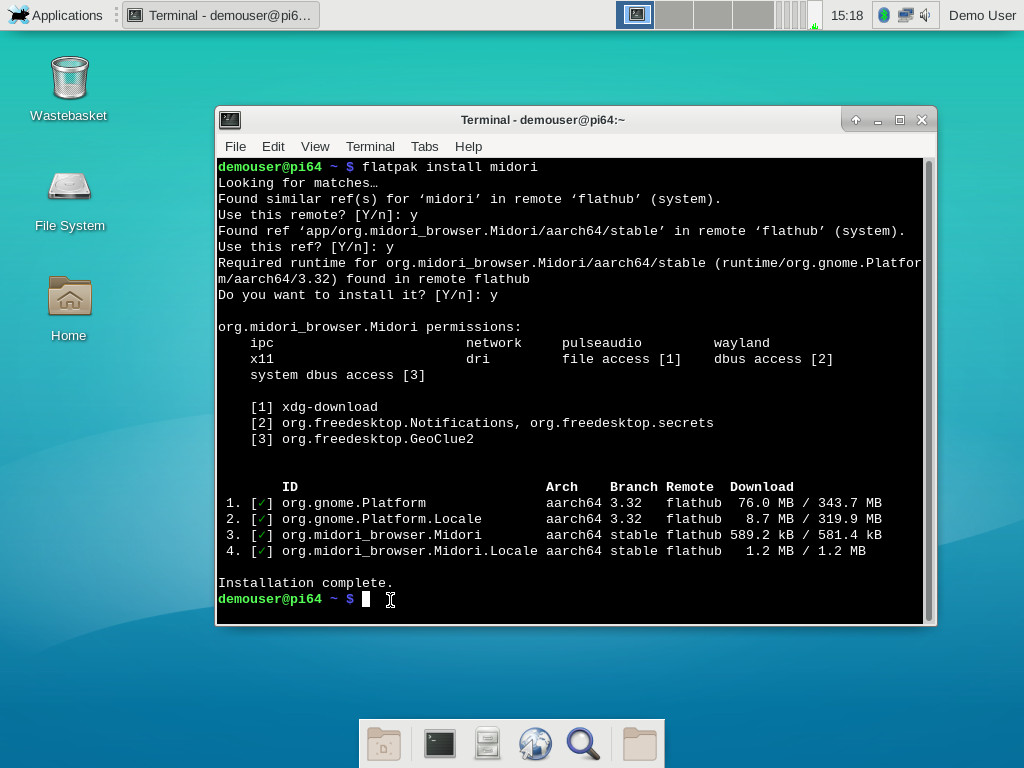
For example, screenshot of installing Midori.
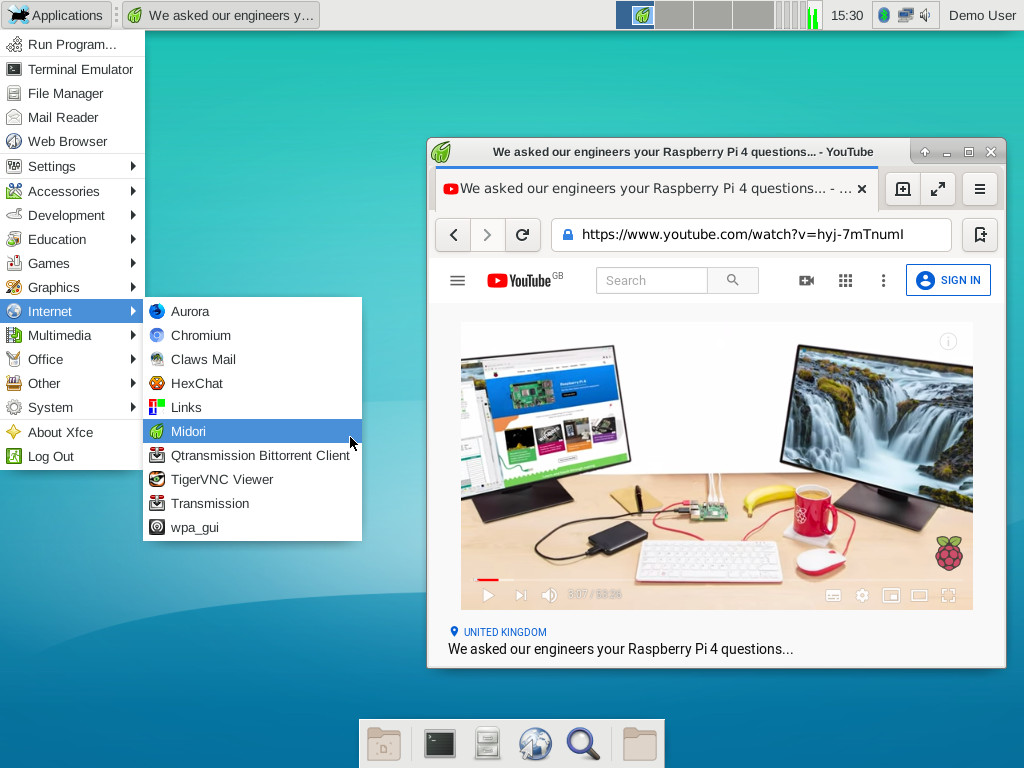
And screenshot of running it.
Flatpak apps come with all dependencies bundled, don't require root priviliges to install or run, are isolated from potentially conflicting package versions in the main host OS, and provide a degree of user-configurable sandboxing.
Do consider however the security concerns that exist around this technology, before jumping in.
If you'd like to install and run precompiled Flatpak apps on your Gentoo RPi4 (or RPi3), please see my new wiki entry here.
Once set up as described therein, you can choose from a wide catalogue of prebuilt aarch64 and arm (32-bit) packages.
For example, screenshot of installing Midori.
And screenshot of running it.
Flatpak apps come with all dependencies bundled, don't require root priviliges to install or run, are isolated from potentially conflicting package versions in the main host OS, and provide a degree of user-configurable sandboxing.
Do consider however the security concerns that exist around this technology, before jumping in.
Regards,
sakaki
sakaki

Just noticed, "prebuilt 32bit apps". Will they just work on Gentoo64?prebuilt aarch64 and arm (32-bit) packages
No Chroot needed?
Might solve my 32bti Laz/fpc/Ultibo issue at the moment.
While there may be security issues, apps that just run on any distribution just have to make it easier for users.
Don't get Pi's if you are scared of learning.
- NeddySeagoon
- Administrator

- Posts: 56077
- Joined: Sat Jul 05, 2003 9:37 am
- Location: 56N 3W

Gavinmc42,
Maybe. An arm64 CPU is not required to provide the 32 bit instruction set.
I only know one arm64 CPU like that and its not fitted to Raspberry Pis.
There is no multilb on arm64, so dynamically linking 32 bit code on arm64 is not possible.
arm64 CPUs that have the 32 bit instruction set can switch (on a core by core basis) between 64 bit and 32 bit modes.
Flatpacks are like 'containers' they are completely self contained. Rather lie a statically linked QEMU that lets you run an arm64 chroot on an amd64 system.
So yes, if your arm64 CPU has the arm32 instruction set, it should just work.
The security implications are horrendous. All those obsolete vulnerable libraries included for free with your flatpack.
Maybe. An arm64 CPU is not required to provide the 32 bit instruction set.
I only know one arm64 CPU like that and its not fitted to Raspberry Pis.
There is no multilb on arm64, so dynamically linking 32 bit code on arm64 is not possible.
arm64 CPUs that have the 32 bit instruction set can switch (on a core by core basis) between 64 bit and 32 bit modes.
Flatpacks are like 'containers' they are completely self contained. Rather lie a statically linked QEMU that lets you run an arm64 chroot on an amd64 system.
So yes, if your arm64 CPU has the arm32 instruction set, it should just work.
The security implications are horrendous. All those obsolete vulnerable libraries included for free with your flatpack.
Regards,
NeddySeagoon
Computer users fall into two groups:-
those that do backups
those that have never had a hard drive fail.
NeddySeagoon
Computer users fall into two groups:-
those that do backups
those that have never had a hard drive fail.
Gavinmc42,
yes, since (as Neddy notes) Flatpak's will bring a full [*] runtime set of necessary libraries with them, and the ARMv8 architecture allows a 64-bit kernel to support both 32 and 64-bit userlands, then Flatpaks marked as arm (32-bit) both show up in the catalogue (when you do remote-ls) and can be installed and run successfully on the gentoo-on-rpi-64bit image. It's not that dissimilar to chrooting into a 32-bit userland (which I discuss on the wiki here), just using some of the kernel containerization technology.
[*] most of the time. Some apps require things with a EULA (such as Oracle JDK/JRE) and these don't tend to get all their deps bundled. But for most regular apps, they will be.
yes, since (as Neddy notes) Flatpak's will bring a full [*] runtime set of necessary libraries with them, and the ARMv8 architecture allows a 64-bit kernel to support both 32 and 64-bit userlands, then Flatpaks marked as arm (32-bit) both show up in the catalogue (when you do remote-ls) and can be installed and run successfully on the gentoo-on-rpi-64bit image. It's not that dissimilar to chrooting into a 32-bit userland (which I discuss on the wiki here), just using some of the kernel containerization technology.
[*] most of the time. Some apps require things with a EULA (such as Oracle JDK/JRE) and these don't tend to get all their deps bundled. But for most regular apps, they will be.
Regards,
sakaki
sakaki
Sakaki, I am having issues with the nmtui tool on the lite image. When I select the SSID I want to connect to, it comes back with:Sakaki wrote: (hint: if you only have WiFi, you can use the bundled nmtui tool to easily setup a (persistent) network connection from the command line.)
Could not activate connection: The access point /org/freedesktop/NetworkManager/AccessPoint/12 was not in the scan list.
Any thoughts? Thanks
n1ese,
I've just double-checked, and it works on various APs around here... so definitely not a universal bug. There are some reports of similar errors (on other distros) online e.g. here and here.
Have you tried restarting NetworkManager?
Is there any relevant information displayed in dmesg?
You could also try first deleting your desired SSID in nmtui (under the "Edit..." entry) and then connecting again.
I've just double-checked, and it works on various APs around here... so definitely not a universal bug. There are some reports of similar errors (on other distros) online e.g. here and here.
Have you tried restarting NetworkManager?
Code: Select all
demouser@pi64 ~ $ sudo rc-service NetworkManager restartYou could also try first deleting your desired SSID in nmtui (under the "Edit..." entry) and then connecting again.
Regards,
sakaki
sakaki
Ok Sakaki, I continue to be an idiot. When trying to configure locales to US I get:
Applications such as emerge then break
What am I doing wrong?
Code: Select all
ganymede /home/n1ese # eselect locale set 4
/usr/bin/locale: Cannot set LC_CTYPE to default locale: No such file or directory
/usr/bin/locale: Cannot set LC_MESSAGES to default locale: No such file or directory
Setting LANG to en_US ...Code: Select all
ganymede /home/n1ese # emerge --ask gpsd
setlocale: unsupported locale setting
setlocale: unsupported locale settingn1ese,
Have you added your desired locale monikers into /etc/locale.gen and generated them via locale-gen? See e.g. these notes.
Have you added your desired locale monikers into /etc/locale.gen and generated them via locale-gen? See e.g. these notes.
Regards,
sakaki
sakaki
Yes sir:Sakaki wrote:n1ese,
Have you added your desired locale monikers into /etc/locale.gen and generated them via locale-gen? See e.g. these notes.
Code: Select all
ganymede /home/n1ese # locale-gen
 * Generating 3 locales (this might take a while) with 4 jobs
 *  (1/3) Generating en_US.ISO-8859-1 ...                                 [ ok ]
 *  (3/3) Generating C.UTF-8 ...                                          [ ok ]
 *  (2/3) Generating en_US.UTF-8 ...                                      [ ok ]
 * Generation complete
 * Adding locales to archive ...                                          [ ok ]
ganymede /home/n1ese # eselect locale set 4
/usr/bin/locale: Cannot set LC_CTYPE to default locale: No such file or directory
/usr/bin/locale: Cannot set LC_MESSAGES to default locale: No such file or directory
Setting LANG to en_US ...so weird, sorry for the wasted bandwidth. Thanks
Automated VL805 (USB) EEPROM / bootloader EEPROM updater now available for gentoo-on-rpi-64bit
All,
as you are no doubt aware, unlike its predecessor, the RPi4B contains a bootloader EEPROM (which replaces bootcode.bin) and also has an EEPROM region holding its VL805 USB chip's firmware. Several updates to both have been made available since launch, offering various bugfixes, additional features, improved power efficiency etc. (e.g., [1,2,3]), so it is well worth keeping them current.
On the Raspbian OS, the package rpi-eeprom may be used to automatically keep both of these on-board firmware components up-to-date, which is very convenient.
Well, I'm pleased to announce this automated update facility is now also available for Gentoo also! To get it, just run:to refresh your repository metadata, then:
to install the EEPROM update service (and current images [4]).
Once complete, reboot.
That's it! Now, each time you boot, your bootloader EEPROM and VL805 firmware EEPROM image versions will automatically be checked, by the rpi4-eeprom-updater package's startup service, against the current version images provided by the RP{F,T} (themselves pulled in via the dependency package dev-embedded/rpi4-eeprom-images). If either has changed, appropriate files will be written to your /boot partition (the script that does this is taken directly from the Raspbian rpi-eeprom package) such that on the next boot, a one-time recovery.bin bootloader will cause the image(s) to be (safely) reflashed. You can check the end of the file /var/log/rc.log after boot, to see if any updates are pending.
A weekly cron job on my build server checks the upstream rpi-eeprom package for updated debs, and, if any are found, automatically creates new counterpart ebuilds (dev-embedded/rpi4-eeprom-images and dev-embedded/rpi4-eeprom-updater), and pushes these to the genpi64 repo. That, in turn, means they will automatically get propagated to your machine via the usual weekly genup process (and then installed, on next boot, by the rpi4-eeprom-updater service as just described).
By default, only "critical" updates to the boot EEPROM and VL805 firmware are applied. If you would like (at your own risk) to apply even beta firmware as soon as it is available, edit the file /etc/default/rpi-eeprom-update and change:to:
For avoidance of doubt, the updater may safely be used on the RPi3 (where it has no effect), on cards swapped between the RPi4 and RPi3, on 'full' and 'lite' images, and on gentoo64 images installed via PINN.
Any problems, please let me know!
Best, sakaki
[1] https://www.raspberrypi.org/forums/view ... 8&t=250990
[2] https://www.raspberrypi.org/forums/view ... 9&t=252501
[3] https://www.raspberrypi.org/forums/view ... 9&t=255001
[4] The EEPROM images may be found at /lib/firmware/raspberrypi/bootloader/...
Edited to remove kernel upgrade step (now unnecessary).
All,
as you are no doubt aware, unlike its predecessor, the RPi4B contains a bootloader EEPROM (which replaces bootcode.bin) and also has an EEPROM region holding its VL805 USB chip's firmware. Several updates to both have been made available since launch, offering various bugfixes, additional features, improved power efficiency etc. (e.g., [1,2,3]), so it is well worth keeping them current.
On the Raspbian OS, the package rpi-eeprom may be used to automatically keep both of these on-board firmware components up-to-date, which is very convenient.
Well, I'm pleased to announce this automated update facility is now also available for Gentoo also! To get it, just run:
Code: Select all
demouser@pi64 ~ $ sudo emaint sync --repo genpi64
Code: Select all
demouser@pi64 ~ $ sudo emerge -v rpi4-eeprom-updater
Once complete, reboot.
That's it! Now, each time you boot, your bootloader EEPROM and VL805 firmware EEPROM image versions will automatically be checked, by the rpi4-eeprom-updater package's startup service, against the current version images provided by the RP{F,T} (themselves pulled in via the dependency package dev-embedded/rpi4-eeprom-images). If either has changed, appropriate files will be written to your /boot partition (the script that does this is taken directly from the Raspbian rpi-eeprom package) such that on the next boot, a one-time recovery.bin bootloader will cause the image(s) to be (safely) reflashed. You can check the end of the file /var/log/rc.log after boot, to see if any updates are pending.
A weekly cron job on my build server checks the upstream rpi-eeprom package for updated debs, and, if any are found, automatically creates new counterpart ebuilds (dev-embedded/rpi4-eeprom-images and dev-embedded/rpi4-eeprom-updater), and pushes these to the genpi64 repo. That, in turn, means they will automatically get propagated to your machine via the usual weekly genup process (and then installed, on next boot, by the rpi4-eeprom-updater service as just described).
By default, only "critical" updates to the boot EEPROM and VL805 firmware are applied. If you would like (at your own risk) to apply even beta firmware as soon as it is available, edit the file /etc/default/rpi-eeprom-update and change:
Code: Select all
FIRMWARE_RELEASE_STATUS="critical"
Code: Select all
FIRMWARE_RELEASE_STATUS="beta"
Any problems, please let me know!
Best, sakaki
[1] https://www.raspberrypi.org/forums/view ... 8&t=250990
[2] https://www.raspberrypi.org/forums/view ... 9&t=252501
[3] https://www.raspberrypi.org/forums/view ... 9&t=255001
[4] The EEPROM images may be found at /lib/firmware/raspberrypi/bootloader/...
Edited to remove kernel upgrade step (now unnecessary).
Regards,
sakaki
sakaki


If I understand what you want : https://sourceforge.net/projects/xming/orion777 wrote:Do we have any remote desktop servers, that can be accessed from windows machine? It is required very seldom, but whet the desktop is required, it is very impractical to have HDMI cable... (typical I use ssh session)
It runs on Windows and connects to the remote linux machines' X server. There are a few ssh config changes to be made to enable X forwarding.
The current gentoo-on-rpi-64bit image ships with xrdp... you can use this to easily connect from a Windows box.orion777 wrote:Good evening!
Do we have any remote desktop servers, that can be accessed from windows machine? It is required very seldom, but whet the desktop is required, it is very impractical to have HDMI cable... (typical I use ssh session)
There is a note about this in the project's wiki: here (and, you no longer need to perform the emerge steps described in those instructions, since the necessary packages are bundled).
Regards,
sakaki
sakaki
- NeddySeagoon
- Administrator
- Posts: 56077
- Joined: Sat Jul 05, 2003 9:37 am
- Location: 56N 3W
orion777,
You could even get a proper certificate from Lets Encrypt.
They are valid for 3 months at a time.
You could even get a proper certificate from Lets Encrypt.
They are valid for 3 months at a time.
Regards,
NeddySeagoon
Computer users fall into two groups:-
those that do backups
those that have never had a hard drive fail.
NeddySeagoon
Computer users fall into two groups:-
those that do backups
those that have never had a hard drive fail.
- NeddySeagoon
- Administrator
- Posts: 56077
- Joined: Sat Jul 05, 2003 9:37 am
- Location: 56N 3W


Qemu virt kvm
Hello again.
I have a question, do current kernels have kvm enabled for qemu/virt ?
As per
https://github.com/sakaki-/gentoo-on-rp ... -under-KVM
Becuase i see this message on when i emerge qemu 4
* Unable to check your kernel for KVM support
And when i run a guest (win10 from the raspberry forums post)
qemu-system-aarch64: -enable-kvm: No machine specified, and there is no default
Use -machine help to list supported machines
scripts.sh: line 5: -M: command
I have a question, do current kernels have kvm enabled for qemu/virt ?
As per
https://github.com/sakaki-/gentoo-on-rp ... -under-KVM
Becuase i see this message on when i emerge qemu 4
* Unable to check your kernel for KVM support
And when i run a guest (win10 from the raspberry forums post)
qemu-system-aarch64: -enable-kvm: No machine specified, and there is no default
Use -machine help to list supported machines
scripts.sh: line 5: -M: command
- NeddySeagoon
- Administrator
- Posts: 56077
- Joined: Sat Jul 05, 2003 9:37 am
- Location: 56N 3W
BRX7,
Thatmeans that the ebuild cannot find the kernel .config file.
If you have /dev/kvm you are good.
/proc/config.gz is provided by a loadable module. I forget its name.
Load that module and use zgrep on /proc/config.gz
That
Code: Select all
* Unable to check your kernel for KVM supportIf you have /dev/kvm you are good.
/proc/config.gz is provided by a loadable module. I forget its name.
Load that module and use zgrep on /proc/config.gz
Regards,
NeddySeagoon
Computer users fall into two groups:-
those that do backups
those that have never had a hard drive fail.
NeddySeagoon
Computer users fall into two groups:-
those that do backups
those that have never had a hard drive fail.
Here you can find how to create a default .config, etc https://github.com/sakaki-/gentoo-on-rp ... rossdev-PC