Forums

Skip to content

Advanced search
  • Quick links
    • Unanswered topics
    • Active topics
    • Search
  • FAQ
  • Login
  • Register
  • Board index Architectures & Platforms Gentoo on ARM
  • Search

Bootable 64-bit RPi3/Pi4 Gentoo image (OpenRC/Xfce/VC4) Pt 2

Gentoo on all things ARM. Both 32 bit and 64 bit.
Tell about your hardware and CHOST.
Problems with crossdev targeting ARM hardware go here too.
Post Reply
  • Print view
Advanced search
349 posts
  • Page 1 of 14
    • Jump to page:
  • 1
  • 2
  • 3
  • 4
  • 5
  • …
  • 14
  • Next
Author
Message
Sakaki
Guru
Guru
User avatar
Posts: 409
Joined: Wed May 21, 2014 8:15 pm

Bootable 64-bit RPi3/Pi4 Gentoo image (OpenRC/Xfce/VC4) Pt 2

  • Quote

Post by Sakaki » Tue Jun 18, 2019 12:33 am

Hello,

I've just posted a v1.4.2 update release of my bootable 64-bit Gentoo image for the RPi3 (model B and B+) on GitHub (here, includes full download instructions).

This release sees a number of significant version bumps to the bundled packages (wrt v1.4.1): for example, GCC from v8 to v9, Clang from v7 to v8, Chromium from v72 to v74, Firefox Quantum from v65 to v67 etc.

Update 25 June 2020: a new v1.6.0 release of the image is available (RPi4 supported, kernel 5.4!); please see this post for more details.

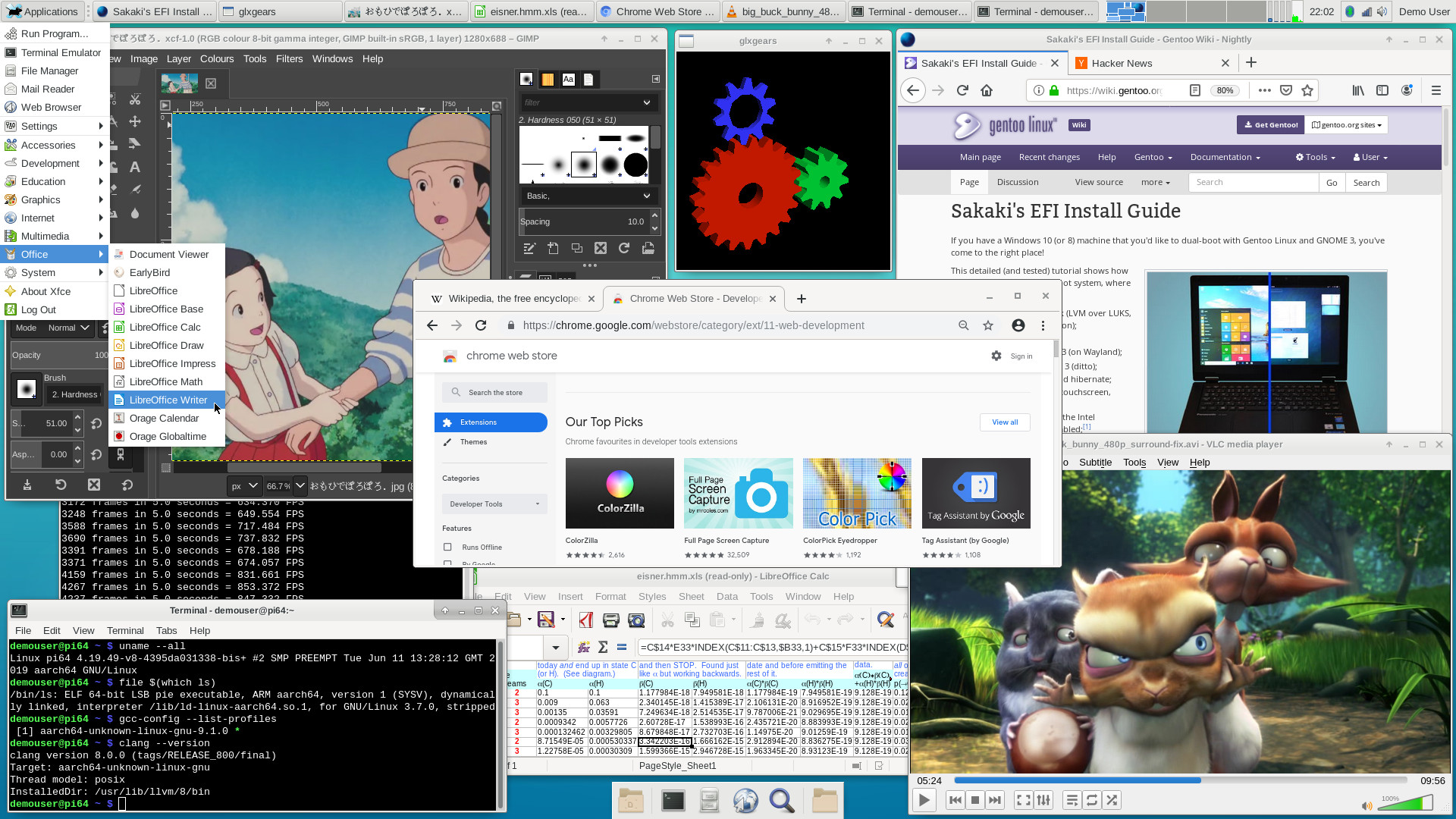
A screenshot of the image running on an RPi3B+ may be viewed here.

As always, you can burn the image (~1,511MiB compressed) to a microSD card (>=16GB), then boot your RPi3 from it directly (the root partition will be automatically resized to fill the card on first boot). Full instructions for download and use are provided on the project's GitHub page.

The image contains a complete (OpenRC-based) Gentoo system (including a full Portage tree, up-to-date as of 12 June 2019) - so you can run emerge operations immediately - and has a reasonably populated userland (see the screenshot referred to above; all the apps shown, and many others, are bundled), so that you can get productive without having to compile or configure anything first (unless you want to, of course ^-^). Just download, xzcat to a microSD card (or use Etcher), and boot!

A changelog from the prior release image (with upgrade instructions) may be viewed here, but in summary:
  • Kernel updated, to sys-kernel/bcmrpi3-kernel-bis-bin-4.19.49.20190611. Fixes some Bluetooth issues experienced with the prior 4.19 kernel, and adds POE fan and (built-in) btrfs support. Support for the RPi camera module (and leverage of the hw video codecs via v4l2) is retained.
  • Per email request from @iugamarian, added the following applications to the image:
    • media-video/mpv;
    • net-p2p/transmission;
    • sys-fs/ncdu; and
    • app-misc/mc.
  • Various minor ebuild tidy-ups.
  • All packages brought up-to-date against the Gentoo tree, as of UTC EOD 12 June 2019 (which means e.g., www-client/firefox-67.0, www-client/chromium-74.0.3729.169-r1, app-office/libreoffice-6.2.4.2 etc. are bundled; a full list of installed packages may be found here).
As before, a variant image for the Pi-Top v1 (an RPi3-based DIY laptop) is also included. Manual upgrade instructions for users on older versions of the image are also provided, here.

Have fun ^-^

And, as always, any problems or comments, please post either in this thread, or in the project's thread on the Raspberry Pi forums (here).

PS: I aim to release the PINN variant of this v1.4.2 image in a week or so, real-world commitments permitting ^-^

Split from [topic=1058530]Bootable 64-bit RPi3 Gentoo image (OpenRC/Xfce/VC4) UPDATED[/topic] and stuck in its place.
--NeddySeagoon


Unstuck 28-Feb-21 -- NeddySeagoon
Last edited by Sakaki on Thu Jun 25, 2020 1:37 am, edited 5 times in total.
Regards,

sakaki
Top
Sakaki
Guru
Guru
User avatar
Posts: 409
Joined: Wed May 21, 2014 8:15 pm

  • Quote

Post by Sakaki » Mon Jun 24, 2019 9:11 am

For those who prefer that install route, the v1.4.2 gentoo-on-rpi3-64bit image is now also available for install through PINN (called gentoo64 - and, for the PiTop v1 variant, gentoo64pt - there).

PS the new Pi4 has been officially announced today, so I guess we have another porting target for Gentoo now ^-^
Regards,

sakaki
Top
NeddySeagoon
Administrator
Administrator
User avatar
Posts: 56071
Joined: Sat Jul 05, 2003 9:37 am
Location: 56N 3W

  • Quote

Post by NeddySeagoon » Mon Jun 24, 2019 9:39 am

Sakaki,

I've just ordered the 4G version. :)
Thank you for the tip off. It won't ship until July 5 though.

-- edit 25 June --

My supplier set low expectations then exceeded them. Its in the post already :)
Last edited by NeddySeagoon on Tue Jun 25, 2019 6:37 pm, edited 1 time in total.
Regards,

NeddySeagoon

Computer users fall into two groups:-
those that do backups
those that have never had a hard drive fail.
Top
paluszak
Apprentice
Apprentice
Posts: 274
Joined: Mon Jun 28, 2004 4:27 pm
Location: Warsaw, Poland

  • Quote

Post by paluszak » Tue Jun 25, 2019 1:37 pm

My Raspberry Pi 4 is on the way, so I hope we'll get an image as well. With USB3, 4G RAM and a faster Ethernet it could have a zillion new uses, like NAS or ceph node.
Top
Sakaki
Guru
Guru
User avatar
Posts: 409
Joined: Wed May 21, 2014 8:15 pm

  • Quote

Post by Sakaki » Sat Jun 29, 2019 11:29 am

paluszak wrote:My Raspberry Pi 4 is on the way, so I hope we'll get an image as well. With USB3, 4G RAM and a faster Ethernet it could have a zillion new uses, like NAS or ceph node.
Getting a sensible 64-bit defconfig-ish kernel build up is really the gating step here. Once that's done, I will probably look to spin a gentoo-on-rpi4-64bit image, real-world commitments permitting ^-^
Regards,

sakaki
Top
orion777
Apprentice
Apprentice
Posts: 207
Joined: Wed Mar 15, 2017 11:05 am
Location: Riga, Latvia

  • Quote

Post by orion777 » Thu Jul 04, 2019 9:06 am

Good day, Sakaki et.all!
Starting from some releases, the WiFi module remains continuously enabled. The command ifconfig wlan0 down can remove it from the list of active connections (till reboot), but the indicator still is blinking; as well as after the reboot it again appears in the list of interfaces.

Since I would like to reduce the interference in 2.4GHz band, as well to reduce the power consumption too, does there any ways how to disable this interface and prevent it to bring up automatically after reboot?
Top
antonlacon
Apprentice
Apprentice
Posts: 257
Joined: Sun Jun 27, 2004 1:36 am

  • Quote

Post by antonlacon » Fri Jul 05, 2019 11:34 pm

orion777 wrote:... does there any ways how to disable this interface and prevent it to bring up automatically after reboot?
Add (or adjust existing)

Code: Select all

dtoverlay=pi3-disable-wifi
to /boot/config.txt. pi3-disable-bt will disable bluetooth, if desired.
Top
orion777
Apprentice
Apprentice
Posts: 207
Joined: Wed Mar 15, 2017 11:05 am
Location: Riga, Latvia

  • Quote

Post by orion777 » Tue Jul 09, 2019 11:52 am

antonlacon wrote: Add (or adjust existing)

Code: Select all

dtoverlay=pi3-disable-wifi
to /boot/config.txt. pi3-disable-bt will disable bluetooth, if desired.
Okay, now wlan0 is not listed in the ifconfig list; but the green indicator is still blinking. Does it should to be like this?
Top
NeddySeagoon
Administrator
Administrator
User avatar
Posts: 56071
Joined: Sat Jul 05, 2003 9:37 am
Location: 56N 3W

  • Quote

Post by NeddySeagoon » Tue Jul 09, 2019 4:05 pm

orion777,

Try the rfkill command. That should turn off the WiFi transmitter.
It can control WiFi and Bluetooth separately.
Regards,

NeddySeagoon

Computer users fall into two groups:-
those that do backups
those that have never had a hard drive fail.
Top
antonlacon
Apprentice
Apprentice
Posts: 257
Joined: Sun Jun 27, 2004 1:36 am

  • Quote

Post by antonlacon » Tue Jul 09, 2019 4:29 pm

orion777 wrote:... the green indicator is still blinking. ...
https://github.com/raspberrypi/firmware ... EADME#L112

Code: Select all

dtparam=eth_led0=14
dtparam=eth_led1=14
in config.txt (probably before naming dtoverlays)
Top
janbielanski
n00b
n00b
Posts: 32
Joined: Sat Jul 06, 2019 8:30 pm
Location: Krakow

  • Quote

Post by janbielanski » Tue Jul 23, 2019 9:33 am

Hello, I am using your RPI3 ARM64 image and I wanted to configure hostapd but I got failed. I don't know what I did wrong (on Raspbian I don't have any problems but I don' t want Raspbian because I want to learn ARM64 bit architecture and AArch64 assembler). I posted my problem here: https://forums.gentoo.org/viewtopic-t-1 ... ight-.html
Top
Sakaki
Guru
Guru
User avatar
Posts: 409
Joined: Wed May 21, 2014 8:15 pm

  • Quote

Post by Sakaki » Wed Jul 24, 2019 8:33 pm

Hi janbielanski,

please see my reply in your thread quoted above.
Regards,

sakaki
Top
orion777
Apprentice
Apprentice
Posts: 207
Joined: Wed Mar 15, 2017 11:05 am
Location: Riga, Latvia

  • Quote

Post by orion777 » Fri Jul 26, 2019 6:39 pm

Good evening!
NeddySeagoon wrote:orion777,
Try the rfkill command. That should turn off the WiFi transmitter. It can control WiFi and Bluetooth separately.
Yes, rfkill, as well as dtoverlay=pi3-disable-wifi in the /boot/config.txt removes wlan0 from the list. However, green indicator on rpi3 still is periodically blinking, that allows me to think that the Wi-Fi device is still enabled.

antonlacon wrote:dtparam=eth_led0=14
dtparam=eth_led1=14
in config.txt (probably before naming dtoverlays)
These parameters, probably, are related to only green and yellow indicators of the ethernet interface.

In my case I would like to disable unnecessary equipment like wlan and bt (not their indication) to reduce interference and power consumption.
Maybe I'm wrong and I do not have to do this?
Top
janbielanski
n00b
n00b
Posts: 32
Joined: Sat Jul 06, 2019 8:30 pm
Location: Krakow

  • Quote

Post by janbielanski » Thu Aug 01, 2019 7:55 pm

Sakaki wrote:Hi janbielanski,

please see my reply in your thread quoted above.
janbielanski wrote:Problem has been solved. The source of problem was configuration file:

Code: Select all

# DNS Domain
dns_domain_lo="astro-pi64.org"

# CONFIG eth0 [network access]
config_eth0="dhcp"

# WIFI ACCESS POINT
# ** network connection
#modules_wlan0="wpa_supplicant"
#config_wlan0="dhcp"
# ** access point
modules_wlan0="[b]!iw[/b] !iwconfig !wpa_supplicant"
config_wlan0="192.168.66.3/24 brd 192.168.66.0"
routes_wlan0="default via 192.168.66.1"
rc_net_wlan0_provide="!net"
I missed to exclude completely iw interface (!iwconfig is not enough, I have to exclude also !iw).
I had seen this mistake when I tried to setup AP on on computer for testing.
Top
janbielanski
n00b
n00b
Posts: 32
Joined: Sat Jul 06, 2019 8:30 pm
Location: Krakow

New problem with media-gfx/fotoxx

  • Quote

Post by janbielanski » Thu Aug 01, 2019 8:06 pm

Hello
When I run genup i could not update media-gfx/fotoxx:

Code: Select all

emerge -av media-gfx/fotoxx

Local copy of remote index is up-to-date and will be used.
 * Last emerge --sync was czw, 13 cze 2019, 02:35:01.

These are the packages that would be merged, in order:

Calculating dependencies... done!
[ebuild     U  ] media-gfx/fotoxx-18.01.3-r1::sakaki-tools [18.01.3::sakaki-tools] 6 687 KiB

Total: 1 package (1 upgrade), Size of downloads: 6 687 KiB

Would you like to merge these packages? [Yes/No] y

>>> Verifying ebuild manifests

>>> Emerging (1 of 1) media-gfx/fotoxx-18.01.3-r1::sakaki-tools
>>> Downloading 'https://www.kornelix.net/downloads/tarballs/fotoxx-18.01.3.tar.gz'
--2019-08-01 21:50:18--  https://www.kornelix.net/downloads/tarballs/fotoxx-18.01.3.tar.gz
Resolving www.kornelix.net... 209.124.66.20
Connecting to www.kornelix.net|209.124.66.20|:443... connected.
HTTP request sent, awaiting response... 404 Not Found
2019-08-01 21:50:18 ERROR 404: Not Found.

!!! Couldn't download 'fotoxx-18.01.3.tar.gz'. Aborting.
 * Fetch failed for 'media-gfx/fotoxx-18.01.3-r1', Log file:
 *  '/var/tmp/portage/media-gfx/fotoxx-18.01.3-r1/temp/build.log'

>>> Failed to emerge media-gfx/fotoxx-18.01.3-r1, Log file:

>>>  '/var/tmp/portage/media-gfx/fotoxx-18.01.3-r1/temp/build.log'

 * Messages for package media-gfx/fotoxx-18.01.3-r1:

 * Fetch failed for 'media-gfx/fotoxx-18.01.3-r1', Log file:
 *  '/var/tmp/portage/media-gfx/fotoxx-18.01.3-r1/temp/build.log'
I think package ebuild need to be updated (current version of fotoxx library is 19.0).
Top
Sakaki
Guru
Guru
User avatar
Posts: 409
Joined: Wed May 21, 2014 8:15 pm

Re: New problem with media-gfx/fotoxx

  • Quote

Post by Sakaki » Wed Aug 07, 2019 11:03 am

janbielanski wrote:Hello
When I run genup i could not update media-gfx/fotoxx:
...
I think package ebuild need to be updated (current version of fotoxx library is 19.0).
I have just pushed a preliminary ebuild for fotoxx-19.13 (commit) to the sakaki-tools overlay.
Amongst other things, the SRC_URI prefix for the upstream source tarballs seems to have moved (again!).
The ebuild still has a few QA issues, but seems to install and run OK.
Apologies for delayed responses btw, bit snowed working on the Pi4-compatible release.
Anyway, thanks for bringing this one to my attention, and please let me know of any issues with the new ebuild.
Regards,

sakaki
Top
Sakaki
Guru
Guru
User avatar
Posts: 409
Joined: Wed May 21, 2014 8:15 pm

  • Quote

Post by Sakaki » Thu Aug 15, 2019 10:21 pm

Migration of rpi3 Overlay Name to genpi64

The following is taken from a news item that affected users should have received - but I copy it below for reference in case today's migration has badly broken anyone's system.

Hello,

In light of the forthcoming (image in soft freeze now) Pi4 support, I have decided to rename the main ebuild repo used by the image, from rpi3-overlay (repo name "rpi3" [1]) to genpi64-overlay (repo name "genpi64"). The custom profile name has also been changed (from default/linux/arm64/17.0/desktop/rpi3 to default/linux/arm64/17.0/desktop/genpi64).

Migration

Along with today's commits migrating the repository name, you will also have received a 'fixup' script, which will correct your /etc/portage/repos.conf entry, and also change the repo name in entries in the /var/db/pkg/... database. The script may be viewed here.

(The GitHub URI for the overlay project has also changed, from [2] to [3], but as they automatically redirect moved project links, your old URI should still refer, while the migration is happening.)

This fixup script will be run automatically, within a week at most, by a cron.weekly service already installed on your RPi. However, if you wish to correct the repo name immediately (or you have the weekly fixup service disabled), then simply issue the following commands on your RPi (if running as demouser, prefix them with sudo):

Code: Select all

pi64 ~ # emaint sync --repo rpi3
pi64 ~ # /etc/cron.weekly/fixup
Results may be viewed in /var/log/latest-fixup-run.log (the relevant fixup is number 0007, and lives at [4] pre-migration, and [5] post-migration). It does nothing on a system where the name has already been migrated.

Once complete, run the follow to update your eix cache:

Code: Select all

pi64 ~ # eix-sync -0
(that's a zero).

Then, run the following, to make sure your weekly fixup service can still locate files in the moved repo:

Code: Select all

pi64 ~ # emerge -vu app-portage/weekly-genup
Testing

Once migration has completed, make sure that:

Code: Select all

pi64 ~ # emaint sync --repo genpi64
completes without errors. Also run:

Code: Select all

pi64 ~ # eselect profile show
and check it returns:

Code: Select all

Current /etc/portage/make.profile symlink:
  genpi64:default/linux/arm64/17.0/desktop/genpi64
If so, congratulations! You have successfully migrated repos.

Post-Migration Use

Once the migration has taken place, you will need to use:

Code: Select all

pi64 ~ # emaint sync --repo genpi64
wherever once you used:

Code: Select all

pi64 ~ # emaint sync --repo rpi3
Otherwise, nothing else should change (packages installed from the binhost do not need reinstallation, or anything like that).

If you experience any issues with this migration process, please feel free to contact me (sakaki@deciban.com).

References

[1] Yes, this wasn't the most future-proof choice of name on my part. Apologies ><
[2] https://github.com/sakaki-/rpi3-overlay
[3] https://github.com/sakaki-/genpi64-overlay
[4] /usr/local/portage/rpi3/app-portage/weekly-genup/files/fixup-0007-migrate-rpi3-overlay-to-genpi64.sh
[5] /usr/local/portage/genpi64/app-portage/weekly-genup/files/fixup-0007-migrate-rpi3-overlay-to-genpi64.sh
Regards,

sakaki
Top
spork_kitty
Tux's lil' helper
Tux's lil' helper
Posts: 124
Joined: Fri Jul 05, 2019 4:28 pm

  • Quote

Post by spork_kitty » Sun Aug 18, 2019 4:25 pm

A quick note: the /etc/cron.weekly script is only present if dev-embedded/rpi3-64bit-meta is built with 'weekly-genup' set in USE (which installs app-portage/weekly-genup). To be fair, that's the default, but when I attempted to run it on my Pi, it was not present. Running the script straight from [4] (after syncing) did the trick, though.

--

Are there any plans to add nftables support? I checked out /boot/config and saw something about XTABLES. None of the family support appears to be there, either.

If that file is incorrect, my apologies. I didn't see /proc/config.gz either, to check what the running kernel is using. Which package do you build your kernels from? I can try building my own from it to enable nftables.

This image is awesome, btw. Easily the best distro that I've found to put on a Pi, even though compiling is a problem (until I have my desktop do compiling for it. 8) )
Top
Sakaki
Guru
Guru
User avatar
Posts: 409
Joined: Wed May 21, 2014 8:15 pm

  • Quote

Post by Sakaki » Mon Aug 19, 2019 12:21 am

spork_kitty wrote:Are there any plans to add nftables support? I checked out /boot/config and saw something about XTABLES. None of the family support appears to be there, either.

If that file is incorrect, my apologies. I didn't see /proc/config.gz either, to check what the running kernel is using. Which package do you build your kernels from? I can try building my own from it to enable nftables.
If there are any features missing from the kernel you feel would be generally useful, feel free to submit a PR against the conform_config.sh script of bcmrpi3-kernel-bis (and/or bcm2711-kernel-bis, for the RPi4), which are the weekly autobuilds that supply the kernels. Here's an example.

BTW the reason you can't see /proc/config.gz is that to save RAM, bcm{rpi3,2711}_defconfig specify this feature be built as a module. If you "sudo modprobe configs", /proc/config.gz should magically appear ^-^
Regards,

sakaki
Top
Sakaki
Guru
Guru
User avatar
Posts: 409
Joined: Wed May 21, 2014 8:15 pm

  • Quote

Post by Sakaki » Mon Aug 19, 2019 3:24 am

Hello,

I've just posted a v1.5.0 release of my bootable 64-bit Gentoo image on GitHub (here, includes full download instructions).

This release marks a significant milestone for the project, as the RPi4 is now supported (in addition to the RPi3 model B and B+, which remain supported too).

Thanks to rapid upstream progress on aarch64 kernel work for the new board, there are surprisingly few compromises required when running the Pi4 under a 'pure' 64-bit OS such as this one. Specifically, for the Pi4 in this 1.5.0 release:
  • V3D graphics acceleration is supported in X under vc4-fkms-v3d / Mesa;
  • the full 4GiB complement of memory is usable (if you are lucky enough to own a top-of-the-line model, that is ^-^);
  • the V4L2 M2M video codecs and optional plug-in camera module are both usable;
  • use of dual HDMI displays is supported;
  • Bluetooth, fast Ethernet, and dual-band WiFi work.
All software on the image (userland and kernel) has been ground-up recompiled using "march=armv8-a+crc -mtune=cortex-a72 -O2" CFLAGS, meaning it should be optimized for the out-of-order pipeline provided by the newer Pi4's Cortex-A72 SoC, while still retaining backwards compatibility with the older RPi3 B/B+'s Cortex-A53.

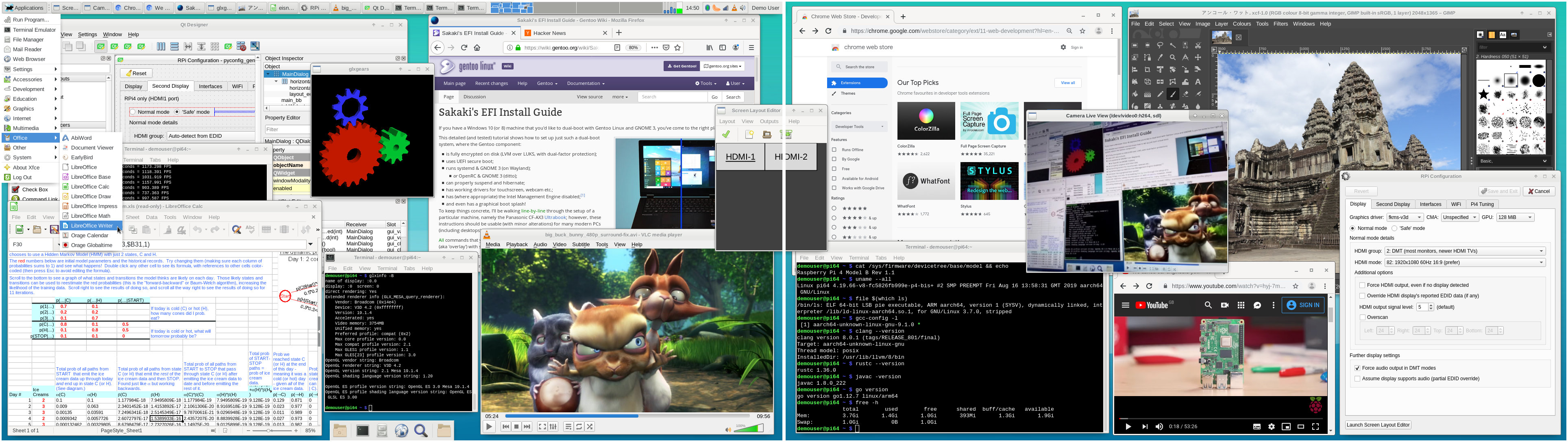
A screenshot of the image running on a dual-display RPi4 B may be viewed here.

As always, you can burn the image (~1,643MiB compressed) to a microSD card (>=16GB), then boot your RPi3 or RPi4 from it directly (the root partition will be automatically resized to fill the card on first boot). Full instructions for download and use are provided on the project's GitHub page.

Since the image contains a complete (OpenRC-based) Gentoo system (including a full Portage tree, up-to-date as of 10 August 2019), you can run emerge operations immediately. But as it also comes with a reasonably populated userland (see the screenshot referred to above; all the apps shown, and many others, are bundled), you can get productive without having to compile or configure anything first (unless you want to, of course ^-^). Just download, xzcat to a microSD card (or use Etcher), and boot!

NB: as you may have noticed, the project's name on GitHub has changed, from gentoo-on-rpi3-64bit to gentoo-on-rpi-64bit, to reflect the fact that the RPi4 is now also supported. Thanks to the way GitHub does things, people trying to find the old project should be automagically redirected to the renamed version. My bad in choosing an over-limiting moniker first time ><

A changelog from the prior release image (with full manual upgrade instructions) may be viewed here, but in summary:
  • Updated the RPi3 kernel (from the bcmrpi3-kernel-bis weekly autobuild) to version 4.19.66.20190816.
  • Added an additional kernel (from the bcm2711-kernel-bis weekly autobuild). This second kernel is used when booting the RPi4, lives at /boot/kernel8-p4.img, and is a tweaked version, as the name suggests, of a completely separate configuration: bcm2711_defconfig, as opposed to bcmrpi3_defconfig. The two kernels have distinguished release names, and so separate subdirectories in /lib/modules, but as they are built together, they share a common kernel tree tip commit. The kernel version used in this release includes (on the bcm2711 build) the recently-upstreamed PR#3144 (which allows the full 4GiB of RAM to be used, where present) and PR#3063 (which enables the use of V3D acceleration on the Pi4). The two kernels have auto-generated ebuilds by which they are installed: sys-kernel/bcmrpi3-kernel-bis-bin and sys-kernel/bcm2711-kernel-bis-bin, respectively.
  • Boot firmware updated to sys-boot/rpi3-64bit-firmware-1.20190718, and userland libraries to media-libs/raspberrypi-userland-1.20190808 (for dual-monitor aware tvservice utility etc.)
  • Size of the boot partition on the image expanded, from 63MiB to 255MiB, to accommodate the new dual-kernel setup just described (required for RPi3/4 booting).
  • Added dev-lang/go (it's been the most frequently requested package), and (an arm64 Pi4 patched version of) dev-libs/pigpio (for easy control of GPIOs) to the core package set.
  • Added sys-block/gparted (for disk management), net-misc/xorgxrdp and net-misc/tigervnc[server] (for remote access), media-sound/pavucontrol for pulseaudio (also made this a default USE flag), and x11-misc/arandr (for multi-screen layouts) to the xfce package set. (Also modified the arandr ebuild to add a login service that auto-loads layouts saved to ~/.screenlayout/default.sh).
  • Added app-office/abiword to the apps set (a lighter alternative to libreoffice writer - which remains bundled too - that some may prefer).
  • Included a slightly tweaked media-libs/mesa to allow v3d acceleration on the RPi4. Standard vc4 acceleration on the RPi3 is still supported.
  • Updated the pyconfig_gen application (found at Settings -> RPi Config Tool): now supports configuring a second monitor (on the Pi4), and also setting the WiFi regulatory domain (RPi3/4). A simple overclocking "manettino" ^-^ for the Pi4 is also provided (all permitted settings should be warranty-safe, per RPF advice, but use at your own risk!).
  • Updated the media-video/pi-ffcam "camera live view" applet to work with the Pi4 (found in the Multimedia menu).
  • Also updated the media/video/pi-ffplay application for the Pi4 (again found in the Multimedia menu, this is a trivial app to illustrate accessing the Pi 3/4's hardware video codecs via v4l2m2m).
  • Moved 6by9's patches to media-video/ffmpeg (upon which the two apps above rely) forward to version 4.1.4, as these don't seem to be upstream yet.
  • Tidied up a number of boot-time services for RPi4 compatibility (e.g., x11-misc/rpi3-safecompositor etc.). Note that for simplicity I have not renamed these, so please don't disable or remove services just because their name starts with "rpi3-" (as for the most part, they still do something useful on an RPi4 too!).
  • I did change the name of the main repo used by the image though, from "rpi3" to "genpi64", and migrated the custom profile too. You can read more about this here.
  • Version bumped sys-boot/rpi3-boot-config, to update the baseline /boot/config.txt file for use with the Pi4 (while still retaining compatibility with the Pi3B/B+).
  • Renamed the master meta-package, from rpi3-64bit-meta to rpi-64bit-meta.
  • Added LLVM_TARGETS="WebAssembly BPF" (in addition to the default AArch64), to allow dev-lang/rust to be built with the wasm USE flag.
  • Various minor ebuild tidy-ups.
  • All packages brought up-to-date against the Gentoo tree, as of 10 August 2019 (which means e.g., www-client/firefox-68.0.1, www-client/chromium-76.0.3809.87-r1, app-office/libreoffice-6.3.0.4 etc. are bundled; a full list of installed packages may be found here).
A variant image for the Pi-Top v1 (an RPi3-based DIY laptop) is also included, as usual.
I also aim to provide PINN versions of both these images shortly, for those that prefer that installation route.

Have fun ^-^

And, as always, any problems or comments, please post either in this thread, or in the project's thread on the Raspberry Pi forums (here).

PS: Updated EEPROM Firmware

If you are using a Pi4, don't forget to update your EEPROM firmware; there's an official fix released that will allow your system to use ~300mW less power. For more information, please see here.

PPS: USB Shortcomings

As this release comes early in the lifecycle of the RPi4, expect to find a number of bugs and issues with it! In particular, one major issue, (due, as I understand it, per this post by 6by9, to a lack of FIQ fast interrupt handling on aarch64) is that isochronous transfers over USB are likely to be pretty bad in 64-bit compared to 32-bit. For example, USB webcams etc will drop frames (bulk transfers, as you might get e.g. when copying large files to and from a storage device, work fine on USB under 64-bit however; as do low-speed peripherals such as mice and keyboards).

Acknowledgement

Thanks to NeddySeagoon for maintaining his public bloodnoc.org armv8a binhost - I needed to do a full --emptytree @world rebuild as part of this image prep, which highlighted quite a few issues (packages that no longer built from source properly, but had tbz2s in my isshoni.org binhost and so didn't show up in regular @world updates) - having his tbz2's to check build settings against (qtbz2 and qxpak are your friends!) was a really useful resource!

Edited to add acknowledgement.
Last edited by Sakaki on Tue Aug 20, 2019 10:14 pm, edited 1 time in total.
Regards,

sakaki
Top
NeddySeagoon
Administrator
Administrator
User avatar
Posts: 56071
Joined: Sat Jul 05, 2003 9:37 am
Location: 56N 3W

  • Quote

Post by NeddySeagoon » Mon Aug 19, 2019 8:09 am

Sakaki,

Check your Pi kernel for UAS support. The Pi4 USB3 can do it and its harmless to enable anyway.
Users with a suitable USB block storage device on the USB3 ports will get a speed improvement as bulk mode is no longer used, so you can have overlapping commands.
Further, UAS should bring support for trim/discard which will make SSD users happy.
My USB/SATA doda needs a Windows only firmware update to pass the trim command, so I've not tried it as I have not had Windows since 2002.

The Pi4 microSD supports trim too. Try

Code: Select all

fstrim -av ...
on your SD card partitions.
I'm using the same card as I was in the Pi3 and it didn't work there. You need a suitable SD card.

I'll need to poke at the vc4-fkms-v3d support. I missed that. Even with Xorg using fbdev, the Pi4 plays dvd rips from a USB storage device.

Thank you.
Keep up the good work.

-- edit --

Did you cheat and flash your Pi4 firmware in 32 bit mode ?

Code: Select all

Pi4_~arm64 ~/Pi4_Firmware # chmod a+x vl805
Pi4_~arm64 ~/Pi4_Firmware # ls -l
total 452
-rwxr-xr-x 1 root root  139240 Jun 28 09:46 vl805
-rw-r--r-- 1 root root   96984 May  3 10:09 vl805_fw_013701.bin
-rw-r--r-- 1 root root   97432 May 17 16:49 vl805_fw_0137a8.bin
-rw-r--r-- 1 roy  users 126338 Aug 19 09:14 vl805_update_0137a8.zip
Pi4_~arm64 ~/Pi4_Firmware # ./vl805
-su: ./vl805: No such file or directory
I'm missing all the 32 bit dependencies :)
Last edited by NeddySeagoon on Mon Aug 19, 2019 8:26 am, edited 1 time in total.
Regards,

NeddySeagoon

Computer users fall into two groups:-
those that do backups
those that have never had a hard drive fail.
Top
Maitreya
Guru
Guru
Posts: 448
Joined: Wed Jan 11, 2006 12:58 am

  • Quote

Post by Maitreya » Mon Aug 19, 2019 8:20 am

Again, Sakaki, great work and thank you!

Does the new release also include a fix for the green hue of v4l2m2m?
Top
Sakaki
Guru
Guru
User avatar
Posts: 409
Joined: Wed May 21, 2014 8:15 pm

  • Quote

Post by Sakaki » Mon Aug 19, 2019 10:33 am

NeddySeagoon wrote:Check your Pi kernel for UAS support. The Pi4 USB3 can do it and its harmless to enable anyway.
...
Thanks, I'll have a look into that.
NeddySeagoon wrote:Did you cheat and flash your Pi4 firmware in 32 bit mode ?
Lack of sleep -> I cheated ^-^
Interestingly per this article, you can use the bundled tool to write to any location on the EEPROM:

Code: Select all

./vl805 -h
Usage: vl805 [<options>]
  where <options> are taken from:
    -h            Show this help message
    -r <file>     Read EEPROM
    -w <file>     Write EEPROM
    -v <file>     Verify EEPROM
    -o <offset>   Specify an offset to read from/write to (for testing).
                  N.B. Erases to the end of the EEPROM!
    -d            Verbose debugging
Wonder if they cryptographically sign, or at least checksum, the bootloader payload in there?
Maitreya wrote:Does the new release also include a fix for the green hue of v4l2m2m?
I believe so - the bundled pi-ffplay app doesn't show the green cast anyhow, and it uses the m2m codecs. Apply 6by9's patches to ffmpeg as shown here, and it should just work (provided you have an up-to-date kernel). The ffmpeg shipped with the image has had this patchset applied.
Regards,

sakaki
Top
NeddySeagoon
Administrator
Administrator
User avatar
Posts: 56071
Joined: Sat Jul 05, 2003 9:37 am
Location: 56N 3W

  • Quote

Post by NeddySeagoon » Mon Aug 19, 2019 3:21 pm

Sakaki,

The Open Source VC4 driver works for me. Thank you.
I even get 3840x2160@30Hz, which came as a bit of a surprise as my display is not supposed to support 3840x2160 at all on HDMI inputs.

I had to revert the firmware change as dmesg filled up with

Code: Select all

...
[  969.734489] scsi host0: uas_eh_device_reset_handler start
[  969.863916] usb 2-2: reset SuperSpeed Gen 1 USB device number 2 using xhci_hcd
[  969.891451] scsi host0: uas_eh_device_reset_handler success
[ 1000.470943] sd 0:0:0:0: [sda] tag#6 uas_eh_abort_handler 0 uas-tag 1 inflight: IN 
[ 1000.470954] sd 0:0:0:0: [sda] tag#6 CDB: opcode=0x28 28 00 1b e2 38 91 00 01 00 00
[ 1000.486938] scsi host0: uas_eh_device_reset_handler start
[ 1000.616014] usb 2-2: reset SuperSpeed Gen 1 USB device number 2 using xhci_hcd
[ 1000.642181] scsi host0: uas_eh_device_reset_handler success
...
Oh, that's UAS in use. Its fine with the old firmware.

Posted from my 64 bit Pi4
Regards,

NeddySeagoon

Computer users fall into two groups:-
those that do backups
those that have never had a hard drive fail.
Top
Kashire
n00b
n00b
User avatar
Posts: 31
Joined: Mon Apr 08, 2019 6:27 am
Contact:
Contact Kashire
Website

  • Quote

Post by Kashire » Mon Aug 19, 2019 4:11 pm

Nice! Thank you Sakaki!

EDIT: I know this is a niche thing, but I am able to fully get qtwebengine + qutebrowser to compile after I edited the zswap to be 8192 MB. [edit /etc/conf.d/rpi3-expand-swap]
Last edited by Kashire on Tue Aug 20, 2019 6:12 pm, edited 1 time in total.
Top
Post Reply
  • Print view

349 posts
  • Page 1 of 14
    • Jump to page:
  • 1
  • 2
  • 3
  • 4
  • 5
  • …
  • 14
  • Next

Return to “Gentoo on ARM”

Jump to
  • Assistance
  • ↳   News & Announcements
  • ↳   Frequently Asked Questions
  • ↳   Installing Gentoo
  • ↳   Multimedia
  • ↳   Desktop Environments
  • ↳   Networking & Security
  • ↳   Kernel & Hardware
  • ↳   Portage & Programming
  • ↳   Gamers & Players
  • ↳   Other Things Gentoo
  • ↳   Unsupported Software
  • Discussion & Documentation
  • ↳   Documentation, Tips & Tricks
  • ↳   Gentoo Chat
  • ↳   Gentoo Forums Feedback
  • ↳   Duplicate Threads
  • International Gentoo Users
  • ↳   中文 (Chinese)
  • ↳   Dutch
  • ↳   Finnish
  • ↳   French
  • ↳   Deutsches Forum (German)
  • ↳   Diskussionsforum
  • ↳   Deutsche Dokumentation
  • ↳   Greek
  • ↳   Forum italiano (Italian)
  • ↳   Forum di discussione italiano
  • ↳   Risorse italiane (documentazione e tools)
  • ↳   Polskie forum (Polish)
  • ↳   Instalacja i sprzęt
  • ↳   Polish OTW
  • ↳   Portuguese
  • ↳   Documentação, Ferramentas e Dicas
  • ↳   Russian
  • ↳   Scandinavian
  • ↳   Spanish
  • ↳   Other Languages
  • Architectures & Platforms
  • ↳   Gentoo on ARM
  • ↳   Gentoo on PPC
  • ↳   Gentoo on Sparc
  • ↳   Gentoo on Alternative Architectures
  • ↳   Gentoo on AMD64
  • ↳   Gentoo for Mac OS X (Portage for Mac OS X)
  • Board index
  • All times are UTC
  • Delete cookies

© 2001–2026 Gentoo Foundation, Inc.

Powered by phpBB® Forum Software © phpBB Limited

Privacy Policy