Ooopsie, sorry.Sakaki wrote:ericbish,
you're welcome, glad it is finally working again!
PS: I'm a she not a he ^-^
Thank you Ma'am!
Code: Select all
demouser@pi64 ~ $ emaint sync --repo rpi3
demouser@pi64 ~ $ emerge -av dev-lang/monoCode: Select all
demouser@pi64 ~ $ mkdir HelloWorld && cd HelloWorld
demouser@pi64 ~/HelloWorld $ nano -w HelloWorld.csCode: Select all
using System;

public class HelloWorld
{
    public static void Main()
    {
        Console.WriteLine("Hello World!");
    }
}Code: Select all
demouser@pi64 ~/HelloWorld $ TERM=xterm mcs HelloWorld.csCode: Select all
demouser@pi64 ~/HelloWorld $ TERM=xterm mono HelloWorld.exe
Hello World!Thanks! Does the image work for you if you just write a vanilla copy of it to a >=16GB microSD card and don't set autoexpand_root_none prior to first boot? I haven't had any other reports of the 1.3.1 image failing to start up (so far anyhow ^-^). Of course it may not be recognizing your connected display for some reason: you could try setting hdmi_safe=1 in config.txt, to see if that helps.satanail wrote:First of all, good job Sakaki !! I have rpi3b+ as well, tried to test your img on it, connected to a webos powered lg tv, with autoroot_expand_none, with hanging on a blackscreen, maybe I should tweak something more, because using my own kernel or editing config.txt didn't work, but still I have a different use case for my it anyway, and I'm not asking for support.
At the moment, I'm afraid not. Hands full with various RISC-V and Power9 projects right now ><satanail wrote:So I want to you ask you if you have any plans for making the same with musl instead of glibc? I've already built a stage3 hardened/arm64/musl and plan on sharing it, when it's more shaped.
The RPi3B/B+ is very usable as a lightweight 64-bit desktop, and browser performance (Chromium / Firefox) is actually not too bad. The issue with Gentoo of course is the "compile everything" bit (^-^) which a small system like this is always going to struggle with. For that reason, the gentoo-on-rpi3-64bit project is backed by a binhost, custom profile and overlay, which means that for 'regular' users (not going off-piste with custom USE flags etc.) emerge updates to most of the mainstream large packages (libreoffice, firefox, gcc, llvm etc.) will essentially always be from binaries. To build binary packages for the binhost in the first place, I generally use a mix of distcc and (more and more now) a QEMU user-mode binfmt_misc chroot (into the image) on a PC workstation (see my notes here and here ff). That helps keep things manageable.satanail wrote:Out of curiosity, what is your evaluation about the performance of that device, using it as a fully-fledged gentoo system?
Thank you for the fast response. Unfortunately can't test right now, seems like ext4 partition got corrupted, because of the hard shutdown. I'm testing on a 64gb sdcard, so I got plenty of space. Is hdmi_safe=1 set by default, if config.txt is not existing? Because I deleted it from my Image and HDMI works.Sakaki wrote: Thanks! Does the image work for you if you just write a vanilla copy of it to a >=16GB microSD card and don't set autoexpand_root_none prior to first boot? I haven't had any other reports of the 1.3.1 image failing to start up (so far anyhow ^-^). Of course it may not be recognizing your connected display for some reason: you could try setting hdmi_safe=1 in config.txt, to see if that helps.
I never compiled anything, nor plan to compile on the rpi. I'm already using a qemu wrapper with --cpu=cortex-a53 to be able to chroot into the custom musl stage and compile 'natively'. I never used distcc. I have 5 phones, will it make it so they share compilation alltogether or it just works for 2 devices? I guess I have to do some bit of researching. Thanks again for the points you made.Sakaki wrote: The RPi3B/B+ is very usable as a lightweight 64-bit desktop, and browser performance (Chromium / Firefox) is actually not too bad. The issue with Gentoo of course is the "compile everything" bit (^-^) which a small system like this is always going to struggle with. For that reason, the gentoo-on-rpi3-64bit project is backed by a binhost, custom profile and overlay, which means that for 'regular' users (not going off-piste with custom USE flags etc.) emerge updates to most of the mainstream large packages (libreoffice, firefox, gcc, llvm etc.) will essentially always be from binaries. To build binary packages for the binhost in the first place, I generally use a mix of distcc and (more and more now) a QEMU user-mode binfmt_misc chroot (into the image) on a PC workstation (see my notes here and here ff). That helps keep things manageable.
No, by default (empty or absent config.txt file), the RPi3 will attempt to set an appropriate HDMI group and mode automatically, based upon the EDID data reported by your display. NB if you delete config.txt, you'll also be using the fallback framebuffer display driver, not the accelerated vc4-(f)kms-v3d one, so video playback etc. will be slower.satanail wrote:Is hdmi_safe=1 set by default, if config.txt is not existing? Because I deleted it from my Image and HDMI works.
Given an appropriate build, and distcc{,d} configuration, it will use as many server nodes as you can throw at it ^-^ Not all builds can be distributed in this way however. See my notes linked above and this page on the Gentoo wiki, for more info.satanail wrote:I never used distcc. I have 5 phones, will it make it so they share compilation alltogether or it just works for 2 devices?
Just to report back, the problem wasn't lying in your *.img. It was the SD card. Freshly 'dd'-ing your image to the sd was rendering ext4 corrupted, without even booting it, so I tested with another 32gb sdcard and it works. I got some weird resolution with fkms-v3d, got 1834x796 or sth, instead of 1920x1080p, was running very smooth and fast without the composer, until I tried out kodi. Not saying anything, it's not your fault, I'm actually really glad there's people like you, in fact I researched a bit about you and I think I'm in love.Sakaki wrote:No, by default (empty or absent config.txt file), the RPi3 will attempt to set an appropriate HDMI group and mode automatically, based upon the EDID data reported by your display. NB if you delete config.txt, you'll also be using the fallback framebuffer display driver, not the accelerated vc4-(f)kms-v3d one, so video playback etc. will be slower.satanail wrote:Is hdmi_safe=1 set by default, if config.txt is not existing? Because I deleted it from my Image and HDMI works.
Given an appropriate build, and distcc{,d} configuration, it will use as many server nodes as you can throw at it ^-^ Not all builds can be distributed in this way however. See my notes linked above and this page on the Gentoo wiki, for more info.satanail wrote:I never used distcc. I have 5 phones, will it make it so they share compilation alltogether or it just works for 2 devices?
Assuming you're running version 1.3.1 of the image, you can use the graphical Applications -> Settings -> RPi3 Config Tool to change the HDMI group and mode to something appropriate for your display. Even if the EDID from your display is providing 'odd' values, you can check '"Override HDMI display's reported EDID (if any)", then choose either HDMI group 1 (CEA) HDMI mode 5 (which is 1920 x 1080; see the full list here) or HDMI group 2 (DMT) mode 82 (also 1920 x 1080), and click "Save and Exit". Your RPi3 will reboot into (hopefully) the correct resolution. Upon restart, choose when prompted to retain the changes.satanail wrote:I got some weird resolution with fkms-v3d, got 1834x796 or sth, instead of 1920x1080p, was running very smooth and fast without the composer, until I tried out kodi.
Code: Select all
hdmi_group=1
hdmi_mode=5
hdmi_ignore_edid=0xa5000080Code: Select all
hdmi_group=2
hdmi_mode=82
hdmi_ignore_edid=0xa5000080Your so descriptive with every answer lol and yes, from the first boot I selected CEA with 1920x1080p@60Hz, but still it gets 1830xsth resolution(it's a 2016 lgtv), which is weird. Please do not stay with the impression that I seek for support or take it as whining, I'm just sharing, please let me fix issues myself lolSakaki wrote:Assuming you're running version 1.3.1 of the image, you can use the graphical Applications -> Settings -> RPi3 Config Tool to change the HDMI group and mode to something appropriate for your display. Even if the EDID from your display is providing 'odd' values, you can check '"Override HDMI display's reported EDID (if any)", then choose either HDMI group 1 (CEA) HDMI mode 5 (which is 1920 x 1080; see the full list here) or HDMI group 2 (DMT) mode 82 (also 1920 x 1080), and click "Save and Exit". Your RPi3 will reboot into (hopefully) the correct resolution. Upon restart, choose when prompted to retain the changes.satanail wrote:I got some weird resolution with fkms-v3d, got 1834x796 or sth, instead of 1920x1080p, was running very smooth and fast without the composer, until I tried out kodi.
Alternatively, you can just add the following (e.g.) to your config.txt (as that's what the config tool does):
Either append:or append:Code: Select all
hdmi_group=1 hdmi_mode=5 hdmi_ignore_edid=0xa5000080As for kodi playback, all 64-bit distros on the RPi3 (not just Gentoo) have the problem that the MMAL and OpenMax IL APIs, to access the gpu's h/w video codecs (amongst other things), are currently unsupported (when the SoC is booted in 64-bit mode). This limits the max performance when playing back video somewhat.Code: Select all
hdmi_group=2
hdmi_mode=82
hdmi_ignore_edid=0xa5000080
 Your github/gentoowikis are enough! I plan on using the PI as a router anyways, so give me the pleasure and fill me up with some userspace tools that'll make me do things faster, please

Yes, as shipped, overscan is turned off on the image, but the simple GUI-based config.txt editor bundled from the 1.3.1 release allows it to be set easily (screenshot).NeddySeagoon wrote:satanail,
The Pi can generate an image suitable for an overscanned display if you tell it to.
I'm fairly sure that Sakakis image does not do that.
Yes, I've rebooted around 10 times, tinkering with the specified GUI tool, tried every seemingly viable option. Also tried both enabled/disabled overscan. Both modes were same resolution. When disabled I was getting the mentioned 'throwing the screen away at the edges', so I re-enabled with four 0's. For real I bought this pi3 to replace an ancient tplink wr740nv4 router. In the meantime and while I'm prepping the rootfs I could use it to watch movies, cuz why not? I have two spare rpi0's, which I plan to use one of them with Kodi. Good thing it supports gbm... Will see how it goes. Thanks for sharing your binhost, maybe I can make use of it. By any chance, do you have a binhost for armv6j as well?NeddySeagoon wrote:satanail,
TV ..
Is something somewhere doing overscan, or expecting overscan?
Overscan was something common in the days of CRT TV, when the picture size on the screen varied noticeably with temperature and a few other things.
It ensures that the image always fills the screen by throwing some away at the edges.
The Pi can generate an image suitable for an overscanned display if you tell it to.
I'm fairly sure that Sakakis image does not do that.
What about your TV setup?
It will do both and by tradition, it will have overscan on. Search through the menus and check.
With a digital source (Pi) and digital screen (any LCD), overscan should be avoided. Its certainly not required.
-- edit --
Feel free to use my arm64 BINHOST if you feel the need for speed.
Its all Pi compatible.
6by9 wrote: > Hardware video acceleration on Kodi using 64bit OS.
Should now be possible on the 4.19 branch using the V4L2 M2M interface (supported by FFmpeg and hence Kodi). The LibreELEC guys were working on patches for FFMpeg to export dmabufs from V4L2 so that they could import into DRM, but that seems to have dropped down their projects list.
There may be one fixup that I need to push as mapping a kernel pointer into an IDR to pass as a 32 bit value to VC. I'll confirm when I'm back in the office.
Check for your TV's scaler mode; you want Dot-for-Dot if available. Some sets have a 'PC' input where this (and only on this input) will have this enabled. Mine enables it when I label the input 'PC' so there's options. Watch out if you're running through a receiver, you will need to set 'passthru' or cable around it.satanail wrote:Yes, I've rebooted around 10 times, tinkering with the specified GUI tool, tried every seemingly viable option. Also tried both enabled/disabled overscan. Both modes were same resolution. When disabled I was getting the mentioned 'throwing the screen away at the edges', so I re-enabled with four 0's. For real I bought this pi3 to replace an ancient tplink wr740nv4 router. In the meantime and while I'm prepping the rootfs I could use it to watch movies, cuz why not? I have two spare rpi0's, which I plan to use one of them with Kodi. Good thing it supports gbm... Will see how it goes. Thanks for sharing your binhost, maybe I can make use of it. By any chance, do you have a binhost for armv6j as well?NeddySeagoon wrote:satanail,
TV ..
Is something somewhere doing overscan, or expecting overscan?
Overscan was something common in the days of CRT TV, when the picture size on the screen varied noticeably with temperature and a few other things.
It ensures that the image always fills the screen by throwing some away at the edges.
The Pi can generate an image suitable for an overscanned display if you tell it to.
I'm fairly sure that Sakakis image does not do that.
What about your TV setup?
It will do both and by tradition, it will have overscan on. Search through the menus and check.
With a digital source (Pi) and digital screen (any LCD), overscan should be avoided. Its certainly not required.
-- edit --
Feel free to use my arm64 BINHOST if you feel the need for speed.
Its all Pi compatible.

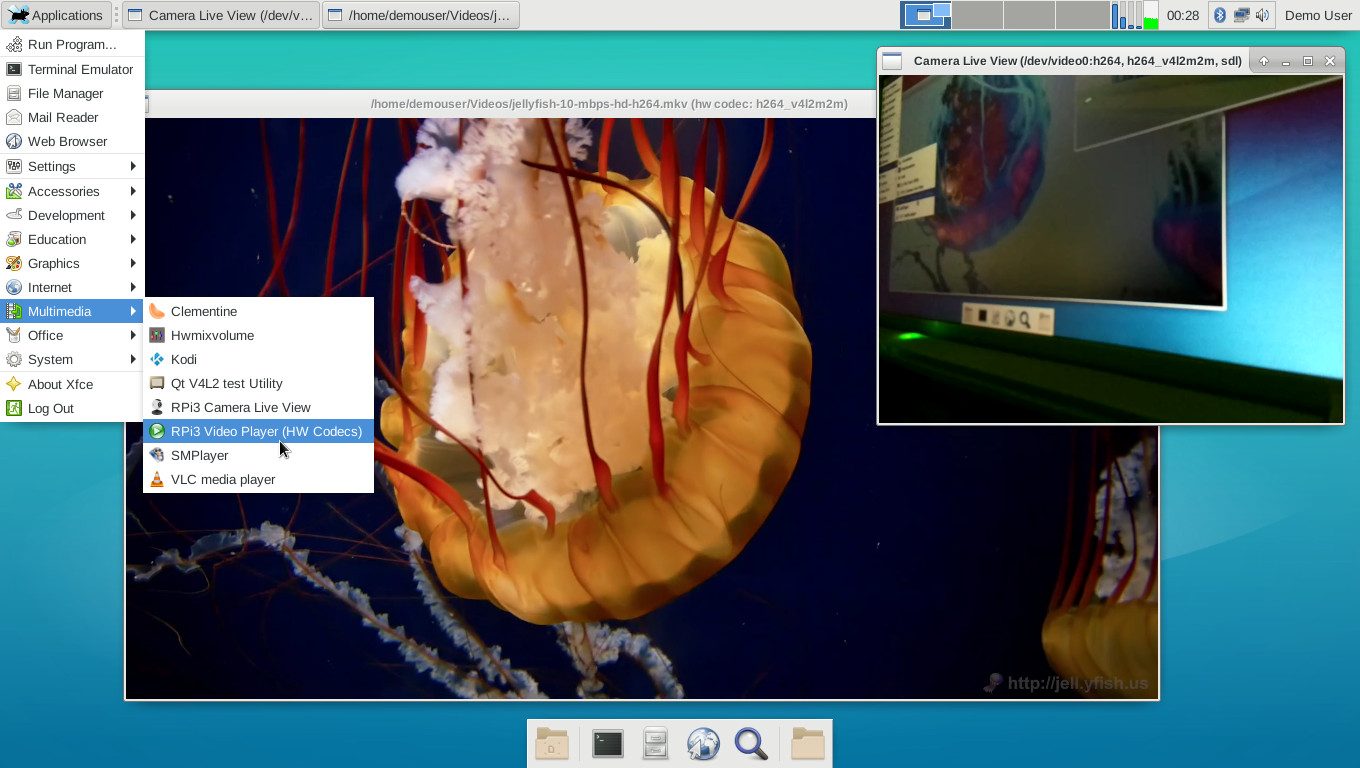
I was configuring a kernel today and it appears that 4.19 has been pushed to the primary upstream kernel version, and it has 64-bit mmal commits. There's an open PR with more v4l2 work in it.Sakaki wrote:All,
h/w video acceleration on the RPi3 may be imminent. From this thread:6by9 wrote: > Hardware video acceleration on Kodi using 64bit OS.
Should now be possible on the 4.19 branch using the V4L2 M2M interface (supported by FFmpeg and hence Kodi). The LibreELEC guys were working on patches for FFMpeg to export dmabufs from V4L2 so that they could import into DRM, but that seems to have dropped down their projects list.
There may be one fixup that I need to push as mapping a kernel pointer into an IDR to pass as a 32 bit value to VC. I'll confirm when I'm back in the office.
Thanks for the heads up! I've updated my bcmrpi3-kernel and bcmrpi3-kernel-bis 64-bit autobuilds accordingly; binary kernel tarballs are therefore available for anyone who'd like to have a play (see links just given, for download instructions) ^-^antonlacon wrote:I was configuring a kernel today and it appears that 4.19 has been pushed to the primary upstream kernel version, and it has 64-bit mmal commits. There's an open PR with more v4l2 work in it.
Code: Select all
demouser@pi64 ~ $ sudo emaint sync --repo rpi3
demouser@pi64 ~ $ sudo emerge -vu www-client/chromium dev-embedded/rpi3-64bit-meta
V4L2 for Kodi is a version 19 feature. However, if you're feeling adventurous, you can try setting it up to use an external player: https://kodi.wiki/view/External_playersSakaki wrote:Unfortunately, the other bundled video playback apps (VLC, Kodi, and SMPlayer) do not yet leverage the m2m codec paths by default - at least, not in the versions currently provided.
Code: Select all
=sys-kernel/bcmrpi3-kernel-bis-bin-4.19.25.20190226Code: Select all
>=sys-kernel/bcmrpi3-kernel-bis-bin-4.19