Hi
In the last couple of months, I've been getting this error x86_64-pc-linux-gnu-g++: Internal error: Segmentation fault but extremly sporadically, once every 2-3 months.
I've found this thread here https://forums.gentoo.org/viewtopic-t-9 ... art-0.html and from reading it, I may have problems with my ram.
I have "keepwork" in my FEATURES variable so that /var/tmp/portage isn't wipped out and I can continue building if an error happens. When I then run "make" manually (without -j9), the building process resumes most of the times without a problem. Sometimes I get again Internal error: Segmentation fault at some different file but waiting a couple of minutes "solves" the problem. From this behaviour I could conclude that I indeed have a ram issue, but wouldn't I also be experiencing more gltches than just this g++ error? I mean, appart of this error all other running processes seem to be running just fine and even starting new programs does not lead to unexpected results (I would've expected crashing and segfaults all over the place). But no, everything just keep running fine.
The problem is that I am not able to reproduce this error. Like I said, it happens once every 2 or 3 months, last time I had this issue was late October 2015; I don't have spare ram dimms and buying new ones just for checking an issue I cannot reproduce seems not a good idea.
Another obvservation I've made is that this only happens when I'm compiling some "heavy" c++ packages that use a lot of c++11 or include boost. Compiling C programs so far have never generated this error, C++ do. Could it be that there is something wrong with my toolchain?
I'm going to run memtest over night and see if it shows something, somehow I don't have the feeling this is a ram issue, but I may be wrong.
Has anybody else had this issue without it beeing caused by defective ram? What else could it be happening here?
Internal compiler error: Segmentation fault. [solved?]
Message
- pablo_supertux
- Advocate

- Posts: 2974
- Joined: Sun Jan 25, 2004 1:58 pm
- Location: Somewhere between reality and Middle-Earth and in Freiburg (Germany)

Internal compiler error: Segmentation fault. [solved?]
Last edited by pablo_supertux on Tue Feb 02, 2016 8:11 pm, edited 1 time in total.
A! Elbereth Gilthoniel!
silivren penna míriel
o menel aglar elenath,
Gilthoniel, A! Elbereth!
silivren penna míriel
o menel aglar elenath,
Gilthoniel, A! Elbereth!

- pablo_supertux
- Advocate
- Posts: 2974
- Joined: Sun Jan 25, 2004 1:58 pm
- Location: Somewhere between reality and Middle-Earth and in Freiburg (Germany)

- NeddySeagoon
- Administrator

- Posts: 56094
- Joined: Sat Jul 05, 2003 9:37 am
- Location: 56N 3W

pablo_supertux,
Boot memtest86 and run a few cycles.
If you get random errors - not repeatable, its probably not RAM.
If you get the same error at the same address it MAY be RAM.
Don't go buying replacement RAM just yet.
Boot memtest86 and run a few cycles.
If you get random errors - not repeatable, its probably not RAM.
If you get the same error at the same address it MAY be RAM.
Don't go buying replacement RAM just yet.
Regards,
NeddySeagoon
Computer users fall into two groups:-
those that do backups
those that have never had a hard drive fail.
NeddySeagoon
Computer users fall into two groups:-
those that do backups
those that have never had a hard drive fail.
- pablo_supertux
- Advocate
- Posts: 2974
- Joined: Sun Jan 25, 2004 1:58 pm
- Location: Somewhere between reality and Middle-Earth and in Freiburg (Germany)
- pablo_supertux
- Advocate
- Posts: 2974
- Joined: Sun Jan 25, 2004 1:58 pm
- Location: Somewhere between reality and Middle-Earth and in Freiburg (Germany)
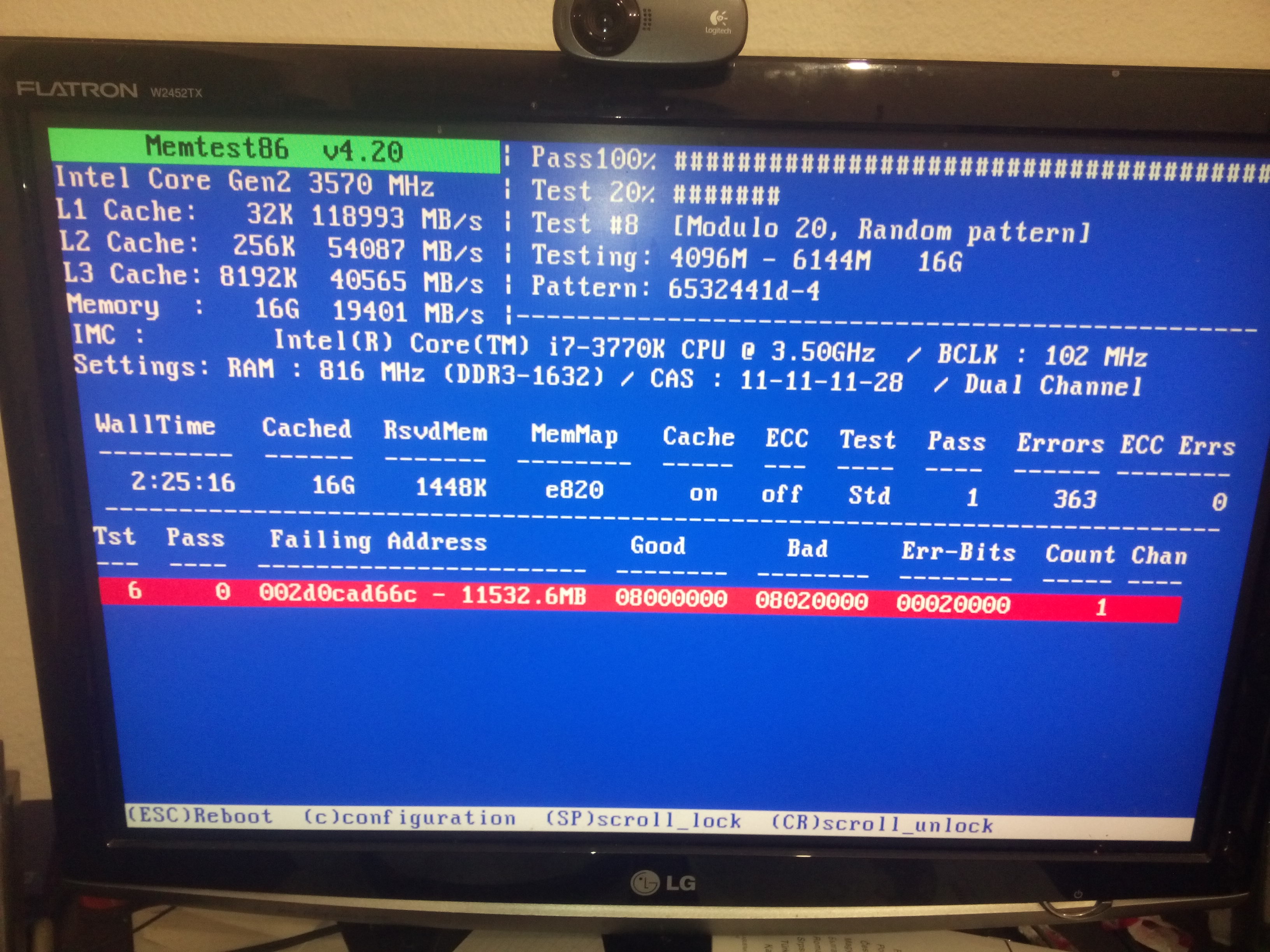
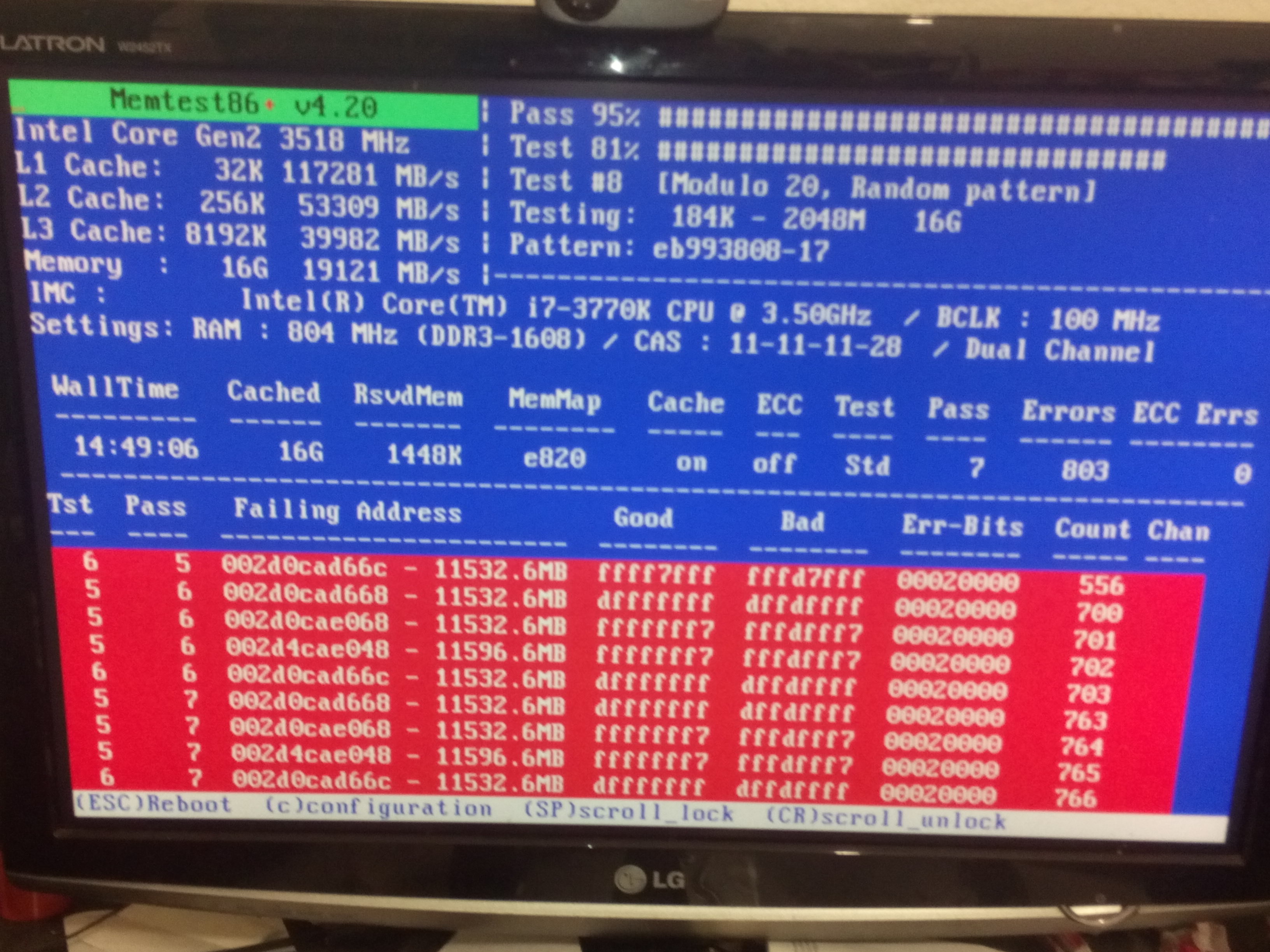
Well, it seems I do have a ram problem:
http://sakuranohana.org/pics/mem01.jpg
http://sakuranohana.org/pics/mem02.jpg
what is the meaning of the Good and Bad columns?
http://sakuranohana.org/pics/mem01.jpg
http://sakuranohana.org/pics/mem02.jpg
what is the meaning of the Good and Bad columns?
A! Elbereth Gilthoniel!
silivren penna míriel
o menel aglar elenath,
Gilthoniel, A! Elbereth!
silivren penna míriel
o menel aglar elenath,
Gilthoniel, A! Elbereth!
- NeddySeagoon
- Administrator
- Posts: 56094
- Joined: Sat Jul 05, 2003 9:37 am
- Location: 56N 3W
pablo_supertux,
Good is the data that was written, bad is the data that was read.
Err-Bits shows the bits that differ. 0x20000 (that's the same one bit) in both cases.
Some things to try.
It looks like you have 4x4G sticks of RAM,
Remove one pair and label them with their RAM slot positions.
Memtest the remaining 8G.
Remove the second pair and label them with their RAM slot positions.
Fit the first pair of DIMMs back in their original slots.
Memtest that 8G.
As its the same data bit failing in the tests, it may be the motherboard or the CPU.
Some motherboards insist on DIMMs being fitted in one pair of of sockets first or they won't boot.
If you have one of those, you need to test each pair of DIMMs in that pair of sockets.
Good is the data that was written, bad is the data that was read.
Err-Bits shows the bits that differ. 0x20000 (that's the same one bit) in both cases.
Some things to try.
It looks like you have 4x4G sticks of RAM,
Remove one pair and label them with their RAM slot positions.
Memtest the remaining 8G.
Remove the second pair and label them with their RAM slot positions.
Fit the first pair of DIMMs back in their original slots.
Memtest that 8G.
As its the same data bit failing in the tests, it may be the motherboard or the CPU.
Some motherboards insist on DIMMs being fitted in one pair of of sockets first or they won't boot.
If you have one of those, you need to test each pair of DIMMs in that pair of sockets.
Regards,
NeddySeagoon
Computer users fall into two groups:-
those that do backups
those that have never had a hard drive fail.
NeddySeagoon
Computer users fall into two groups:-
those that do backups
those that have never had a hard drive fail.
- pablo_supertux
- Advocate
- Posts: 2974
- Joined: Sun Jan 25, 2004 1:58 pm
- Location: Somewhere between reality and Middle-Earth and in Freiburg (Germany)
I have actually 2x 8GB sticks. The manual of the MB says in this case I should use DIMM_A1 and DIMM_B1. I'll test the sticks separately and see what happens.NeddySeagoon wrote:pablo_supertux,
It looks like you have 4x4G sticks of RAM,
Remove one pair and label them with their RAM slot positions.
Memtest the remaining 8G.
Remove the second pair and label them with their RAM slot positions.
Fit the first pair of DIMMs back in their original slots.
Memtest that 8G.
A! Elbereth Gilthoniel!
silivren penna míriel
o menel aglar elenath,
Gilthoniel, A! Elbereth!
silivren penna míriel
o menel aglar elenath,
Gilthoniel, A! Elbereth!
- pablo_supertux
- Advocate
- Posts: 2974
- Joined: Sun Jan 25, 2004 1:58 pm
- Location: Somewhere between reality and Middle-Earth and in Freiburg (Germany)
I checked stick # 1 (alone) on it's original slot and on the other slot, where stick 2 was. In both cases memtest failed to find any error, after one pass the error list remained empty.
I then checked stick #2 in all 4 slots and in every slot memtest found an error (same address, different bit from the day before yesterday) almost immediately in every slot.
So I don't think the problem is the MB, thank goodness, changing the ram is much easier than changing the whole MB.
I then checked stick #2 in all 4 slots and in every slot memtest found an error (same address, different bit from the day before yesterday) almost immediately in every slot.
So I don't think the problem is the MB, thank goodness, changing the ram is much easier than changing the whole MB.
A! Elbereth Gilthoniel!
silivren penna míriel
o menel aglar elenath,
Gilthoniel, A! Elbereth!
silivren penna míriel
o menel aglar elenath,
Gilthoniel, A! Elbereth!
- NeddySeagoon
- Administrator
- Posts: 56094
- Joined: Sat Jul 05, 2003 9:37 am
- Location: 56N 3W
- pablo_supertux
- Advocate
- Posts: 2974
- Joined: Sun Jan 25, 2004 1:58 pm
- Location: Somewhere between reality and Middle-Earth and in Freiburg (Germany)
I've installed the new ram I bought today and let memtest have a pass at it, this time it concluded without error. It is the first time to me that a ram stick has failed.
Anyway thank you for the advice. I hope that the error doesn't bite me again.
Anyway thank you for the advice. I hope that the error doesn't bite me again.
A! Elbereth Gilthoniel!
silivren penna míriel
o menel aglar elenath,
Gilthoniel, A! Elbereth!
silivren penna míriel
o menel aglar elenath,
Gilthoniel, A! Elbereth!