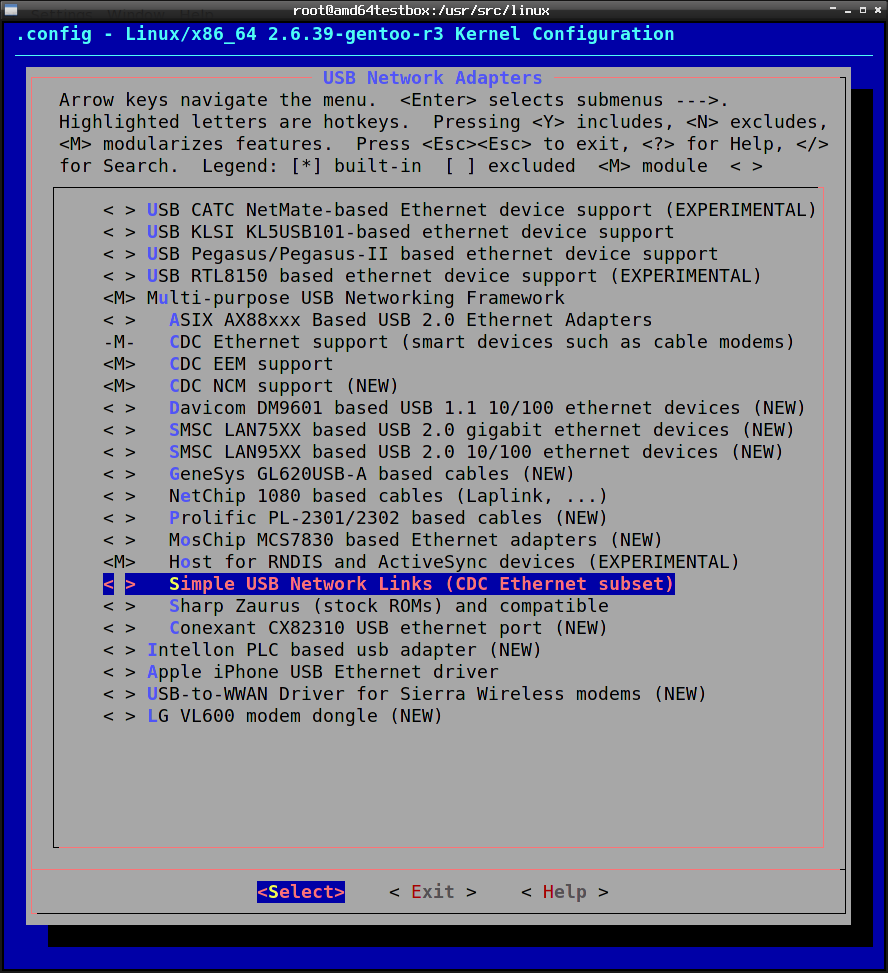
First enable the modules you need;
Device Drivers
USB Network Adaptors
Code: Select all
Device Drivers --->
  [*] Network device support --->
    USB Network Adapters --->
      [*] Multi-purpose USB Networking Framework
        <*> CDC Ethernet support
        <*> CDC EEM support
        <*> Simple USB Network Links (CDC Ethernet subset)
          [*] Embedded ARM Linux links
  [*] USB Support --->
    <*> USB Modem (CDC ACM) support
    <*> USB Wireless Device Management support
Code: Select all
lsmod
Module                  Size  Used by
rndis_host              5868  0
cdc_ether               4265  1 rndis_host
usbnet                 16196  2 rndis_host,cdc_ether
mii                     4038  1 usbnet
Code: Select all
usb0      Link encap:Ethernet  HWaddr fa:c6:01:4c:4b:71
          BROADCAST MULTICAST  MTU:1500  Metric:1
          RX packets:0 errors:0 dropped:0 overruns:0 frame:0
          TX packets:0 errors:0 dropped:0 overruns:0 carrier:0
          collisions:0 txqueuelen:1000
          RX bytes:0 (0.0 B)  TX bytes:0 (0.0 B)
Code: Select all
scsi 10:0:0:0: Direct-Access     Google,  Inc.Nexus One         PQ: 0 ANSI: 2
sd 10:0:0:0: Attached scsi generic sg3 type 0
sd 10:0:0:0: [sdc] Attached SCSI removable disk
usb 1-7: USB disconnect, address 10
usb 1-7: new high speed USB device using ehci_hcd and address 11
usbcore: registered new interface driver cdc_ether
rndis_host 1-7:1.0: usb0: register 'rndis_host' at usb-0000:00:02.1-7, RNDIS device, fa:c6:01:4c:4b:71
usbcore: registered new interface driver rndis_host
That is when you can see from dmesg that the device changed from a usb storage device to new interface driver.
Then it is as simple as;
Code: Select all
dhcpcd usb0

http://forums.gentoo.org/viewtopic-t-84 ... ering.html