Forums

Skip to content

Advanced search
  • Quick links
    • Unanswered topics
    • Active topics
    • Search
  • FAQ
  • Login
  • Register
  • Board index Architectures & Platforms Gentoo on AMD64
  • Search

DDR400 and AMD64 question [ANSWERED]

Have an x86-64 problem? Post here.
Locked
Advanced search
16 posts • Page 1 of 1
Author
Message
omschaub
Tux's lil' helper
Tux's lil' helper
User avatar
Posts: 132
Joined: Fri Sep 03, 2004 5:23 pm
Location: Roanoke, VA
Contact:
Contact omschaub
Website

DDR400 and AMD64 question [ANSWERED]

  • Quote

Post by omschaub » Thu Feb 02, 2006 5:53 pm

I recently upgraded from a 754 2800 to a 939 3700 with 1MB cache and I have been very pleased so far. One of the main reasons I wanted to update was the motherboard. I opted for the Chaintech VNF4 (using nForce4 chipset) -- again, very pleased. While shopping for a new mb, I wanted two things out of it. 1. Sensors.. my old one had none, and I like to see the temp of the cpu and more importantly 2. I wanted 4 slots so that I could upgrade my memory.

So.. I found this gem and upgraded.. it promised up to 4 gb of memory and had four slots... I also got (as a gift -- bday ) some more memory to upgrade me from 1Gb to 3Gb.. so I will have 2x512 and 2x1Gb ... then I go to the mb manual and see this nasty quote:
Due to CPU specifications limitations, two DDR400 memory modules inserted into DIMM1/3, three DDR400 into DIMM1/2/3 , or four DDR400 into DIMM1/2/3/4 is not recommended
So now I am angry.. and I have questions :evil: :?:

1. Why is this information not prominantly displayed in the stats on their web page.. don't tell me that it can use DDR400 in dual channel mode up to 4GB.. and then when I get it in have this laid on me

2. "is not recommended" -- so what happens if I do put DDR400 in all slots?


any experiences with this? I would prefer hearing about this some before I try to force something I will regret.

Thanks!
Last edited by omschaub on Thu Feb 02, 2006 7:03 pm, edited 1 time in total.
Support bacteria -- it's the only culture some people have!
Top
6D7474
Tux's lil' helper
Tux's lil' helper
User avatar
Posts: 135
Joined: Thu Sep 08, 2005 10:51 am

  • Quote

Post by 6D7474 » Thu Feb 02, 2006 6:09 pm

most motherboards for athlon64 can't run all 4 DIMMs at DDR400 - so your memory will be downclocked to 333MHz...
Top
omschaub
Tux's lil' helper
Tux's lil' helper
User avatar
Posts: 132
Joined: Fri Sep 03, 2004 5:23 pm
Location: Roanoke, VA
Contact:
Contact omschaub
Website

  • Quote

Post by omschaub » Thu Feb 02, 2006 6:43 pm

6D7474 wrote:most motherboards for athlon64 can't run all 4 DIMMs at DDR400 - so your memory will be downclocked to 333MHz...
Do you happen to know if this is an automatic thing or should I go in and manually set it down to 333.. IMO, 3GB at 333 is better than 2 at 400 ... especially since I use Eclipse running memory hungry apps. Thanks for the info!
Support bacteria -- it's the only culture some people have!
Top
Birtz
Apprentice
Apprentice
User avatar
Posts: 272
Joined: Wed Feb 09, 2005 11:16 pm
Location: Osijek / Croatia

  • Quote

Post by Birtz » Thu Feb 02, 2006 6:49 pm

Not all of them mainboards do this 6D7474. I have Neo2 Platinum (MS-7025) and Athlon64 3500+ (NewCastle). My memory configuration will run full dual-channel DDR400 (i.e. 200MHz x 2), but only when I drop to 2T timing (it is still 2-2-2-5 by spec, Corsair Low Latency). All four slots are filled with "the same" 512MB modules. It is not great (loses some hundert megabytes in memory copy tests), but much better than DDR333.

[EDIT]
omschaub, you can try setting the memory to 333 (FSB to Auto or 166), fill the memory slots up, power it up, then change timing to 2T in bios. Finally, change FSB to 200 (DDR400) and reboot. If it boots, just pass some hours in memtest86 before you celebrate :-) If not, all I had to do is to reset the CMOS (via jumper) and start again.
[/EDIT]
It is not enough to have a good mind. The main thing is to use it well.
-- Rene Descartes

Don't have a childhood hero? How about Rob Hubbard http://www.freenetpages.co.uk/hp/tcworh/profile.htm
Top
omschaub
Tux's lil' helper
Tux's lil' helper
User avatar
Posts: 132
Joined: Fri Sep 03, 2004 5:23 pm
Location: Roanoke, VA
Contact:
Contact omschaub
Website

  • Quote

Post by omschaub » Thu Feb 02, 2006 7:01 pm

Sage advice Birtz... I get the new memory in a few days.. so I will just do the ol'e trial and error as you have suggested. I have really come to realize that memtest+ is an absolute friend when working with memory.. I cannot tell you how many 'random crash' problems I have found with that kernel for friends -- you know the 'friends' -- the AOL users on Windows that constantly barage you with their comp problems :D

Thanks again for both of your thoughts!
Support bacteria -- it's the only culture some people have!
Top
Birtz
Apprentice
Apprentice
User avatar
Posts: 272
Joined: Wed Feb 09, 2005 11:16 pm
Location: Osijek / Croatia

  • Quote

Post by Birtz » Thu Feb 02, 2006 7:10 pm

No problem. I was also very dissapointed when I bought that extra memory to fill up the slots, since there was no 1GB modules available in quantity I had to go with 4x512MB solution (my target was 2GB main memory). Actually, in my Mainboard user manual it states that there is no way to have it all filled up and use DDR400 dual channel mode. All I needed was a BIOS update and voila. So check for the BIOS update also ;-)

Regards
It is not enough to have a good mind. The main thing is to use it well.
-- Rene Descartes

Don't have a childhood hero? How about Rob Hubbard http://www.freenetpages.co.uk/hp/tcworh/profile.htm
Top
widan
Veteran
Veteran
User avatar
Posts: 1512
Joined: Tue Jun 07, 2005 4:26 pm
Location: Paris, France

  • Quote

Post by widan » Thu Feb 02, 2006 8:39 pm

6D7474 wrote:most motherboards for athlon64 can't run all 4 DIMMs at DDR400 - so your memory will be downclocked to 333MHz...
In fact it depends on the CPU (not the motherboard), and you don't need to fill all the slots to have it happen (depending on the CPU core revision).

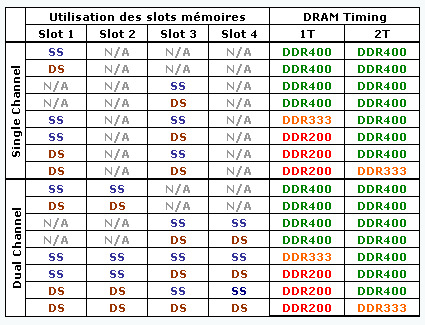
There is no easy way to determine maximum speed. You need to get the Bios Developer Guide (#26094) from AMD's site, and go to chapter 4.1.1, then to the proper subchapter depending on your CPU core revision (revision E is Venice core - maybe Winchester core too). If you have a revision E core, you can also look at this table for the most common cases (in this table, SS = Single-Sided, with 1 bank, and chips on only one side usually, DS = Dual-Sided, with two banks and chips on both sides of the stick).

Edit: Winchester core is revision D, not E.
Last edited by widan on Fri Feb 03, 2006 12:09 am, edited 1 time in total.
Top
omschaub
Tux's lil' helper
Tux's lil' helper
User avatar
Posts: 132
Joined: Fri Sep 03, 2004 5:23 pm
Location: Roanoke, VA
Contact:
Contact omschaub
Website

  • Quote

Post by omschaub » Thu Feb 02, 2006 9:09 pm

widan wrote: There is no easy way to determine maximum speed. You need to get the Bios Developer Guide (#26094) from AMD's site, and go to chapter 4.1.1, then to the proper subchapter depending on your CPU core revision (revision E is Venice core - maybe Winchester core too). If you have a revision E core, you can also look at this table for the most common cases (in this table, SS = Single-Sided, with 1 bank, and chips on only one side usually, DS = Dual-Sided, with two banks and chips on both sides of the stick).
I don't see anything listed in my specs about a revision 'letter' ... E or otherwise.. but here is my processor specs

San Diego core.. so I guess no revision E since it is not listed on the official specs :(
Support bacteria -- it's the only culture some people have!
Top
widan
Veteran
Veteran
User avatar
Posts: 1512
Joined: Tue Jun 07, 2005 4:26 pm
Location: Paris, France

  • Quote

Post by widan » Thu Feb 02, 2006 11:08 pm

San Diego is a Venice with twice the cache, so it is also revision E. On the AMD site, it is the "stepping" line (the first letter of that is the revision).
Top
omschaub
Tux's lil' helper
Tux's lil' helper
User avatar
Posts: 132
Joined: Fri Sep 03, 2004 5:23 pm
Location: Roanoke, VA
Contact:
Contact omschaub
Website

  • Quote

Post by omschaub » Thu Feb 02, 2006 11:13 pm

Nice widan.. thanks for the info.. I will take your links, study the tables, set up the 'best possible' and then get testing!

Thanks again!
Support bacteria -- it's the only culture some people have!
Top
widan
Veteran
Veteran
User avatar
Posts: 1512
Joined: Tue Jun 07, 2005 4:26 pm
Location: Paris, France

  • Quote

Post by widan » Fri Feb 03, 2006 1:10 am

In your case, you will likely have 2 double-sided sticks per channel (I don't think there are 1GB single-sided modules, and most 512MB are still double-sided), so the official maximum is DDR333 2T (or DDR200 1T, but you want to avoid that one). You probably can try DDR400 2T with reasonable chances of success (you will need to force it manually in the BIOS).

If you try DDR400 2T or even 1T, and it refuses to boot, remember that your CPU can always use DDR400 1T with one double sided stick per channel, so just remove the new sticks, reboot, and go in the BIOS to back off the settings. Then put the two sticks back in. No need to clear the CMOS, which is quite useful since the "clear CMOS" jumper is usually at the worst possible place when the board is in a case (I remember a board where it was between two PCI slots :x).
Top
meph84
Tux's lil' helper
Tux's lil' helper
Posts: 79
Joined: Fri Aug 19, 2005 12:40 pm
Location: Czech Rep.

  • Quote

Post by meph84 » Fri Feb 03, 2006 8:51 am

6D7474 wrote:most motherboards for athlon64 can't run all 4 DIMMs at DDR400 - so your memory will be downclocked to 333MHz...
ooops... in that case I'm very lucky I think :)
Gentoo Linux 2.6.15-gentoo-r7
AMD 64 3000+, 2GB RAM 400Mhz, GeForce 6800,
180GB Samsung HDD, LG DVD Burner,
SoundBlaster Audigy 2 ZS, Winfast 2000XP Deluxe TV,
KDE 3.5
Top
omschaub
Tux's lil' helper
Tux's lil' helper
User avatar
Posts: 132
Joined: Fri Sep 03, 2004 5:23 pm
Location: Roanoke, VA
Contact:
Contact omschaub
Website

  • Quote

Post by omschaub » Wed Feb 15, 2006 11:08 pm

Just an update here:

I got in the memory and installed all 3 GB on the board and cranked it up to 200MHZ.. DDR400..and I ran memtest. It ran great until the 6th test where it produced 3 errors.. subsequent tests caused an error here or there. Through the first run, I got a total of 7 errors. I tried to slow the timings down, but that did not help. Then I downgraded the speed to DDR333 and ran the memtest for several hours without a single error.. so that is where I sit, slower than I wanted, but happy with my memory size! Thanks for all the help and info!
Support bacteria -- it's the only culture some people have!
Top
energyman76b
Advocate
Advocate
User avatar
Posts: 2048
Joined: Wed Mar 26, 2003 11:31 am
Location: Germany

Re: DDR400 and AMD64 question [ANSWERED]

  • Quote

Post by energyman76b » Thu Feb 16, 2006 4:28 pm

Hi,

you have to put always the same type of memory in all slots used.

That simple.

And it is on their hp.

You just did not look carefully enough.

You can put different types of RAM in the slots, but then you loose the dual channel mode and lots of speed.

If you can have 4GB at ddr400 depends on your CPU. Newer Venice can do it, elder Newcastle can not.

It is all documented. You just have to look for it.
Study finds stunning lack of racial, gender, and economic diversity among middle-class white males

I identify as a dirty penismensch.
Top
widan
Veteran
Veteran
User avatar
Posts: 1512
Joined: Tue Jun 07, 2005 4:26 pm
Location: Paris, France

Re: DDR400 and AMD64 question [ANSWERED]

  • Quote

Post by widan » Thu Feb 16, 2006 6:21 pm

energyman76b wrote:You can put different types of RAM in the slots, but then you loose the dual channel mode and lots of speed.
You need to fill the slots two by two with identical modules. But the two pairs can be different (ie 2*512MB + 2*1GB). You also need to fill the slots in a certain order (ie do not leave slot 1 on channel A empty when slot 1 on channel B has a DIMM in it).
energyman76b wrote:If you can have 4GB at ddr400 depends on your CPU. Newer Venice can do it, elder Newcastle can not.
It also depends on your RAM. For 4GB at DDR400 2T (assuming 1GB DIMMs) on a Venice, you need at least one pair of DIMMs to be single-sided (four double-sided DIMMs will only get you DDR333 2T).
Top
omschaub
Tux's lil' helper
Tux's lil' helper
User avatar
Posts: 132
Joined: Fri Sep 03, 2004 5:23 pm
Location: Roanoke, VA
Contact:
Contact omschaub
Website

Re: DDR400 and AMD64 question [ANSWERED]

  • Quote

Post by omschaub » Thu Feb 16, 2006 6:28 pm

widan wrote:
energyman76b wrote:You can put different types of RAM in the slots, but then you loose the dual channel mode and lots of speed.
You need to fill the slots two by two with identical modules. But the two pairs can be different (ie 2*512MB + 2*1GB). You also need to fill the slots in a certain order (ie do not leave slot 1 on channel A empty when slot 1 on channel B has a DIMM in it).
Widan.. I was just about to make this comment and you beat me to it. Your example (2*512MB + 2*1GB) is exactly what I have and my MB reports that it is operating the memory in Dual Channel mode -- at DDR333 -- but Dual Channel none the less, so I am sated! :D No real "noticable" speed diference either, which is a plus.
Support bacteria -- it's the only culture some people have!
Top
Locked

16 posts • Page 1 of 1

Return to “Gentoo on AMD64”

Jump to
  • Assistance
  • ↳   News & Announcements
  • ↳   Frequently Asked Questions
  • ↳   Installing Gentoo
  • ↳   Multimedia
  • ↳   Desktop Environments
  • ↳   Networking & Security
  • ↳   Kernel & Hardware
  • ↳   Portage & Programming
  • ↳   Gamers & Players
  • ↳   Other Things Gentoo
  • ↳   Unsupported Software
  • Discussion & Documentation
  • ↳   Documentation, Tips & Tricks
  • ↳   Gentoo Chat
  • ↳   Gentoo Forums Feedback
  • ↳   Duplicate Threads
  • International Gentoo Users
  • ↳   中文 (Chinese)
  • ↳   Dutch
  • ↳   Finnish
  • ↳   French
  • ↳   Deutsches Forum (German)
  • ↳   Diskussionsforum
  • ↳   Deutsche Dokumentation
  • ↳   Greek
  • ↳   Forum italiano (Italian)
  • ↳   Forum di discussione italiano
  • ↳   Risorse italiane (documentazione e tools)
  • ↳   Polskie forum (Polish)
  • ↳   Instalacja i sprzęt
  • ↳   Polish OTW
  • ↳   Portuguese
  • ↳   Documentação, Ferramentas e Dicas
  • ↳   Russian
  • ↳   Scandinavian
  • ↳   Spanish
  • ↳   Other Languages
  • Architectures & Platforms
  • ↳   Gentoo on ARM
  • ↳   Gentoo on PPC
  • ↳   Gentoo on Sparc
  • ↳   Gentoo on Alternative Architectures
  • ↳   Gentoo on AMD64
  • ↳   Gentoo for Mac OS X (Portage for Mac OS X)
  • Board index
  • All times are UTC
  • Delete cookies

© 2001–2026 Gentoo Foundation, Inc.

Powered by phpBB® Forum Software © phpBB Limited

Privacy Policy


magic