Page 5 of 14
Posted: Fri Dec 27, 2019 10:41 pm
by Sakaki
Hello,
I've just posted a
v1.5.3 bugfix release of my bootable 64-bit Gentoo image for the RPi4 B / RPi3 B & B+ on GitHub (
here, includes full download instructions).
For screenshots, and details of the major changes introduced in 1.5.2, please see my earlier post.
A changelog from the prior release image (with upgrade instructions) may be viewed
here, but in summary:
- Updated the uploadable firmware file /lib/firmware/brcmfmac43455-sdio.bin (for the RPi3B+/4B's CYW43455 WiFi/BT chip) to match that provided by the Raspbian distribution (by adding their newer version of this file to the sys-firmware/brcm43430-firmware package, controlled by the 43455-fix USE flag, removing it from sys-kernel/linux-firmware, basis the same USE flag, and adding the 43455-fix USE flag to the default profile). This change will (hopefully) improve WiFi performance / stability meaningfully, particularly on the RPi4B (where, for some APs, the older driver was preventing association entirely). Thanks to haaldemir for reporting.
- Bumped media-libs/raspberrypi-userland, as 6by9's pointer-wrangling PR#586 (64-bit userland MMAL) has now been tidied up and merged into raspberrypi-userland upstream.
- Upgraded the shipped kernels, to bcm{rpi3,2711}-kernel-bis-bin-4.19.89.20191217.
- Various minor ebuild tidy-ups.
- All packages brought up-to-date against the Gentoo tree, as of 14 December 2019 (so e.g., sys-devel/clang is now at 9.0.1_rc2).
Users on the prior 1.5.2 release can simply run "sudo genup" in a terminal to upgrade to 1.5.3 (or wait for the weekly autoupdate to do it on your behalf), rebooting once complete. Manual upgrade instructions for users on older versions of the image are also provided, here.
Have fun ^-^
And, as always, any problems or comments, please post either in this thread, or in the project's thread on the Raspberry Pi forums (
here).
PS the bootable images are also available for download via PINN, for those who prefer that route, called gentoo64 and gentoo64lite there.
Posted: Sat Dec 28, 2019 1:17 am
by spork_kitty
So, I was lucky and received a Pi4 for the holidays! I have an existing install of genpi on my pi3, though, that I'd like to preserve in my hardware upgrade. What are the big things I should be paying attention to during my migration? Is a kernel upgrade/rebuild all I really need?
(EDIT: Backing up the entire SD card right now, as step 0.

)
Posted: Sat Dec 28, 2019 7:06 am
by orion777
Good evening!
Short question to everyone: I got approx. 3% CPU load from pigpiod. Do others have same situation? I'm on rpi 3B.
Code: Select all
  PID USER      PR  NI    VIRT    RES    SHR S  %CPU  %MEM     TIME+ COMMAND
 2459 root      20   0   74612   1628   1428 S   2.7   0.2   1:27.56 pigpiod
Posted: Sat Dec 28, 2019 9:49 am
by Sakaki
spork_kitty wrote:So, I was lucky and received a Pi4 for the holidays! I have an existing install of genpi on my pi3, though, that I'd like to preserve in my hardware upgrade. What are the big things I should be paying attention to during my migration? Is a kernel upgrade/rebuild all I really need?
(EDIT: Backing up the entire SD card right now, as step 0.
)
If you started with a modern version of the gentoo-on-rpi-64bit image (>=1.5.0), it should "just work" (i.e., you should be able to move the same card between your 3B/B+ and 4B RPis at will). If using an
earlier version, you can upgrade, but you need to follow some manual instructions. Please see the page
https://github.com/sakaki-/gentoo-on-rpi-64bit/releases for more details.
You can find your currently installed version with:
Code: Select all
demouser@pi64 ~ $ eix rpi-64bit-meta
and if that shows nothing installed then:
Code: Select all
demouser@pi64 ~ $ eix rpi3-64bit-meta
.
If upgrading from an old version, pay particular attention to dispatch-conf requested changes to /boot/config.txt, as this controls booting.
If in doubt, write the current (v1.5.3) image to a fresh card, and boot that; then you can use its filesystem (and installed package set + configs) as a reference. But, what you want to do is definitely possible ^-^
Posted: Sat Dec 28, 2019 5:47 pm
by spork_kitty
Sakaki wrote:spork_kitty wrote:So, I was lucky and received a Pi4 for the holidays! I have an existing install of genpi on my pi3, though, that I'd like to preserve in my hardware upgrade. What are the big things I should be paying attention to during my migration? Is a kernel upgrade/rebuild all I really need?
(EDIT: Backing up the entire SD card right now, as step 0.
)
If you started with a modern version of the gentoo-on-rpi-64bit image (>=1.5.0), it should "just work" (i.e., you should be able to move the same card between your 3B/B+ and 4B RPis at will).
[snip]
If in doubt, write the current (v1.5.3) image to a fresh card, and boot that; then you can use its filesystem (and installed package set + configs) as a reference. But, what you want to do is definitely possible ^-^
Good to know! Thanks for the confirmation. I should also specify that I'm using a modified kernel with nftables support, that I'm pretty sure I put together using your defconfig and a cross-compiling environment. I checked your defconfig today and I see nftables support has improved.
I think I'll put together my Pi4, then try the 3's SD card in it without modifications. It's on genpi 1.5.0 or 1.5.1. Hard to tell since the -meta package isn't installed anymore. I'll have to check logs or notes to see why, but it seems safe to say it should work.
If it comes time to upgrade the kernel I'll try using the one you ship first. Kernel maintenance is certainly not my strength, I just need nftables support so I can use fail2ban with my network-facing stuff. What's the best way to find the module names I'll need for nftables? The best way I've found so far is to navigate to them in `make menuconfig` and hit ? to get the help text. The module name isn't always there though...
EDIT: Okay, I booted it up and got the rainbow screen, then the Raspberry Pi logo and some kernel output:
[images removed]
Looks like it's trying to initialize the wi-fi (which I don't need) and can't find the regulatory.db file, then it detects an SDIO device (my guess is the SD card) and then nothing happens. Strange.
EDIT2: I put genpi64 onto an SD card, then copied the boot partition's contents to my old genpi64's boot partition contents. This booted the Pi4, and aside from it complaining about missing nftables modules (which I can fix), it works!

Posted: Sun Dec 29, 2019 3:01 pm
by NeddySeagoon
Sakaki,
I've started to cherry pick your overlay for my binhost and Pi4.
So far its just
Code: Select all
media-libs/raspberrypi-userland::genpi64
dev-embedded/rpi4-eeprom-images::genpi64
dev-embedded/rpi4-eeprom-updater::genpi64
sys-apps/rpi-video::genpi64y
It works now without changing SD cards to flash the eeprom. Thank you.
It would be really good to upstream this into ::gentoo.
I would offer but I would need to do my ebuild quiz first :)
Next on the list is hardware video decoding.
Keep up the good work.
Posted: Thu Jan 02, 2020 10:37 pm
by Sakaki
Thanks Neddy ^-^
Speaking of h/w video decoding, although the
gentoo-on-rpi-64bit image now supports access to the RPi's built-in h/w video codecs via both V4L2-M2M and MMAL endpoints (and ships with a custom version of ffmpeg that can utilise both), neither firefox nor chromium currently exploit these out of the box (see e.g.
this post and
this thread), although I think Raspbian's 32-bit custom Chromium build can use MMAL codecs, so it may be possible to adopt some of their patches (not something I've looked at yet). PRs on this topic welcome!
However, one way you
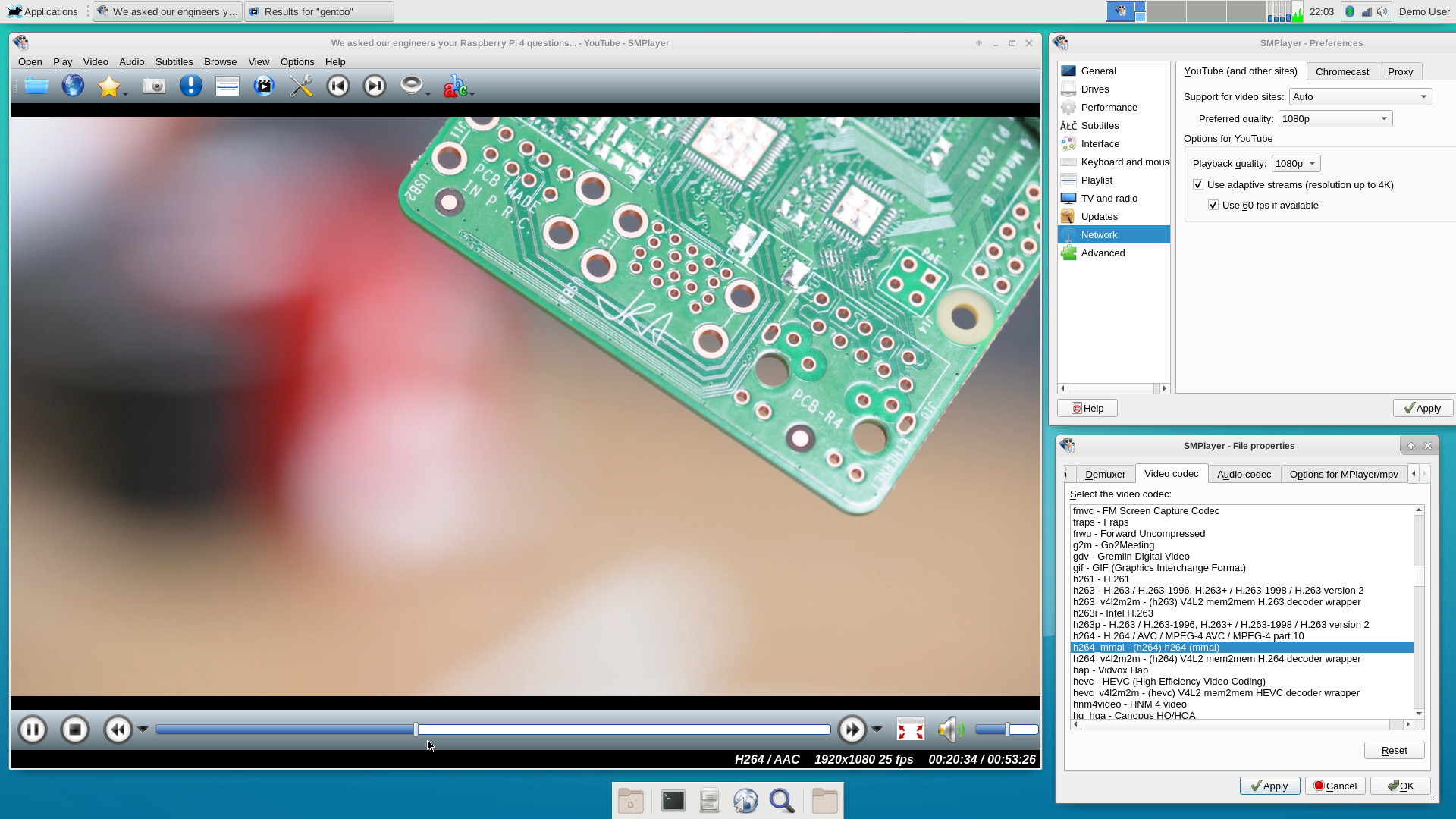
can stream high-res YouTube videos is by using Applications -> Multimedia -> SMPlayer, as this does have the necessary acceleration enabled. In this app, you can specify the default quality you want via Options -> Preferences, Network (left tab), and open streams via Open -> URL... (just paste in the youtube URL you want to watch).
On my RPi4B (4GB), with a fast IP connection, this plays back 1080p videos smoothly; here's
a screenshot.
If you like this route, you can also install media-video/smtube as a front end:
Code: Select all
demouser@pi64 ~ $ sudo emaint sync --repo genpi64
demouser@pi64 ~ $ sudo emerge -v media-video/smtube
Once built, this YouTube browser front-end can be launched by pressing F11 from within SMPlayer.
Posted: Sat Jan 04, 2020 7:08 am
by orion777
What about the video capturing over the camera? Is it done via built-in codec or it is done by using CPU resources? Because the CPU load is about 2.6 with live preview, tested over remote desktop.. (all 4 kernels are loaded about 60%)
Posted: Sat Jan 04, 2020 10:36 am
by Sakaki
orion777 wrote:What about the video capturing over the camera? Is it done via built-in codec or it is done by using CPU resources? Because the CPU load is about 2.6 with live preview, tested over remote desktop.. (all 4 kernels are loaded about 60%)
Yes, it uses the built-in codec. The live view CPU is consumed in
decoding the H264 stream again (which is
done in software, here) and in displaying the output (using sdl).
As noted e.g. in the
project's wiki, here, you can just
capture an H264 stream using e.g.:
Code: Select all
demouser@pi64 ~ $ ffmpeg -f video4linux2 -input_format h264 \
  -video_size 1280x720 -framerate 30 -i /dev/video0 \
  -vcodec copy -an -f matroska test.mkv
using Ctrl-c to stop when done. You should find this consumes very little CPU when running.
As an alternative, as of v1.5.2 of the image MMAL is available too, along with the (bundled) apps
raspivid and
raspistill, so you can use these tools also.
Posted: Sun Jan 05, 2020 11:44 am
by ian.au
Sakaki,
I've just spent a couple of days with a new rpi4 B 4GB and installed your 27/12 image, with root on a Samsung T5 ssd. It's all flying along now and looks like it might be fast enough for daily driving, I'm going to trial it as my desktop for a month

thanks so much for all the effort that has obviously gone into the project. The install was pretty seamless for me, but there was an issue that tripped me up: so maybe this will save someone else with a non uk keyboard some googling:
The RPI Keyboard default setting.. it was a real pain to change that and I think you probably need to reconsider this section of your install instructions..
UK locale settings, keyboard mapping, timezone and WiFi regulatory domain; however, these are easily changed if desired. See the Gentoo Handbook (here and here) for details on the first three;
Locale, Timezone and Wifi domain are all straightforward, but changing the keymaps variable per the wiki (in my case from "gb" to "us") doesn't successfully remap the system keyboard, to do that requires editing in
Code: Select all
/etc/X11/xorg.conf.d/00-keyboard.conf
Code: Select all
section "InputClass"
        Identifier "system-keyboard"
        MatchIsKeyboard "on"
        Option "XkbLayout" "us"
EndSection
with thanks to rwcooper on the rasberrypi.org forums for the tip on that;
In my case I also got the RPI-KYB which has a somewhat non-standard 78 key layout in US english mode so I also created
to get the mapping right and all is good now.
Cheers,
Ian
Posted: Sun Jan 05, 2020 6:28 pm
by Sakaki
ian.au wrote:Sakaki,
Locale, Timezone and Wifi domain are all straightforward, but changing the keymaps variable per the wiki (in my case from "gb" to "us") doesn't successfully remap the system keyboard, to do that requires editing in
Code: Select all
/etc/X11/xorg.conf.d/00-keyboard.conf
Thanks Ian, I really need to add a user-friendly way to set these various locale settings, piwiz-style, at startup... in the meantime though, I have updated the install instructions to reflect the /etc/X11/xorg.conf.d/00-keyboard.conf issue.
Posted: Sun Jan 05, 2020 6:51 pm
by Sakaki
Hello,
If you are interested in running
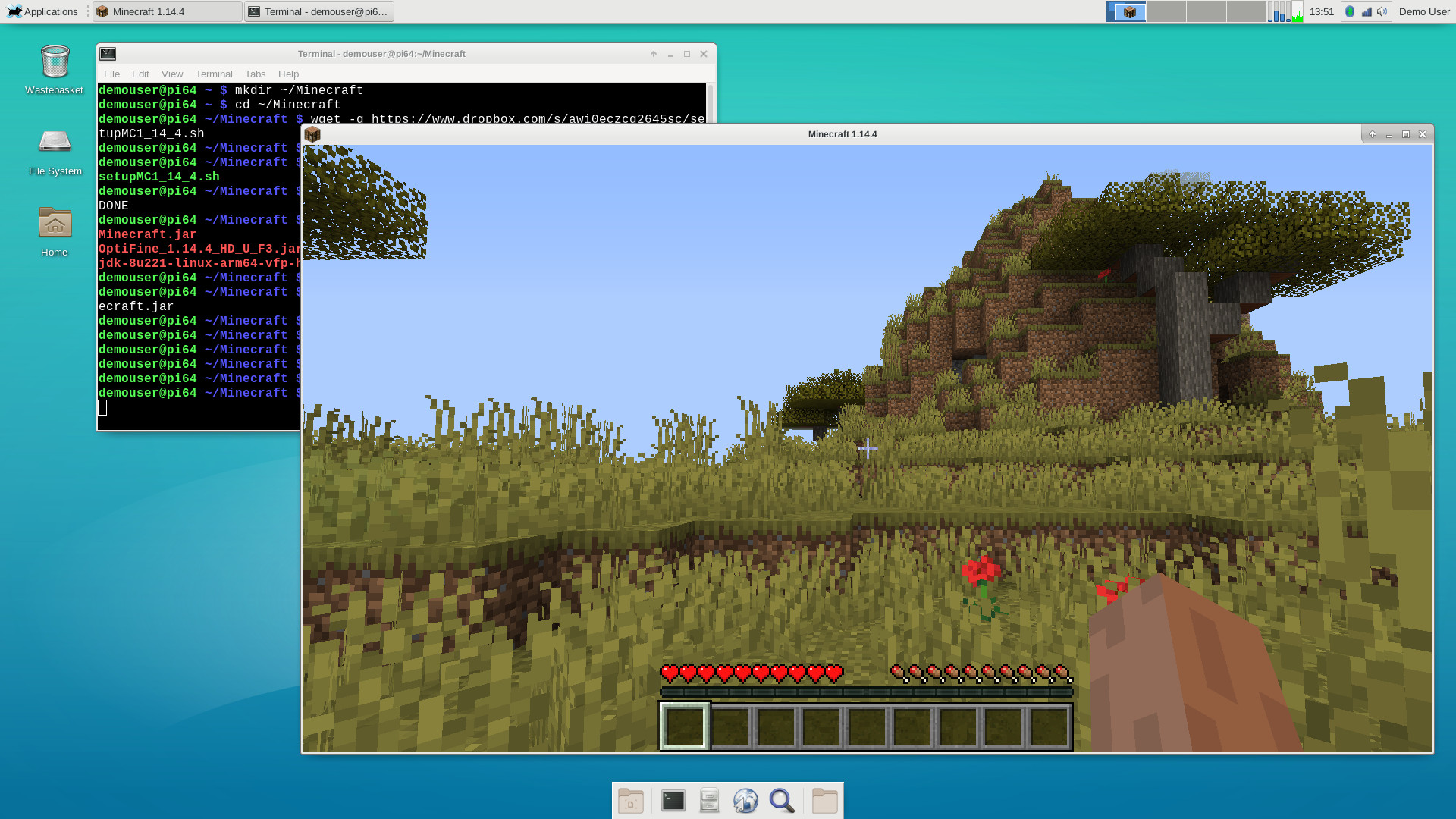
full Minecraft v1.14.4 (with OptiFine) on your RPi4 under the v1.5.3 image, please see my post
here (credit for the original instructions: rpiMike).
Please note this will require you to download executables and other files from various sources that you may or may not deem trustworthy... proceed at your own risk!
Here's a screenshot.
Posted: Mon Jan 06, 2020 2:00 pm
by ian.au
Sakaki,
I've experienced another couple of issues as I'm setting up this system - so I'm just going to mention them here;
I managed to crash the system by stretching a chromium window fully across HDMI0-HDMI1 and was noticing some degradation generally in graphics performance and system responsiveness as more tabs and windows were opened. Logs were showing multiple instances of the following error:
Code: Select all
Jan 5 13:12:00 pi64 kernel: [drm:vc4_bo_create [vc4]] *ERROR* Failed to allocate from CMA:
After a bit of investigation and a couple of re-reads of your Github info I noticed that the default image ships with fkms-v3d set, but the default options for a new user
Code: Select all
Applications -> Settings -> Window Manager Tweaks [Compositor]
is set to on.
Killing the compositor immediately dropped 20% of CPU usage at a cost of about 10% increase in memory use - and the kernel message has disappeared. The memory use increase in part due to the fact that I set
to include
and the overall performance is much improved for those two changes, so I think they're worth mentioning.
Next issue was in two parts, on I've solved, the other I really haven't been able to work out.. so starting with the symptom that started the process: I found that even though I had disabled the power manager and screensaver options if I left the computer unattended for more than 15-30 mins (really not sure how long) I would come back to find the screens blank, but with backlights on

and unresponsive to kbd or mouse i/o. System was still up and could be operated normally via ssh.
[edit - removed solution after screens blanked again as above] So both parts of this problem still occur. With the screen blanking issue there appears a concurrent log error
Code: Select all
pi64 kernel: raspberrypi-firmware soc:firmware: Request 0x00048019 returned status 0x80000001
Last issue is really strange, whilst troubleshooting the screen-blanking issue above I briefly turned on the XscreenSaver with screen lock and found that I could not unlock the screen - my password wouldn't be accepted by the unlock dialog. I have no idea what the cause of that behavior might be, so my solution for now is to turn it off, it's bedtime here.
Cheers,
Ian
Posted: Tue Jan 07, 2020 8:50 pm
by Sakaki
Hi Ian,
not sure what is causing the screen blanking issue you experienced, not something I've seen here (and I have RPi4s that have been running this image since it was released). I do recall there was one earlier issue with screensaver blanking, that had an autostart service added to fix it; this
may be conflicting with anything you are trying to do. Please see:
https://github.com/sakaki-/genpi64-over ... -r3.ebuild
One other thing you
could try would be to select Applications -> Settings ->RPi Config Tool, select "Force HDMI output, even if no display detected", and save (rebooting when prompted, and electing to keep your settings on reboot).
As to the X screensaver issue, the simplest way around that is probably to issue:
Code: Select all
demouser@pi64 ~ $ sudo emaint sync --repo genpi64
demouser@pi64 ~ $ sudo emerge -v xfce-extra/xfce4-xkb-plugin
and once this completes, right-click in an empty part of the top (grey) panel bar, and select Panel -> Add New Items... from the drop-down. Then click on the "Keyboard Layouts" entry (you may have to scroll through the list to find it) and click the Add button.
You should now see a flag on your panel bar. Right-click on this and choose Properties from the drop-down. Under "Behavior" choose Manage layout: "globally" (from the menu there) and then click Close.
Then select Applications -> Settings -> Keyboard, Layout tab, and uncheck "Use system defaults". Remove all keyboards from the list, then add your own layout (you can add multiple if you like; if you do so, you can then click on the flag icon to switch between them, and/or set a hotkey to do that in the Applications -> Settings -> Keyboard, Layout dialog).
You should now find that the X screensaver works fine (and your /etc/X11/xorg.conf.d/00-keyboard.conf entry will be ignored).
You may need to re-login once to get everything to "take".
I'm going to aim to ship future releases with this plugin installed - makes setting up the keyboard much easier (not sure how I missed it initially! ><)
Posted: Tue Jan 07, 2020 10:41 pm
by ian.au
Sakaki wrote:Hi Ian,
not sure what is causing the screen blanking issue you experienced, not something I've seen here (and I have RPi4s that have been running this image since it was released). I do recall there was one earlier issue with screensaver blanking, that had an autostart service added to fix it; this
may be conflicting with anything you are trying to do. Please see:
https://github.com/sakaki-/genpi64-over ... -r3.ebuild
One other thing you
could try would be to select Applications -> Settings ->RPi Config Tool, select "Force HDMI output, even if no display detected", and save (rebooting when prompted, and electing to keep your settings on reboot).
Hi Sakaki, thanks for that, I'm back at work this week but I'll find some time to review this issue. Just FYI the blanking issue only occurs in my newly created user, your demouser account never blanks the screen, without the 'force HDMI..' hack, so seems to me there's some default config item that needs to be amended. I'll see if I can diff through the configs and find the culprit. My plan this morning is to usermod my new daily user away, diff the configs and see if I can fix up the profile. I've been away from xfce on the desktop for a few years now so that's slowing me up too, I really appreciate the input.
As to the X screensaver issue, the simplest way around that is probably to issue:
Code: Select all
demouser@pi64 ~ $ sudo emaint sync --repo genpi64
demouser@pi64 ~ $ sudo emerge -v xfce-extra/xfce4-xkb-plugin
and once this completes, right-click in an empty part of the top (grey) panel bar, and select Panel -> Add New Items... from the drop-down. Then click on the "Keyboard Layouts" entry (you may have to scroll through the list to find it) and click the Add button.
You should now see a flag on your panel bar. Right-click on this and choose Properties from the drop-down. Under "Behavior" choose Manage layout: "globally" (from the menu there) and then click Close.
Then select Applications -> Settings -> Keyboard, Layout tab, and uncheck "Use system defaults". Remove all keyboards from the list, then add your own layout (you can add multiple if you like; if you do so, you can then click on the flag icon to switch between them, and/or set a hotkey to do that in the Applications -> Settings -> Keyboard, Layout dialog).
You should now find that the X screensaver works fine (and your /etc/X11/xorg.conf.d/00-keyboard.conf entry will be ignored).
You may need to re-login once to get everything to "take".
I'm going to aim to ship future releases with this plugin installed - makes setting up the keyboard much easier (not sure how I missed it initially! ><)
Yes I figured the keyboard was likely at the root of this one, I'll let you know how I get on, as above and previously thanks for taking the time with this, it's a really promising project.
Cheers,
Posted: Thu Jan 09, 2020 4:03 pm
by roylongbottom
Sakaki wrote:Thanks Neddy ^-^
Speaking of h/w video decoding, although the
gentoo-on-rpi-64bit image now supports access to the RPi's built-in h/w video codecs via both V4L2-M2M and MMAL endpoints (and ships with a custom version of ffmpeg that can utilise both), neither firefox nor chromium currently exploit these out of the box (see e.g.
this post and
this thread), although I think Raspbian's 32-bit custom Chromium build can use MMAL codecs, so it may be possible to adopt some of their patches (not something I've looked at yet). PRs on this topic welcome!
Hi Sakaki
Some benchmark result of video players using Raspbian and Gentoo are here:
https://forums.gentoo.org/viewtopic-p-8 ... ml#8407756
Posted: Fri Jan 24, 2020 11:25 pm
by spork_kitty
Maybe I missed it in the thread but I noticed when the screen blanks and comes back, I get a mouse cursor and it reacts to parts of the GUI, but the screen is otherwise black and unresponsive. When I restart lightdm the loginbox is transparent. I was able to type my password and get into my account, but it too was a black screen. It takes a full reboot to fix. This is genpi 1.5.3, more or less unmodified (disabled screensaver and screen blanking until I figure out a fix).
distcc-pump (Again)
Posted: Thu Jan 30, 2020 11:52 am
by Biker
Hi, Sakaki and thanks for all your work with this binary distro.
I've read through most of this (2-part) thread, just to get up to speed.
I noticed a number of distcc related problems somewhere back in the thread, but I've also noted the Gentoo bug
https://bugs.gentoo.org/702146 indicating thoughts of removing distcc-pump from the Gentoo handbook.
Was wondering if it would make sense to remove the distcc-pump from the (commented) FEATURES= in make.conf as provided in a fresh installation?
And also if it should still be recommended in
https://github.com/sakaki-/gentoo-on-rp ... tcc-Client to have distcc-pump in the FEATURES ?
Posted: Thu Jan 30, 2020 7:08 pm
by NeddySeagoon
Biker,
Testing portage has distcc-pump removed already.
Re: distcc-pump (Again)
Posted: Fri Jan 31, 2020 11:59 am
by Sakaki
Biker wrote:Was wondering if it would make sense to remove the distcc-pump from the (commented) FEATURES= in make.conf as provided in a fresh installation?
And also if it should still be recommended in
https://github.com/sakaki-/gentoo-on-rp ... tcc-Client to have distcc-pump in the FEATURES ?
Thanks for the reminder on this. I've removed distcc-pump from the wiki, and
set up an issue to drop it from make.conf in the next image release.
sys-boot/rpi3-64bit-firmware
Posted: Fri Jan 31, 2020 6:31 pm
by nvertigo
I've a serious issue when using sys-boot/rpi3-64bit-firmware-1.20200114:
The boot process stops after checking the fses (since it's at that point, when the screen blanks for a split second, I guess it happens when the gpu fw should be loaded).
This doesn't happen if I use sys-boot/rpi3-64bit-firmware-1.20190925.
It doesn't matter if I use my own kernel build or your prebuild kernel.
Re: sys-boot/rpi3-64bit-firmware
Posted: Fri Jan 31, 2020 7:40 pm
by Sakaki
nvertigo wrote:I've a serious issue when using sys-boot/rpi3-64bit-firmware-1.20200114:
The boot process stops after checking the fses (since it's at that point, when the screen blanks for a split second, I guess it happens when the gpu fw should be loaded).
This doesn't happen if I use sys-boot/rpi3-64bit-firmware-1.20190925.
It doesn't matter if I use my own kernel build or your prebuild kernel.
Ack. I've seen this myself also, in recent testing.
Won't affect most users happily, as the most recent unmasked
kernels (bcm{rpi3,2711}-kernel{,-bis}-bin-4.19.89.20191217) constrain this package to be an earlier version (through the with-matching-boot-fw USE flag).
I've just masked sys-boot/rpi3-64bit-firmware-1.20200114, pending further investigation.
Re: sys-boot/rpi3-64bit-firmware
Posted: Fri Jan 31, 2020 8:18 pm
by nvertigo
Sakaki wrote:
Ack. I've seen this myself also, in recent testing.
Just for completeness: when 20200114 showed up (before your binary package was ready) I've build the package from source: same result.
And now for something completely different: for the removed distcc-pump feature:
"pump emerge" still works
Code: Select all
ara ~ # alias emerge
alias emerge='FEATURES="-userpriv" /usr/bin/pump /usr/bin/emerge'
userpriv doesn't permit opening sockets (needed for pump include server).
To distcc clang, I've created (on the build host):
Code: Select all
adler ~ # ls -la /usr/local/bin/aarch64-unknown-linux-gnu-clang*
-rwxr-xr-x 1 root root 65 Jan 18 09:36 /usr/local/bin/aarch64-unknown-linux-gnu-clang
-rwxr-xr-x 1 root root 67 Jan 18 09:36 /usr/local/bin/aarch64-unknown-linux-gnu-clang++
-rwxr-xr-x 1 root root 69 Jan 18 09:31 /usr/local/bin/aarch64-unknown-linux-gnu-clang++-9
-rwxr-xr-x 1 root root 67 Jan 18 09:34 /usr/local/bin/aarch64-unknown-linux-gnu-clang-9
adler ~ # cat /usr/local/bin/aarch64-unknown-linux-gnu-clang
#!/bin/bash
exec /usr/lib/llvm/9/bin/clang --target=aarch64 "$@"
adler ~ # cat /usr/local/bin/aarch64-unknown-linux-gnu-clang++
#!/bin/bash
exec /usr/lib/llvm/9/bin/clang++ --target=aarch64 "$@"
adler ~ # cat /usr/local/bin/aarch64-unknown-linux-gnu-clang++-9
#!/bin/bash
exec /usr/lib/llvm/9/bin/clang++-9 --target=aarch64 "$@"
adler ~ # cat /usr/local/bin/aarch64-unknown-linux-gnu-clang-9
#!/bin/bash
exec /usr/lib/llvm/9/bin/clang-9 --target=aarch64 "$@"
adler ~ # ls -la /usr/lib/distcc/aarch64-unknown-linux-gnu-clang*
lrwxrwxrwx 1 root root 16 Jan 18 09:37 /usr/lib/distcc/aarch64-unknown-linux-gnu-clang -> /usr/bin/distccd
lrwxrwxrwx 1 root root 16 Jan 18 09:37 /usr/lib/distcc/aarch64-unknown-linux-gnu-clang++ -> /usr/bin/distccd
lrwxrwxrwx 1 root root 16 Jan 18 09:37 /usr/lib/distcc/aarch64-unknown-linux-gnu-clang++-9 -> /usr/bin/distccd
lrwxrwxrwx 1 root root 16 Jan 18 09:37 /usr/lib/distcc/aarch64-unknown-linux-gnu-clang-9 -> /usr/bin/distccd
Works flawlessly for me.
sys-boot/rpi3-64bit-firmware dependency conflict ??
Posted: Wed Feb 12, 2020 9:38 am
by Biker
Sakaki,
During the genup I notice :
Code: Select all
WARNING: One or more updates/rebuilds have been skipped due to a dependency conflict:

sys-boot/rpi3-64bit-firmware:0

  (sys-boot/rpi3-64bit-firmware-1.20200210:0/0::genpi64, ebuild scheduled for merge) USE="-dtbo -pitop" conflicts with
    ~sys-boot/rpi3-64bit-firmware-1.20190925[-dtbo(+)] required by (sys-kernel/bcmrpi3-kernel-bis-bin-4.19.89.20191217:0/0::genpi64, installed) USE="checkboot with-matching-boot-fw -pitop"
    ^                             ^^^^^^^^^^
    ~sys-boot/rpi3-64bit-firmware-1.20190925[-dtbo(+)] required by (sys-kernel/bcm2711-kernel-bis-bin-4.19.89.20191217:0/0::genpi64, installed) USE="checkboot pi3multiboot with-matching-boot-fw -pitop"
    ^                             ^^^^^^^^^^
To your understanding, is this due to something I've done (wrong) ?
Alternatively, is there something I can do to avoid this situation ?
Missing layman
Posted: Wed Feb 12, 2020 9:55 am
by Biker
When running genup :
Code: Select all
 * Syncing all portage overlays
/usr/bin/eix-sync: line 396: layman: command not found
 * layman -S failed
Should layman be part of GenPi64 by default ?
If not, could 'genup' check for the presence of 'layman' before trying to use it instead of reporting it's absence as an error ?