Linux 6.18 causes touchpad LED to burn my eyeballs
Message

Linux 6.18 causes touchpad LED to burn my eyeballs
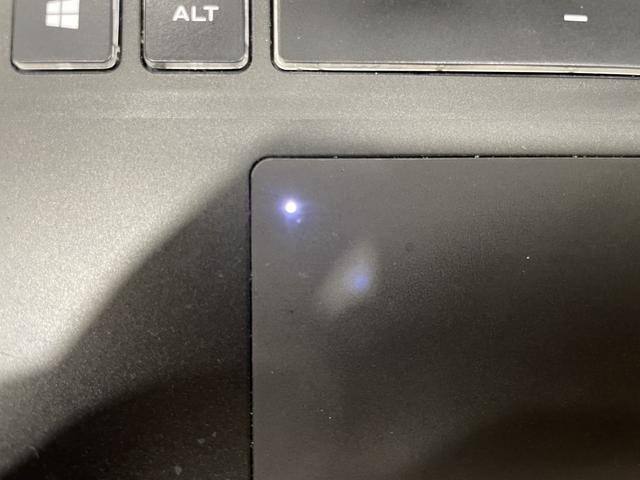
I understand that Linux 6.18 has done some significant work on touchpads, specifically in the haptics area. But when I boot into 6.18 (as opposed to my previous 6.12) there is a small LED in the touchpad that lights up whenever it is disabled, specifically during boot before sddm loads and when working in the virtual console, that is so bright I have to cover it or it hurts my eyes and causes a blurry spot for the next 20-30 of minutes. There are the obvious fixes of downgrading back to Linux 6.12 or masking the LED with tape, but neither seem like the correct way to address this issue, which is to disable the LED in configuration somewhere, but I have not been able to find that solution. Any help or tips would be appreciated.


It's a CyberpowerPC laptop (CyberPowerPC TRACER V EDGE R15E), and I'm not entirely certain what device the trackpad is. It's an i2c connected device using hid-multitouch as shown in the following dmesg extract
I have done some more digging (hense the more detail above), and apparently this sun-level LED is the regularly functioning "disabled" indicator. When booting in Windows (even MS just lists it as a HID-compliant touch pad) and toggling the touchpad disable button (fn-F5) it turns on just as bright when it's disabled. I have just never bothered to do that. I am unable to toggle the touchpad manually in Linux in Plasma, but I assume if I could it would match. Also enabling the gpm service turns off the light too. What appears to have happened is that Linux now "correctly" disables the touchpad when not in a GUI environment or otherwise needing a mouse, while in 6.12 the touchpad was just always enabled.
So, this is the "correct" behaviour and the designer of this hardware should be forced to have a LED constantly in their peripheral vision until they've learned their lesson. A small thin tape square may be the solution after all.
The offending LED
Code: Select all
[    1.906152] input: UNIW0001:00 093A:0255 Mouse as /devices/platform/AMDI0010:01/i2c-0/i2c-UNIW0001:00/0018:093A:0255.0001/input/input5
[    1.906437] input: UNIW0001:00 093A:0255 Touchpad as /devices/platform/AMDI0010:01/i2c-0/i2c-UNIW0001:00/0018:093A:0255.0001/input/input6
[    1.906530] hid-generic 0018:093A:0255.0001: input,hidraw0: I2C HID v1.00 Mouse [UNIW0001:00 093A:0255] on i2c-UNIW0001:00
[    2.063232] input: UNIW0001:00 093A:0255 Mouse as /devices/platform/AMDI0010:01/i2c-0/i2c-UNIW0001:00/0018:093A:0255.0001/input/input9
[    2.063364] input: UNIW0001:00 093A:0255 Touchpad as /devices/platform/AMDI0010:01/i2c-0/i2c-UNIW0001:00/0018:093A:0255.0001/input/input10
[    2.063476] hid-multitouch 0018:093A:0255.0001: input,hidraw0: I2C HID v1.00 Mouse [UNIW0001:00 093A:0255] on i2c-UNIW0001:00
So, this is the "correct" behaviour and the designer of this hardware should be forced to have a LED constantly in their peripheral vision until they've learned their lesson. A small thin tape square may be the solution after all.
The offending LED
search for UNIW0001:00 093A:0255 Touchpad and you'll find many issues or infos from the past.
have you asked CyberPower Support ?
is your BIOS current and there's no Option in BIOS settings, regarding LED ?
i would try e.g. current Fedora Live ISO (Rawhide) or Gnome OS nightly https://os.gnome.org/ and take test.
good luck.

can't look at the uploaded picture, because many (fishy) sites are blocked on my Router and System !
use https://wiki.gentoo.org/wiki/Wgetpaste next time.
EDIT: https://www.tuxedocomputers.com/en/Info ... ng-.tuxedo - scroll down to Permanently disable touchpad.
have you asked CyberPower Support ?
is your BIOS current and there's no Option in BIOS settings, regarding LED ?
i would try e.g. current Fedora Live ISO (Rawhide) or Gnome OS nightly https://os.gnome.org/ and take test.
good luck.
can't look at the uploaded picture, because many (fishy) sites are blocked on my Router and System !
use https://wiki.gentoo.org/wiki/Wgetpaste next time.
EDIT: https://www.tuxedocomputers.com/en/Info ... ng-.tuxedo - scroll down to Permanently disable touchpad.
and activate gpm.Also enabling the gpm service turns off the light too
" Die Realität ist eine Illusion, die durch Mangel an ehrlicher Kommunikation entsteht "
---
" Der Mensch ist von Natur aus neugierig, was am Ende übrig bleibt ist die Gier "
---
" Der Mensch ist von Natur aus neugierig, was am Ende übrig bleibt ist die Gier "
- rab0171610
- l33t

- Posts: 721
- Joined: Sat Dec 24, 2022 1:41 am
I would get creative. I am not at the laptop so obviously I can only be creative but have no way of verifying if it is practical or not in real life.
Provided you still want to see the light when activated, you could try a hole punch and wax paper. Use a very light adhesive to apply the dot of wax paper over it.
You could rub beeswax over the area lightly to buffer it.
As you mentioned before, a very small dot of matte tape.
You might be able to use a yellow or orange highlighter type material. Or a drop of water based acrylic paint thinned with water similar to when painting stain glass for crafts. Again this is if you only want to apply a filter to the light. If you don't care whether you see the light or not, you could use a solid paint or silver spray paint on a Qtip. Dab the paint onto the light. You could use tape with a small pin hole exposing only the light for masking.
A hole punch and any thin colored plastic to create a small dot and apply with light adhesive. They make file folders in sheer see-through plastic in multiple colors (red, blue, yellow, etc.)
If you don't care whether you see it or not, then obviously you don't have to worry about transparency.
A dot of paint or fingernail polish. (Acetone and a q-tip can remove that later.) If you plan to sell the laptop, then you want to make sure it is reversible.
They also make metallic finish wax sold at craft stores. You could get it in silver or pewter, whichever is closest in color to the touchpad paint and only using a very very small microdot of the product on the tip of a needle or push pin, apply the silver colored "wax metallic finish" and buff it with a Q-tip or cotton ball. Buff several times to spread it as thin as possible and remove excess.
If you just want to cover it and be done with it, then a sharpie works well. Quick and easy. Rubbing alcohol can remove sharpie marks later in many cases.
Provided you still want to see the light when activated, you could try a hole punch and wax paper. Use a very light adhesive to apply the dot of wax paper over it.
You could rub beeswax over the area lightly to buffer it.
As you mentioned before, a very small dot of matte tape.
You might be able to use a yellow or orange highlighter type material. Or a drop of water based acrylic paint thinned with water similar to when painting stain glass for crafts. Again this is if you only want to apply a filter to the light. If you don't care whether you see the light or not, you could use a solid paint or silver spray paint on a Qtip. Dab the paint onto the light. You could use tape with a small pin hole exposing only the light for masking.
A hole punch and any thin colored plastic to create a small dot and apply with light adhesive. They make file folders in sheer see-through plastic in multiple colors (red, blue, yellow, etc.)
If you don't care whether you see it or not, then obviously you don't have to worry about transparency.
A dot of paint or fingernail polish. (Acetone and a q-tip can remove that later.) If you plan to sell the laptop, then you want to make sure it is reversible.
They also make metallic finish wax sold at craft stores. You could get it in silver or pewter, whichever is closest in color to the touchpad paint and only using a very very small microdot of the product on the tip of a needle or push pin, apply the silver colored "wax metallic finish" and buff it with a Q-tip or cotton ball. Buff several times to spread it as thin as possible and remove excess.
If you just want to cover it and be done with it, then a sharpie works well. Quick and easy. Rubbing alcohol can remove sharpie marks later in many cases.