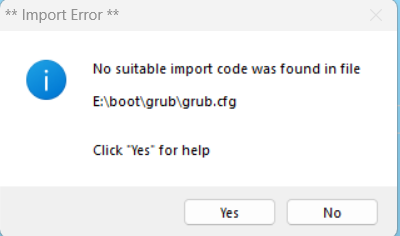
I'm new to this so i dont want to screw up my system by rushing it. The reason im on Windows 11 is because im using a brand new machine(i dont mind using a distro if its needed), but looking through the partition pages on the wiki it seems they are all tailored towards linux. I was wondering if it was possible to partition EFI using diskpart to dualboot windows 11 LTSC from massgrave and gentoo.
Perhaps im taking the wrong way entirely?
Partition EFI for dual boot using windows 11
Message
- lars_the_bear
- Guru

- Posts: 537
- Joined: Wed Jun 05, 2024 7:04 am
I'm running Gentoo on a system with Windows (10) and it was surprisingly easy to install Gentoo. AFAIK you only need one EFI partition, and I guess you already have that. You need at least one partition to install Gentoo on. You may already have a free partition but, on a new machine, you probably don't. In which case you should be able to use Windows tools (or maybe gparted from a Linux USB boot) to shrink one of the existing Windows partitions (not the EFI partition), and turn it into a free partition. Then, in the Gentoo install, just mount that free partition as the new Gentoo partition, and install Gentoo in it.
I found that the Grub configuration did the EFI stuff correctly, and added the existing Windows partition to the boot menu.
I guess it isn't always that easy, but for me it was.
BR, Lars.
I found that the Grub configuration did the EFI stuff correctly, and added the existing Windows partition to the boot menu.
I guess it isn't always that easy, but for me it was.
BR, Lars.
My EFI Partition is 260 MB and 100% free --though I've read you need about 1GB for gentoo--lars_the_bear wrote:I'm running Gentoo on a system with Windows (10) and it was surprisingly easy to install Gentoo. AFAIK you only need one EFI partition, and I guess you already have that. You need at least one partition to install Gentoo on. You may already have a free partition but, on a new machine, you probably don't. In which case you should be able to use Windows tools (or maybe gparted from a Linux USB boot) to shrink one of the existing Windows partitions (not the EFI partition), and turn it into a free partition. Then, in the Gentoo install, just mount that free partition as the new Gentoo partition, and install Gentoo in it.
I found that the Grub configuration did the EFI stuff correctly, and added the existing Windows partition to the boot menu.
I guess it isn't always that easy, but for me it was.
BR, Lars.
Partition ### Type Size Offset
------------- ---------------- ------- -------
Partition 1 System 260 MB 1024 KB
Partition 2 Reserved 16 MB 261 MB
Partition 3 Primary 328 GB 277 MB
Partition 4 Recovery 2000 MB 474 GB
Would I need grub because I doubt simply mounting would work
- lars_the_bear
- Guru
- Posts: 537
- Joined: Wed Jun 05, 2024 7:04 am
My EFI partition is 600Mb, of which only 24Mb is actually used. The Gentoo documentation does, indeed, say to reserve 1Gb, but I have no idea why. I suspect it's irrelevant if you're dual-booting, anyway: you'll have to continue to use the existing EFI partition, if there is one. I don't think there's much opportunity to resize it, or create an additional one. I guess you'd need to be more of a guru than I am, to clarify these points.
You'll need to use the grub utility to install a compatible bootloader for Linux, at some point in the installation. Grub understands EFI, although there are some subtleties, which are in the documentation. Before you get to that point, you'll need to free some space to create a partition to install Gentoo in. The documented procedure is to mount that partition on top of /mnt/gentoo, and then use chroot to make /mnt/gentoo the new root of the filesystem. Then, when you run grub and all the rest of it, you'll be looking at a Linux-like filesystem, that these tools are designed to recognize.
The documentation also talks about allocating partitions for swap space and a /boot partition. I didn't do any of that for my dual-boot installation -- I just shrunk the Windows partition, created a new partition in the free space, and mounted that partition on /mnt/gentoo.
How familiar are you with Linux in general? I have to say that I've been using Linux for 30 years, and I still find Gentoo a challenge.
BR, Lars.
You'll need to use the grub utility to install a compatible bootloader for Linux, at some point in the installation. Grub understands EFI, although there are some subtleties, which are in the documentation. Before you get to that point, you'll need to free some space to create a partition to install Gentoo in. The documented procedure is to mount that partition on top of /mnt/gentoo, and then use chroot to make /mnt/gentoo the new root of the filesystem. Then, when you run grub and all the rest of it, you'll be looking at a Linux-like filesystem, that these tools are designed to recognize.
The documentation also talks about allocating partitions for swap space and a /boot partition. I didn't do any of that for my dual-boot installation -- I just shrunk the Windows partition, created a new partition in the free space, and mounted that partition on /mnt/gentoo.
How familiar are you with Linux in general? I have to say that I've been using Linux for 30 years, and I still find Gentoo a challenge.
BR, Lars.
I just noticed it doesnt show but I do have a free partition already, https://files.catbox.moe/gumb7d.png this shows it betterlars_the_bear wrote:My EFI partition is 600Mb, of which only 24Mb is actually used. The Gentoo documentation does, indeed, say to reserve 1Gb, but I have no idea why. I suspect it's irrelevant if you're dual-booting, anyway: you'll have to continue to use the existing EFI partition, if there is one. I don't think there's much opportunity to resize it, or create an additional one. I guess you'd need to be more of a guru than I am, to clarify these points.
You'll need to use the grub utility to install a compatible bootloader for Linux, at some point in the installation. Grub understands EFI, although there are some subtleties, which are in the documentation. Before you get to that point, you'll need to free some space to create a partition to install Gentoo in. The documented procedure is to mount that partition on top of /mnt/gentoo, and then use chroot to make /mnt/gentoo the new root of the filesystem. Then, when you run grub and all the rest of it, you'll be looking at a Linux-like filesystem, that these tools are designed to recognize.
The documentation also talks about allocating partitions for swap space and a /boot partition. I didn't do any of that for my dual-boot installation -- I just shrunk the Windows partition, created a new partition in the free space, and mounted that partition on /mnt/gentoo.
How familiar are you with Linux in general? I have to say that I've been using Linux for 30 years, and I still find Gentoo a challenge.
BR, Lars.
as for my linux knowledge im good enough to survive, but best way to learn is to jump into the deep-end right
- lars_the_bear
- Guru
- Posts: 537
- Joined: Wed Jun 05, 2024 7:04 am
The unallocated partition doesn't show up on the partition listing you posted earlier, although the 328Gb Windows partition does. I'm not sure where that listing came from -- Windows, perhaps?
If you boot the Gentoo installer you should be able to 'fdisk /dev/nvme0n1' or 'fdisk /dev/sda' (depending on the kind of disk you have), and see the partition layout, including things that might be ignored by Windows. fdisk doesn't care whether there's a filesystem in the unallocated space or not. From the sizes of the partitions, you should be able to work out the partition number of the unallocated region, and create a Linux filesystem (e.g., xfs or btrfs) in that region.
As I'm sure you know, you have to get this right: writing a Linux filesystem on top of anything except the unallocated space will be catastrophic
BR, Lars.
If you boot the Gentoo installer you should be able to 'fdisk /dev/nvme0n1' or 'fdisk /dev/sda' (depending on the kind of disk you have), and see the partition layout, including things that might be ignored by Windows. fdisk doesn't care whether there's a filesystem in the unallocated space or not. From the sizes of the partitions, you should be able to work out the partition number of the unallocated region, and create a Linux filesystem (e.g., xfs or btrfs) in that region.
As I'm sure you know, you have to get this right: writing a Linux filesystem on top of anything except the unallocated space will be catastrophic
BR, Lars.
- plasmonics
- n00b

- Posts: 13
- Joined: Wed Mar 16, 2011 4:59 pm
Linux does not care how many EFI partitions you have. However, it matters to windows. Based on my own experience, if you have more than one EFI, then when windows 10 does a major update, it will complete about 99% and then crash, reverting to the previous state. It does not give a detailed error description.
According to microsoft documentation, you are only allowed one EFI partition per computer. This is a windows limitation, not Linux.
I also have a 260 MiB EFI partition on my laptop. I multiboot windows 10 with 5 different Linux'es including gentoo. The EFI partition is only 21% full. Gentoo only takes up 144 KiB.
According to microsoft documentation, you are only allowed one EFI partition per computer. This is a windows limitation, not Linux.
I also have a 260 MiB EFI partition on my laptop. I multiboot windows 10 with 5 different Linux'es including gentoo. The EFI partition is only 21% full. Gentoo only takes up 144 KiB.

I did that 7 years ago on my current laptop, and just bought a new one, and will be doing it on it shortly. I forgot all the details ( and will need a reminder), but the point was that you start within windows, you repartition your drive in windows, shrinking windows installation and
making space for Linux, but do not touch EFI partition and Windows boot loader.
Then you install Linux in your empty space, (linux installer will see EFI boot vfat partition, Windows partition, and there will also be some recovery partitions from Windows or your laptop manufacturer). repartitioning it further if you wish, but you use the same EFI partition that windows is using.
My efi boot looks like
where Gentoo subdirectory I created myself, but the rest of structure came from Windows and my laptop manufacturer. I do not use bootloaders, I use EFI stub kernel, set available to EFI with efibootmgr.
It tells me that currently I have
making space for Linux, but do not touch EFI partition and Windows boot loader.
Then you install Linux in your empty space, (linux installer will see EFI boot vfat partition, Windows partition, and there will also be some recovery partitions from Windows or your laptop manufacturer). repartitioning it further if you wish, but you use the same EFI partition that windows is using.
My efi boot looks like
Code: Select all
# tree -L 3 /boot

/boot
├── BOOT
│   └── BOOT.SDI
└── EFI
    ├── Boot
    │   ├── LenovoBT.EFI
    │   ├── License.txt
    │   ├── ReadMe.txt
    │   └── bootx64.efi
    ├── Gentoo
    │   ├── vmlinuz-4.19.160-gentoo.efi
    │   └── vmlinuz-5.15.147-gentoo.efi
    └── Microsoft
        ├── Boot
        └── Recovery
It tells me that currently I have
Code: Select all
# efibootmgr

BootCurrent: 0001
Timeout: 2 seconds
BootOrder: 0001,0002,0000,0017,0019,001B,001C,001D,001E,0018,001A
Boot0000* Windows Boot Manager  HD(1,GPT,898364cc-b1c6-42e6-9e3b-e50f8e0f48d3,0x800,0x82000)/File(\EFI\Microsoft\Boot\bootmgfw.efi)57494e444f5753000100000088000000780000004200430044004f0042004a004500430054003d007b00390064006500610038003600320063002d0035006300640064002d0034006500370030002d0061006300630031002d006600330032006200330034003400640034003700390035007d00000000000100000010000000040000007fff0400
Boot0001* Gentoo        HD(1,GPT,898364cc-b1c6-42e6-9e3b-e50f8e0f48d3,0x800,0x82000)/File(\EFI\Gentoo\vmlinuz-5.15.147-gentoo.efi)
Boot0002* GentooCurrent HD(1,GPT,898364cc-b1c6-42e6-9e3b-e50f8e0f48d3,0x800,0x82000)/File(\EFI\Gentoo\vmlinuz-4.19.160-gentoo.efi)
Boot0010  Setup FvFile(721c8b66-426c-4e86-8e99-3457c46ab0b9)
Boot0011  Boot Menu     FvFile(126a762d-5758-4fca-8531-201a7f57f850)
Boot0012  Diagnostic Splash Screen      FvFile(a7d8d9a6-6ab0-4aeb-ad9d-163e59a7a380)
Boot0013  Lenovo Diagnostics    FvFile(3f7e615b-0d45-4f80-88dc-26b234958560)
Boot0014  Startup Interrupt Menu        FvFile(f46ee6f4-4785-43a3-923d-7f786c3c8479)
Boot0015  Rescue and Recovery   FvFile(665d3f60-ad3e-4cad-8e26-db46eee9f1b5)
Boot0016  MEBx Hot Key  FvFile(ac6fd56a-3d41-4efd-a1b9-870293811a28)
Boot0017* USB CD        VenMsg(bc7838d2-0f82-4d60-8316-c068ee79d25b,86701296aa5a7848b66cd49dd3ba6a55)
Boot0018* USB FDD       VenMsg(bc7838d2-0f82-4d60-8316-c068ee79d25b,6ff015a28830b543a8b8641009461e49)
Boot0019* NVMe0 VenMsg(bc7838d2-0f82-4d60-8316-c068ee79d25b,001c199932d94c4eae9aa0b6e98eb8a400)
Boot001A* ATA HDD0      VenMsg(bc7838d2-0f82-4d60-8316-c068ee79d25b,91af625956449f41a7b91f4f892ab0f600)
Boot001B* USB HDD       VenMsg(bc7838d2-0f82-4d60-8316-c068ee79d25b,33e821aaaf33bc4789bd419f88c50803)
Boot001C* PCI LAN       VenMsg(bc7838d2-0f82-4d60-8316-c068ee79d25b,78a84aaf2b2afc4ea79cf5cc8f3d3803)
Boot001D  Other CD      VenMsg(bc7838d2-0f82-4d60-8316-c068ee79d25b,aea2090adfde214e8b3a5e471856a35406)
Boot001E  Other HDD     VenMsg(bc7838d2-0f82-4d60-8316-c068ee79d25b,91af625956449f41a7b91f4f892ab0f606)
Boot001F* IDER BOOT CDROM       PciRoot(0x0)/Pci(0x16,0x2)/Ata(0,1,0)
Boot0020* IDER BOOT Floppy      PciRoot(0x0)/Pci(0x16,0x2)/Ata(0,0,0)
Boot0021* ATA HDD       VenMsg(bc7838d2-0f82-4d60-8316-c068ee79d25b,91af625956449f41a7b91f4f892ab0f6)
Boot0022* ATAPI CD      VenMsg(bc7838d2-0f82-4d60-8316-c068ee79d25b,aea2090adfde214e8b3a5e471856a354)
Last edited by dmpogo on Mon Sep 02, 2024 5:24 pm, edited 1 time in total.


The recommended size for the ESP depends on what you want to boot and if you want to (ab)use the ESP as /boot partition.
If you want to directly boot the Linux kernel from your EFI firmware, you need more space because the EFI binary (in this case the kernel) is bigger than a simple bootloader.
Also if you are (ab)using the ESP as /boot then part of your Gentoo system is stored "outside" on a FAT formatted partition (with all the FAT limitations).
If you use the ESP only to store the bootloader, you can safely use the existing ESP and share it with Windows.
If you want to directly boot the Linux kernel from your EFI firmware, you need more space because the EFI binary (in this case the kernel) is bigger than a simple bootloader.
Also if you are (ab)using the ESP as /boot then part of your Gentoo system is stored "outside" on a FAT formatted partition (with all the FAT limitations).
If you use the ESP only to store the bootloader, you can safely use the existing ESP and share it with Windows.
i was using diskpart which is the new fdisk since windows 11 doesnt support fdisklars_the_bear wrote:The unallocated partition doesn't show up on the partition listing you posted earlier, although the 328Gb Windows partition does. I'm not sure where that listing came from -- Windows, perhaps?
If you boot the Gentoo installer you should be able to 'fdisk /dev/nvme0n1' or 'fdisk /dev/sda' (depending on the kind of disk you have), and see the partition layout, including things that might be ignored by Windows. fdisk doesn't care whether there's a filesystem in the unallocated space or not. From the sizes of the partitions, you should be able to work out the partition number of the unallocated region, and create a Linux filesystem (e.g., xfs or btrfs) in that region.
As I'm sure you know, you have to get this right: writing a Linux filesystem on top of anything except the unallocated space will be catastrophic
BR, Lars.
https://files.catbox.moe/wk2pkp.png
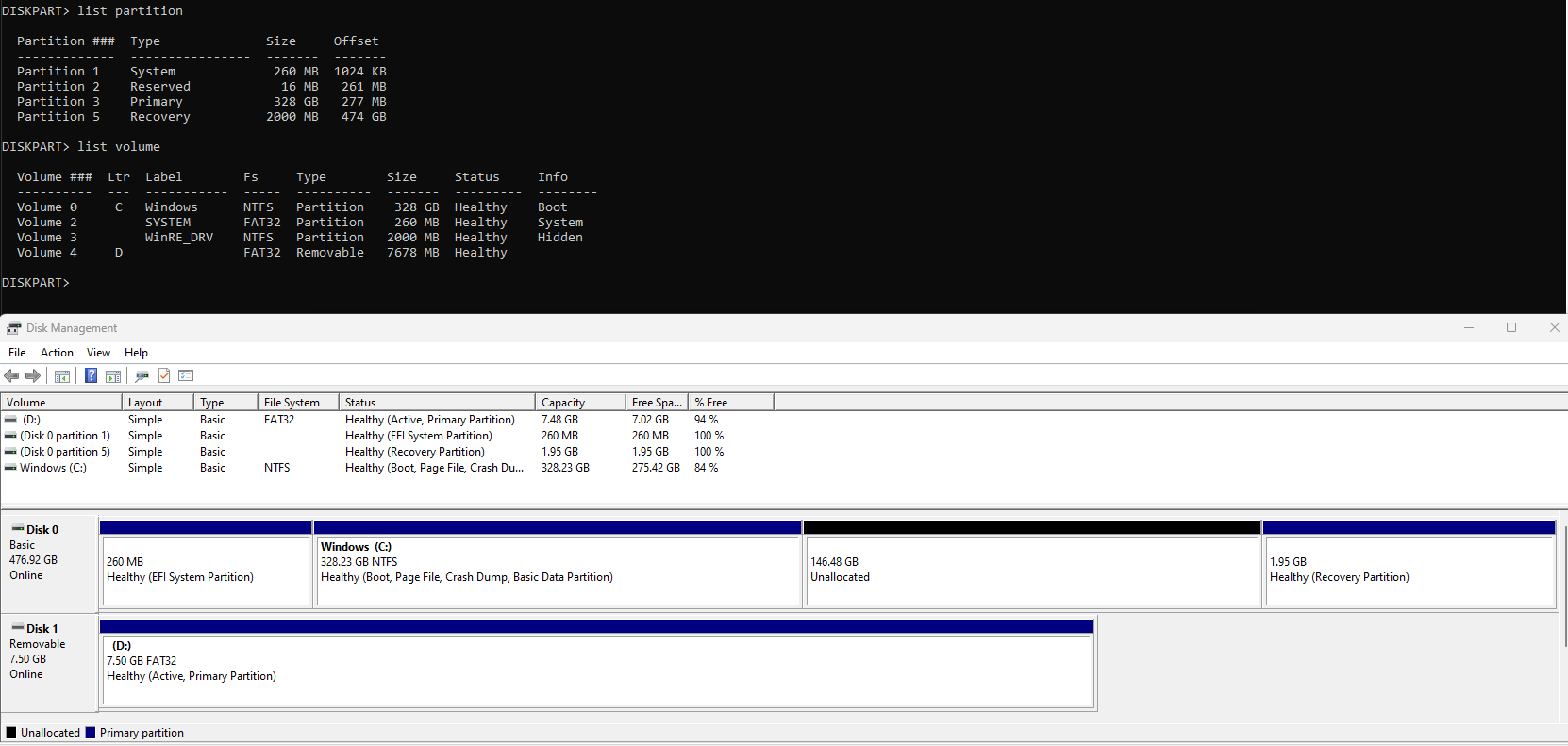
i managed to get grub2win but id have to disable secure boot so i'll report back
Looks like I got the bootloader working after disabling Secure boot and encryption I just have one last problem with importing the cfg for gentoo which it apparently cant recognize
https://files.catbox.moe/usx3xj.png
https://files.catbox.moe/usx3xj.png