Hi winter08,
Yes it should be possible. Conky is displaying acpi battery status.
If you have a usb ups supported by the HAL driver in NUT (NetworkUpsTools), you
may get this info. (If the ups is reporting it. Some small ups'es only give status)
You need to compile nut with the hal use flag. This make your ups hotplug and
start the hal-enabled driver. This driver report to the acpi interface.
Have tested this with my PW3105 in gnome. The battery applet appear and is reporting
the status of the ups. If i pull the plug it shift to a battery symbol and say that you are
running on battery.
Observe that you can not run NUT as a service (upsdrv, upsd and upsmon) as this would
conflict with the hal driver.
Ref:http://blog.shadypixel.com/monitoring-a ... ntu-linux/
Only the first part about hal is relevant. Then it explain the 'normal' way to run NUT.
Conky [Part 2]
Message


You can use the the ${goto xx} command to move displayed output xx pixels from the left edge of your conky display.entox wrote:hi guys !!
I'm using conky to put several thinks on my desktop like you can see on this screenshot :
http://img376.imageshack.us/img376/9940/fvwm0vr.jpg
because i also have some Buttonbars from fvwm next to it i have to adjust every item ... (so i have several instances of conky, which is difficult to handle and also could be handled by one instance )
So is it possible to give a item in config an position something similar to that :Code: Select all
${pos_x 100} ${pos_y 100} $uptime
You can use ${offset xx} to move it xx pixels to the right of where the command is put on the line.
And use the ${voffset xx} command to move displayed test up or down. -xx will move text up xx will move text down.
So:
Code: Select all
${goto 150}${voffset -25}$uptimeSee a sample: ${goto}, ${offset} & ${voffset}
Hope that helps.
Bruce
Text buffer size:Ernetas wrote:For me, conky can not display more than 4 lines of text. What is that for? Maybe that's a bug? This happens whatever the command shows (even the text "aaaaaaaaaaaaaaaa..."). It just cuts off the end of 4th line.
What is wrong?
So above TEXT put this line:text_buffer_size Size of the standard text buffer (default is 256 bytes). This buffer is used for intermediary text, such as individual lines, output from $exec vars, and various other variables. Increasing the size of this buffer can drastically reduce Conky's performance, but will allow for more text display per variable. The size of this buffer cannot be smaller than the default value of 256 bytes.
Code: Select all
text_buffer_size 512Bruce
Use a mono font.ootput wrote:I'm trying to figure out how to align each field MPD | CPU | UPTIME etc so that each field, delimited by '|' stays centered while it expands/contracts, with the '|' horizontally fixed at certain points along the frame. Overall, I'd like the entire output to remain right-aligned.
Use ${goto xx} to position all the | in your one liner. leaving enough space between for "max" output.
For example: $uptime the display could be: 13d 22h 43m 18s - or - 3h 3m 02s
Code: Select all
Uptime: 13d 22h 43m 18s |
Uptime: 3h 3m 02s |Code: Select all
Uptime: $uptime${goto 100}| next command${goto 241}Personally I'd use: $uptime_short - I don't need the seconds.
Check out: the ${goto} & ${offset} part of: ${goto}, ${offset} & ${voffset}
Also: check out this post.
Hope this helps.
Bruce
Last edited by Bruce-CH! on Sun May 17, 2009 2:12 pm, edited 1 time in total.

Incredibly huge thanks!Bruce-CH! wrote:Text buffer size:Ernetas wrote:For me, conky can not display more than 4 lines of text. What is that for? Maybe that's a bug? This happens whatever the command shows (even the text "aaaaaaaaaaaaaaaa..."). It just cuts off the end of 4th line.
What is wrong?
So above TEXT put this line:text_buffer_size Size of the standard text buffer (default is 256 bytes). This buffer is used for intermediary text, such as individual lines, output from $exec vars, and various other variables. Increasing the size of this buffer can drastically reduce Conky's performance, but will allow for more text display per variable. The size of this buffer cannot be smaller than the default value of 256 bytes.
Have a nice day.Code: Select all
text_buffer_size 512
Bruce
You're welcome.Ernetas wrote:Incredibly huge thanks!
Conky Hardcore! Just a simple place to learn about Conky with HowT0's, Tips and Tricks, Scripts and Screenshots. Anyone who has something they would like to see added, please PM me.
- rzrgenesys187
- n00b

- Posts: 34
- Joined: Wed Jan 21, 2009 9:58 pm
Conky doesn't use default font (${font} is not working)
I just noticed this problem last night. For some reason ${font} in my conkyrc file doesn't set the font to what is default, it continues using whatever font was specified using ${font some_font:font_size}.
I have no idea where to begin looking for the cause of this problem, however, I have tried re-emerging conky to no avail. Let me know if you need to see any files other than the conkyrc which is shown below (note: the file has not been changed and was working a few days ago. Also the file is running fine with conky on ubuntu so the error shouldn't be there)
I have no idea where to begin looking for the cause of this problem, however, I have tried re-emerging conky to no avail. Let me know if you need to see any files other than the conkyrc which is shown below (note: the file has not been changed and was working a few days ago. Also the file is running fine with conky on ubuntu so the error shouldn't be there)
Code: Select all
# conky configuration

# set to yes if you want Conky to be forked in the background
background yes

# X font when Xft is disabled, you can pick one with program xfontsel
#font 5x7
#font 6x10
#font 7x13
#font 8x13
#font 9x15
#font *mintsmild.se*
#font -*-*-*-*-*-*-34-*-*-*-*-*-*-*


# Use Xft?
use_xft yes

# Xft font when Xft is enabled
#xftfont Bitstream Vera Sans Mono:size=8
xftfont tlwgtypewriter:size=9
#xftfont comic sans:size=9

# Text alpha when using Xft
xftalpha 0.8

# Update interval in seconds
update_interval 5.0

# This is the number of times Conky will update before quitting.
# Set to zero to run forever.
total_run_times 0

# Create own window instead of using desktop (required in nautilus)
own_window yes
own_window_hints undecorated,below,skip_taskbar,sticky
#own_window_hints undecorated,below,sticky
background no
#own_window_colour brown
own_window_transparent yes
own_window_type override
#! /bin/sh
#str=`echo '\033[01;32m29'`

# Use double buffering (reduces flicker, may not work for everyone)
double_buffer yes

# Minimum size of text area
minimum_size 50 5

# Draw shades?
draw_shades no

# Draw outlines?
draw_outline no

# Draw borders around text
draw_borders no

# Stippled borders?
stippled_borders 8

# border margins
border_margin 9

# border width
border_width 10

# Default colors and also border colors
default_color red
default_shade_color red
default_outline_color red

# Text alignment, other possible values are commented
alignment top_left
#alignment middle_right
#alignment bottom_left
#alignment bottom_right

# Gap between borders of screen and text
# same thing as passing -x at command line
gap_x 25
gap_y 35

# Add spaces to keep things from moving about?  This only affects certain objects.
use_spacer right

override_utf8_locale yes
# stuff after 'TEXT' will be formatted on screen

TEXT
${color white}${font Arial:size=9}$nodename  ${hr}
${color white}${voffset 2}${font OpenLogos:size=9}Q${font} Kernel:  ${alignr}${kernel}
${font StyleBats:size=9}A${font}${color white} CPU ${cpu}% $alignr${cpugraph 8,60 000000 ffffff}
${font StyleBats:size=9}g${font}${color white} RAM: $memperc% ${color white}${alignr}${membar 8,60}
${font Webdings:size=9}~${font}${color white} Battery: ${battery_percent BAT1}% ${alignr}${color white}${battery_bar 8,60 BAT1}
${font StyleBats:size=9}q${font}${color white} Uptime: ${alignr}${color white}${uptime}
${color white}${font StyleBats:size=9}X${font} Processes: $alignr${color white}$processes
${color white}${font StyleBats:size=9}l${font} Running:   $alignr${color white}$running_processes
${color white}${font StyleBats:size=9}c${font} Load: $alignr${color white}$loadavg
${color white}${font StyleBats:size=9}u${font} ${time %a, } $alignr${color white}${time %e %B %G}
${color white}${font StyleBats:size=9}o${font} ${time %Z,    }$alignr${color white}${time %H:%M:%S}
${color white}${font Arial:size=9}Processor  ${hr}${font}
${color white}Model: ${alignr}${execi 99999 cat /proc/cpuinfo | grep "model name" -m1 | cut -d":" -f2 | cut -d" " -f2- | sed 's#Processor ##'}
${color white}Temperature: ${alignr}${exec sensors | grep 'Core' -m1 | cut -b14-18}
${color white}Highest CPU:
${color white} ${top name 1}$alignr${top_mem cpu 1}
${color white} ${top name 2}$alignr${top cpu 2}
${color white} ${top name 3}$alignr${top cpu 3}
${color white} ${top name 4}$alignr${top cpu 4}
${color white}${font Arial:size=9}Memory  ${hr}${font}
${color white}MEM:  $alignr $memperc% $mem/$memmax
${color white}Highest MEM:
${color white} ${top_mem name 1}$alignr${top_mem mem 1}
${color white} ${top_mem name 2}$alignr${top_mem mem 2}
${color white} ${top_mem name 3}$alignr${top_mem mem 3}
${color white} ${top_mem name 4}$alignr${top_mem mem 4}
${color white}${font Arial:size=9}Storage:  ${hr}${font}
${color white}Gentoo:    $alignr${color white}${fs_free /}/${fs_size /}
${fs_bar 3,100 /}
${color white}Ubuntu:    $alignr${color white}${fs_free /mnt/disk}/${fs_size /mnt/disk}
${fs_bar 3,100 /mnt/disk}
${color white}${font Arial:size=9}Network  ${hr}${font}${color white}
${if_existing /proc/net/route wlan0}
${voffset -6}${font PizzaDude Bullets:size=9}O${font} Up: ${upspeed wlan0} kb/s ${alignr}${upspeedgraph wlan0 8,60 3465A4 729FCF}
${voffset 4}${font PizzaDude Bullets:size=9}U${font} Down: ${downspeed wlan0} kb/s ${alignr}${downspeedgraph wlan0 8,60 3465A4 729FCF}
${voffset 4}${font PizzaDude Bullets:size=9}N${font} Upload: ${alignr}${totalup wlan0}
${voffset 4}${font PizzaDude Bullets:size=9}T${font} Download: ${alignr}${totaldown wlan0}
${voffset 4}${font PizzaDude Bullets:size=9}Z${font} Signal: ${wireless_link_qual wlan0}% ${alignr}${wireless_link_bar 8,60 wlan0}
${voffset 4}${font PizzaDude Bullets:size=9}a${font} Local Ip: ${alignr}${addr wlan0}
${else}${if_existing /proc/net/route eth0}
${voffset -6}${font PizzaDude Bullets:size=9}O${font} Up: ${upspeed eth0} kb/s ${alignr}${upspeedgraph eth0 8,60 3465A4 729FCF}
${voffset 4}${font PizzaDude Bullets:size=9}U${font} Down: ${downspeed eth0} kb/s ${alignr}${downspeedgraph eth0 8,60 3465A4 729FCF}
${voffset 4}${font PizzaDude Bullets:size=9}N${font} Upload: ${alignr}${totalup eth0}
${voffset 4}${font PizzaDude Bullets:size=9}T${font} Download: ${alignr}${totaldown eth0}
${voffset 4}${font PizzaDude Bullets:size=9}a${font} Local Ip: ${alignr}${addr eth0}
${else}
${font PizzaDude Bullets:size=14}4${font} Network Unavailable
${endif}${endif}
${color white}${font Arial:size=9}Weather  ${hr}${font}${color white}
${execpi 3600 conkyForecast -i --location=USPA1290 --template=/home/andy/.conky/forecast}
Re: Conky doesn't use default font (${font} is not working)
Hi Andy,rzrgenesys187 wrote:I just noticed this problem last night. For some reason ${font} in my conkyrc file doesn't set the font to what is default, it continues using whatever font was specified using ${font some_font:font_size}.
I have no idea if this will help for a couple of reasons:
1. at the moment I'm on Xubuntu
2. I don't have your default font.
Next a question: Are the conky versions the same here and with Ubuntu?
However, since it's not working here and it is with Ubuntu I did notice some things that I "cleaned up" and just maybe it will help. One never knows, each distro is different.
First: I noticed that you are using only "white" but your default was "red", and while you had a LOT of ${color white}, you did not have a single ${color} to turn it off. So I changed your defauly color and deleted all references to color in your file:
Code: Select all
# Default colors and also border colors
default_color white
default_shade_color white
default_outline_color whiteThird: I saw where you had used:
${font Arial:size=9}$command ${hr}
and
${font Arial:size=9}$command ${hr}${font}
Changed all those to:
${font Arial:size=9}$command${font} ${hr}
You have the only change I made "above" TEXT here's the changes "below" TEXT
Code: Select all
TEXT
${font Arial:size=9}$nodename${font}  ${hr}
${voffset 2}${font OpenLogos:size=9}Q${font} Kernel:  ${alignr}${kernel}
${font StyleBats:size=9}A${font} CPU ${cpu}% ${alignr}${cpugraph 8,60 000000 ffffff}
${font StyleBats:size=9}g${font} RAM: $memperc% ${alignr}${membar 8,60}
${font Webdings:size=9}~${font} Battery: ${battery_percent BAT1}% ${alignr}${battery_bar 8,60 BAT1}
${font StyleBats:size=9}q${font} Uptime: ${alignr}${uptime}
${font StyleBats:size=9}X${font} Processes: ${alignr}$processes
${font StyleBats:size=9}l${font} Running:   ${alignr}$running_processes
${font StyleBats:size=9}c${font} Load: ${alignr}$loadavg
${font StyleBats:size=9}u${font} ${time %a, } ${alignr}${time %e %B %G}
${font StyleBats:size=9}o${font} ${time %Z,    }${alignr}${time %H:%M:%S}
${font Arial:size=9}Processor${font}  ${hr}
Model: ${alignr}${execi 99999 cat /proc/cpuinfo | grep "model name" -m1 | cut -d":" -f2 | cut -d" " -f2- | sed 's#Processor ##'}
Temperature: ${alignr}${exec sensors | grep 'Core' -m1 | cut -b14-18}
Highest CPU:
 ${top name 1}${alignr}${top_mem cpu 1}
 ${top name 2}${alignr}${top cpu 2}
 ${top name 3}${alignr}${top cpu 3}
 ${top name 4}${alignr}${top cpu 4}
${font Arial:size=9}Memory${font}  ${hr}
MEM:  ${alignr} $memperc% $mem/$memmax
Highest MEM:
 ${top_mem name 1}${alignr}${top_mem mem 1}
 ${top_mem name 2}${alignr}${top_mem mem 2}
 ${top_mem name 3}${alignr}${top_mem mem 3}
 ${top_mem name 4}${alignr}${top_mem mem 4}
${font Arial:size=9}Storage:${font}  ${hr}
Gentoo:    ${alignr}${fs_free /}/${fs_size /}
${fs_bar 3,100 /}
Ubuntu:    ${alignr}${fs_free /mnt/disk}/${fs_size /mnt/disk}
${fs_bar 3,100 /mnt/disk}
${font Arial:size=9}Network${font}  ${hr}
${if_existing /proc/net/route wlan0}
${voffset -6}${font PizzaDude Bullets:size=9}O${font} Up: ${upspeed wlan0} kb/s ${alignr}${upspeedgraph wlan0 8,60 3465A4 729FCF}
${voffset 4}${font PizzaDude Bullets:size=9}U${font} Down: ${downspeed wlan0} kb/s ${alignr}${downspeedgraph wlan0 8,60 3465A4 729FCF}
${voffset 4}${font PizzaDude Bullets:size=9}N${font} Upload: ${alignr}${totalup wlan0}
${voffset 4}${font PizzaDude Bullets:size=9}T${font} Download: ${alignr}${totaldown wlan0}
${voffset 4}${font PizzaDude Bullets:size=9}Z${font} Signal: ${wireless_link_qual wlan0}% ${alignr}${wireless_link_bar 8,60 wlan0}
${voffset 4}${font PizzaDude Bullets:size=9}a${font} Local Ip: ${alignr}${addr wlan0}
${else}${if_existing /proc/net/route eth0}
${voffset -6}${font PizzaDude Bullets:size=9}O${font} Up: ${upspeed eth0} kb/s ${alignr}${upspeedgraph eth0 8,60 3465A4 729FCF}
${voffset 4}${font PizzaDude Bullets:size=9}U${font} Down: ${downspeed eth0} kb/s ${alignr}${downspeedgraph eth0 8,60 3465A4 729FCF}
${voffset 4}${font PizzaDude Bullets:size=9}N${font} Upload: ${alignr}${totalup eth0}
${voffset 4}${font PizzaDude Bullets:size=9}T${font} Download: ${alignr}${totaldown eth0}
${voffset 4}${font PizzaDude Bullets:size=9}a${font} Local Ip: ${alignr}${addr eth0}
${else}
${font PizzaDude Bullets:size=14}4${font} Network Unavailable
${endif}${endif}
${font Arial:size=9}Weather${font}  ${hr}
${execpi 3600 conkyForecast -i --location=USPA1290 --template=/home/andy/.conky/forecast}Have a nice day.
Bruce
Conky Hardcore! Just a simple place to learn about Conky with HowT0's, Tips and Tricks, Scripts and Screenshots. Anyone who has something they would like to see added, please PM me.
- rzrgenesys187
- n00b
- Posts: 34
- Joined: Wed Jan 21, 2009 9:58 pm
Thanks for the reply, however, the changes didn't correct the output of conky and ${font} still isn't returning the font to what is set at default. On ubuntu I'm running version 1.6.1 of conky vs. 1.7.0_rc1 on gentoo. I don't think it is the version as I haven't updated conky in some time and this problem just started up two days ago out of nowhere. FYI, here is a screenshot of my desktop so you can see exactly what is going on http://i677.photobucket.com/albums/vv14 ... enshot.png
I just tried running it by changing one of the ${font} variables to ${font tlwgtypewriter:size=9} (which is my default font) and it worked as it was supposed to. Is there a dependency or something that governs Xft that may not be working correctly?
I just tried running it by changing one of the ${font} variables to ${font tlwgtypewriter:size=9} (which is my default font) and it worked as it was supposed to. Is there a dependency or something that governs Xft that may not be working correctly?
Well, the only other thing I can think of it to build your conky one line at a time below TEXT and see just where the error starts.
Also, change your "typewriter" font to something more common.
If NONE of that helps then I'd think there is a problem that is not conky related.
Have a nice day.
Bruce
Also, change your "typewriter" font to something more common.
If NONE of that helps then I'd think there is a problem that is not conky related.
Have a nice day.
Bruce
Conky Hardcore! Just a simple place to learn about Conky with HowT0's, Tips and Tricks, Scripts and Screenshots. Anyone who has something they would like to see added, please PM me.
- rzrgenesys187
- n00b
- Posts: 34
- Joined: Wed Jan 21, 2009 9:58 pm
You said:rzrgenesys187 wrote:I tried what you said and the problem begins right at the beginning and changing the default font doesn't help. Do you have any idea where to begin looking for an outside problem that may cause this?
I would start with re-installing conky v1.6.1 since we know that works.On ubuntu I'm running version 1.6.1 of conky vs. 1.7.0_rc1 on gentoo.
And the latest stable conky release is out as well: Conky 1.7.1
Have a nice day.
Bruce
Conky Hardcore! Just a simple place to learn about Conky with HowT0's, Tips and Tricks, Scripts and Screenshots. Anyone who has something they would like to see added, please PM me.
- rzrgenesys187
- n00b
- Posts: 34
- Joined: Wed Jan 21, 2009 9:58 pm
Actually I see from other posts in other forums, while v1.7.1.1 is the stable release, a lot of "Oops!" applied to it. Fonts disappearing graphs not working right. I think I'll wait a while and one post where "everything" disappeared except his bar graphs. Really strange.rzrgenesys187 wrote:Upgrading to 1.7.1 makes the problem worse somehow, and downgrading to 1.6.1 doesn't fix the problem either. It almost seems like when I use ${font somefont:size} the font variable is being changed so that when ${font} is later used it uses this new value rather than the default.
Now if v1.6.1 doesn't work then you have a different problem with the laptop (you said it's working with Ubuntu in your desktop if I recall correctly) and need to find out what it is. Maybe you are missing a "dependency". Did you install something recently that "removed" someting as a result of installation?
I'm grasping at straws, trying to eliminate all possibilities.
Bruce
Conky Hardcore! Just a simple place to learn about Conky with HowT0's, Tips and Tricks, Scripts and Screenshots. Anyone who has something they would like to see added, please PM me.
- rzrgenesys187
- n00b
- Posts: 34
- Joined: Wed Jan 21, 2009 9:58 pm
I haven't removed anything recently. One of the first things I did was to go through my emerge.log and rollback any updates I had applied right before the problem happened and it didn't solve anything.
As an aside: I replaced all of the ${font} with the more explicit one as a workaround, but I would still like to find the root of the problem
As an aside: I replaced all of the ${font} with the more explicit one as a workaround, but I would still like to find the root of the problem
- bobspencer123
- Guru

- Posts: 544
- Joined: Mon Dec 19, 2005 1:50 am

anybody have a working weather script anymore. My just stopped working in the past couple of days with this error: missing XOAP link parameter in request. I did a quick google and I think this is related to weather.com change. I'm using the old weather script that looks like this:
any help is appreciated.
Code: Select all
#!/bin/sh
#
# Grab weather data from weather.com and format it according to the given XSLT
# Script written by boojit
# Modified by Hellf[i]re
# The orignal script and xslt can be downloaded from http://pondol.com/weather.tar.gz

# Usage:
# ${execi 1800 /path/to/weather/weather.sh location}
# Usage Example:
# ${execi 1800 /home/user/weather/weather.sh 03833}

# your Location ID: use http://xoap.weather.com/search/search?where=[yourcity] to find it
# U.S. users can just use their zip code; doubt that works for anyone else though (YMMV)
LOCID=13090

# s=standard units, m=metric units
UNITS=m

# where this script and the XSLT lives
RUNDIR=/home/kundera/scripts/weather

# there's probably other stuff besides CURL that will work for this, but i haven't
# tried any others.
# you can get curl at http://curl.haxx.se/
CURLCMD=/usr/bin/curl

# get it at http://xmlsoft.org/XSLT/
XSLTCMD=/usr/bin/xsltproc

# you probably don't need to modify anything below this point....

# CURL url. Use cc=* for current forecast or dayf=10 to get a multi-day forecast
CURLURL="http://xoap.weather.com/weather/local/$LOCID?cc=*&unit=$UNITS&dayf=2"

# The XSLT to use when translating the response from weather.com
# You can modify this xslt to your liking
XSLT=$RUNDIR/weather.xslt

#filter (if you want to convert stuff to lower-case or upper case or something)
#FILTER="|gawk '{print(tolower(\$0));}'"


#####
eval "$CURLCMD \"$CURLURL\" 2>/dev/null| $XSLTCMD $XSLT - $FILTER"
- shadowknight
- Tux's lil' helper

- Posts: 142
- Joined: Sat Aug 03, 2002 7:13 pm

bobspencer123 wrote:anybody have a working weather script anymore. My just stopped working in the past couple of days with this error: missing XOAP link parameter in request. I did a quick google and I think this is related to weather.com change. I'm using the old weather script that looks like this:
any help is appreciated.Code: Select all
# CURL url. Use cc=* for current forecast or dayf=10 to get a multi-day forecast
CURLURL="http://xoap.weather.com/weather/local/$LOCID?cc=*&unit=$UNITS&dayf=2"
I was just setting conky back up myself last night and ran into this. Apparently, there have been some changes.... Now you will need to go to weather.com and register http://www.weather.com/services/?from=hat_more look for the xml feed on the list on the left.... once you are registered, change the line above to something like this:
Code: Select all
CURLURL="http://xoap.weather.com/weather/local/$LOCID?link=xoap&prod=xoap&par=<your number>&key=<your key>&cc=*&unit=$UNITS&dayf=5"
That should fix that problem for you
- bobspencer123
- Guru
- Posts: 544
- Joined: Mon Dec 19, 2005 1:50 am


conky 1.7.2_rc2 segfaults at diskiograph
After I updated conky from 1.7.1.1-r2 to 1.7.2_rc2 conky segfault, if I delete diskiograph from .conkyrc it works like expected.
Someone using 1.7.2_rc2 with diskiograph?
Someone using 1.7.2_rc2 with diskiograph?
- Art Vandalay
- Guru
- Posts: 335
- Joined: Tue Sep 16, 2003 9:57 pm
- Location: Melbourne - VIC
have any of you guys successfully got transparency working on kde-4.2?
i'm aware that i need to use the feh utility but i'm not having much luck with the various scripts i've googled.
preferably one that isn't hardcoded to a specific wallpaper as i've set my background to change every hour or so.
cheers
i'm aware that i need to use the feh utility but i'm not having much luck with the various scripts i've googled.
preferably one that isn't hardcoded to a specific wallpaper as i've set my background to change every hour or so.
cheers
I might not have morals...but at least I have standards

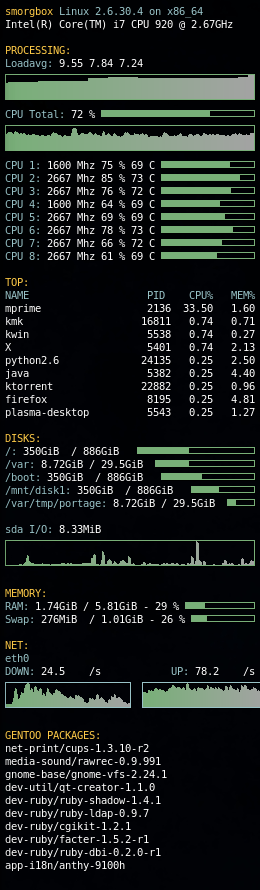
Post your conky
http://farm4.static.flickr.com/3630/380 ... 4e68_o.png
Code: Select all
update_interval .5
alignment tr
#background no
double_buffer yes
own_window yes
text_buffer_size 512
use_spacer right
maximum_width 250
minimum_size 250x1200
show_graph_scale yes
#show_graph_range yes
temperature_unit celsius
#own_window_type desktop
own_window_transparent yes
own_window_hints undecorated,bottom,sticky,skip_taskbar,skip_pager
use_xft                 yes
#xftfont                 terminus:size=8
xftfont                 Monospace:size=8
pad_percents            3
#================================================================
#${texeci 240 curl -s http://gpo.zugaina.org/RSS/Newest/ | sed -n '/title/ s/.*>\([^ ]*\)<.*/\1/p'}
#${texeci 240 curl -s http://www.gentoo-portage.com/RSS/Newest/~amd64 | sed -n '/title/ s/.*>\([^ ]*\)<.*/\1/p' | head -n 20}

TEXT
${color #ffcb48}$nodename$color ${color #98c2c7}$sysname $kernel on $machine$color
${execi 3600 uname -p}

${color #ffcb48}PROCESSING: $color
${color #98c2c7}Loadavg:$color ${loadavg}
${color #78af78}${loadgraph 78af78 a3a3a3}
${color #98c2c7}CPU Total:$color ${cpu cpu0}% ${color #78af78}${cpubar}
${color #78af78}${cpugraph cpu0 78af78 a3a3a3}
${color #98c2c7}CPU 1:$color ${freq 1} Mhz ${cpu cpu1}% ${platform coretemp.0 temp 1}C ${color #78af78}${cpubar cpu1}
${color #98c2c7}CPU 2:$color ${freq 2} Mhz ${cpu cpu2}% ${platform coretemp.1 temp 1}C ${color #78af78}${cpubar cpu2}
${color #98c2c7}CPU 3:$color ${freq 3} Mhz ${cpu cpu3}% ${platform coretemp.2 temp 1}C ${color #78af78}${cpubar cpu3}
${color #98c2c7}CPU 4:$color ${freq 4} Mhz ${cpu cpu4}% ${platform coretemp.3 temp 1}C ${color #78af78}${cpubar cpu4}
${color #98c2c7}CPU 5:$color ${freq 5} Mhz ${cpu cpu5}% ${platform coretemp.4 temp 1}C ${color #78af78}${cpubar cpu5}
${color #98c2c7}CPU 6:$color ${freq 6} Mhz ${cpu cpu6}% ${platform coretemp.5 temp 1}C ${color #78af78}${cpubar cpu6}
${color #98c2c7}CPU 7:$color ${freq 7} Mhz ${cpu cpu7}% ${platform coretemp.6 temp 1}C ${color #78af78}${cpubar cpu7}
${color #98c2c7}CPU 8:$color ${freq 8} Mhz ${cpu cpu8}% ${platform coretemp.7 temp 1}C ${color #78af78}${cpubar cpu8}

${color #ffcb48}TOP: $color
${color #98c2c7}NAME $alignr PID    CPU%   MEM%$color
${top name 1} $alignr ${top pid 1} ${top cpu 1} ${top mem 1}
${top name 2} $alignr ${top pid 2} ${top cpu 2} ${top mem 2}
${top name 3} $alignr ${top pid 3} ${top cpu 3} ${top mem 3}
${top name 4} $alignr ${top pid 4} ${top cpu 4} ${top mem 4}
${top name 5} $alignr ${top pid 5} ${top cpu 5} ${top mem 5}
${top name 6} $alignr ${top pid 6} ${top cpu 6} ${top mem 6}
${top name 7} $alignr ${top pid 7} ${top cpu 7} ${top mem 7}
${top name 8} $alignr ${top pid 8} ${top cpu 8} ${top mem 8}
${top name 9} $alignr ${top pid 9} ${top cpu 9} ${top mem 9}

${color #ffcb48}DISKS: $color
${color #98c2c7}/:$color ${fs_used /} / ${fs_size /} ${color #78af78} ${fs_bar 6 /}$color
${color #98c2c7}/var:$color ${fs_used /var} / ${fs_size /var} ${color #78af78} ${fs_bar 6 /var}$color
${color #98c2c7}/boot:$color ${fs_used /boot} / ${fs_size /boot} ${color #78af78} ${fs_bar 6 /boot}$color
${color #98c2c7}/mnt/disk1:$color ${fs_used /mnt/disk1} / ${fs_size /mnt/disk1} ${color #78af78} ${fs_bar 6 /mnt/disk1}$color
${color #98c2c7}/var/tmp/portage:$color ${fs_used /var/tmp/portage} / ${fs_size /var/tmp/portage} ${color #78af78} ${fs_bar 6 /var/tmp/portage}$color

${color #98c2c7}sda I/O:$color ${diskio sda}
${color #78af78}${diskiograph sda 78af78 a3a3a3}

${color #ffcb48}MEMORY: $color
${color #98c2c7}RAM:$color ${mem} / ${memmax} - ${memperc}% ${color #78af78}${membar 6}${color}
${color #98c2c7}Swap:$color ${swap} / ${swapmax} - ${swapperc}% ${color #78af78}${swapbar 6}$color

${color #ffcb48}NET: $color
${color #98c2c7}eth0
${color #98c2c7}DOWN: ${color #ffffff}${downspeedf eth0}/s $alignr ${color #98c2c7}UP: ${color #ffffff}${upspeedf eth0}/s
${color #98c2c7}${downspeedgraph eth0 25,125 78af78 a3a3a3} $alignr ${color #98c2c7}${upspeedgraph eth0 25,125 78af78 a3a3a3}

${color #ffcb48}GENTOO PACKAGES: $color
${texeci 240 curl -s http://packages.gentoo.org/feed/arch/amd64 | sed -n '/span/ s/.*>\([^ ]*\)<.*/\1/p' | head -n 20}

#${color #ffcb48}LOCAL WEATHER: $color
#${execi 1800 /home/*/scripts/weather}
Last edited by Ormaaj on Wed Oct 20, 2010 3:51 am, edited 1 time in total.